

Repeated reminders, submissions across disconnected channels, and incomplete or outdated files can turn a straightforward intake into a bottleneck. Teams searching for “automate document collection process” need more than automatic notifications: they need a controlled workflow that keeps every request and response visible.
Automation should make collection easier to manage without obscuring completeness, exceptions, or the customer experience. A well-designed process gives each request clear ownership, guides submitters through structured intake, and routes missing or mismatched information for review instead of leaving it buried in an inbox.
This guide explains how to map document requirements, collect and validate submissions, manage exceptions, and choose an approach that fits your workflow. It also covers how a configurable workflow engine and self-service portal can coordinate requests, intake, review, and follow-up from the first request through reporting.
Key Takeaways
- Effective document collection automation connects requests, submissions, validation, follow-up, and review in one controlled workflow.
- Assign each intake stage an owner, a visible status, and a clear completion condition so teams can identify and resolve gaps.
- Compare email and spreadsheets, point solutions, and configurable platforms based on validation, exception handling, auditability, and integration needs.
- Pilot a defined workflow and establish access, retention, escalation, and audit requirements before automating sensitive intake.
- A configurable workflow engine, self-service portal, document management, and compliance agents can support structured collection and review.
Why automate the document collection process in the first place?
Document collection automation coordinates the full intake cycle: requests are issued, submissions are received, files are checked against requirements, gaps trigger follow-up, and complete cases move to review. It builds on the broader concept of Document automation, but focuses on controlling the movement and status of requested materials, not just creating documents.
Document collection automation is a workflow for moving the right information from request to review; file storage is only where materials reside. That distinction matters at scale. A shared folder may hold documents, but it does not necessarily show which requests are outstanding, whether a submission meets the requirements, or who owns the next step.
To automate the document collection process effectively, make the workflow visible and consistent. Define the requirements for each request, assign an accountable owner, show the current status, and specify how exceptions are resolved. Staff and requesters can then see what is needed and what happens next instead of relying on scattered messages to reconstruct progress.
Which parts of document collection are worth automating?
Automate repeatable coordination: sending standard requests, recording receipt, tracking status, and issuing reminders when required items remain outstanding. These steps follow defined rules and can be handled consistently. Reserve staff judgment for ambiguous or unusual submissions, such as a file that appears to meet the request but contains conflicting information. Route these cases to a reviewer rather than allowing uncertainty to go unnoticed. Human oversight remains part of the process.
Where do manual collection workflows break down?
Email attachments and spreadsheets split the record across inboxes, folders, and tracking sheets. One employee may update a status while another sends a duplicate reminder, or a new file may arrive without being linked to the original request. Vague instructions compound the problem: requesters may send the wrong version, omit a required page, or submit a file that cannot be used for review.
Unclear ownership creates another failure point. If no one is responsible for checking submissions or assigning exceptions, cases can stall without a clear next action. Requesters may not know whether a file arrived or what needs correction. A coordinated workflow makes responsibilities and status explicit, giving teams a consistent way to manage routine intake and route exceptions to people who can assess them.
Automate document collection from request to review
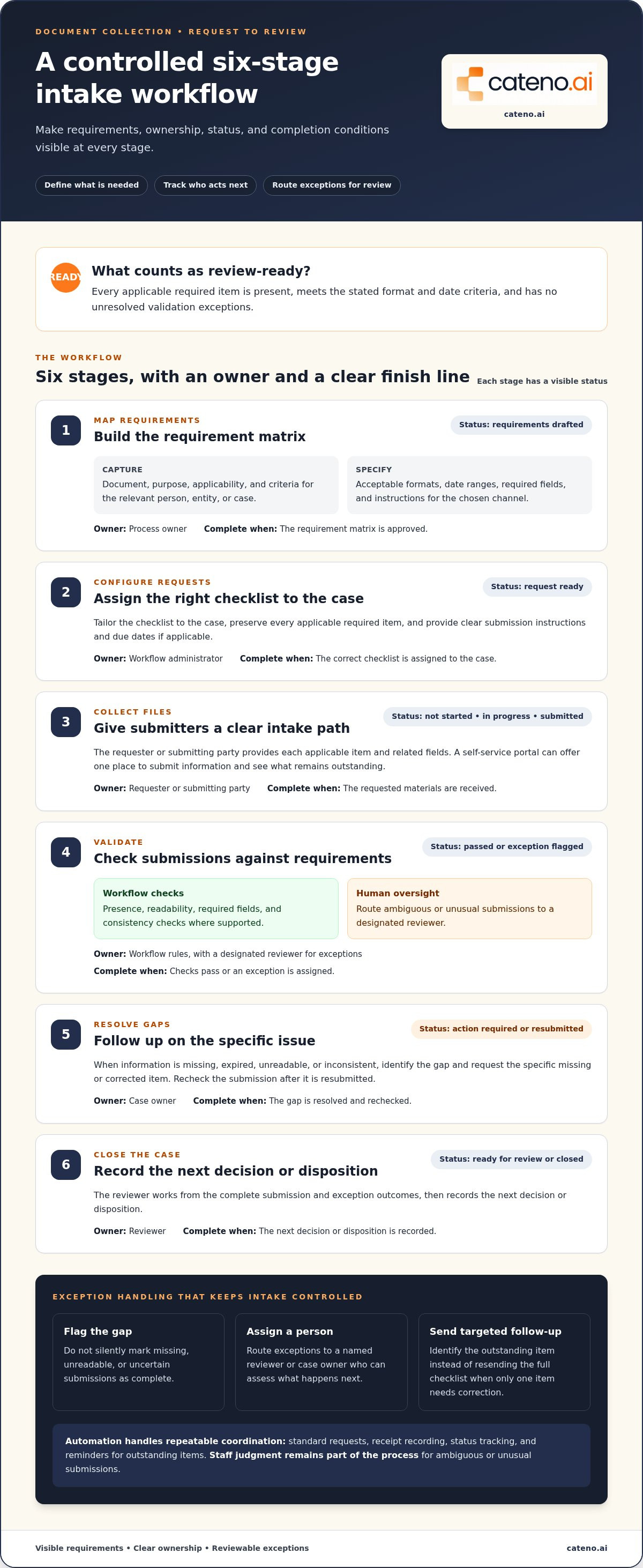
A reliable intake workflow makes each stage explicit: what is needed, who acts next, what the current status means, and what qualifies as complete. To automate document collection at scale, build those rules into the workflow rather than relying on individuals to interpret messages in their inboxes.
Define requests and completion rules
Start with a requirement matrix that connects each document to its purpose and the relevant person, entity, or case. Specify acceptable formats, date ranges, required fields, and submission instructions for the chosen channel. Tailor each request to the case by asking for applicable evidence while preserving every required item. Define what happens when information is missing, expired, unreadable, or inconsistent so the workflow flags a gap instead of treating the submission as complete.
A review-ready submission contains every applicable required item, meets the stated format and date criteria, and has no unresolved validation exceptions. Use that definition to configure completion conditions across the workflow:
- Map requirements. Owner: process owner. Required information: document, purpose, applicability, and criteria. Status: requirements drafted. Complete when the matrix is approved.
- Configure requests. Owner: workflow administrator. Required information: tailored checklist, instructions, and due dates if applicable. Status: request ready. Complete when the correct checklist is assigned to the case.
- Collect files. Owner: requester or submitting party. Required information: each applicable item and related fields. Status: not started, in progress, or submitted. Complete when the requested materials are received.
- Validate. Owner: workflow rules, with a designated reviewer for exceptions. Required information: presence, readability, required fields, and consistency checks where supported. Status: passed or exception flagged. Complete when checks pass or an exception is assigned.
- Resolve gaps. Owner: case owner. Required information: specific missing or corrected items. Status: action required or resubmitted. Complete when the gap is resolved and rechecked.
- Close the case. Owner: reviewer. Required information: complete submission and exception outcomes. Status: ready for review or closed. Complete when the reviewer records the next decision or disposition.
Coordinate validation, follow-up, and portal intake
Validation and reminders should work together. If a required file is missing or unreadable, route the issue to a named reviewer and send a targeted reminder that identifies the outstanding item. Do not silently mark uncertain submissions complete or resend the full checklist when only one item needs correction.
A self-service portal gives submitters one clear place to provide requested information and see what remains outstanding. Centralized status can reduce ambiguous email exchanges. A configurable workflow can coordinate portal intake, validation, and follow-up while keeping human review in the process for unusual submissions.
Which document collection automation approach fits your workflow?
The right approach depends on how requests move, how much validation they need, and what happens when a submission is unusual. A process with a small, stable checklist may work well with basic tools. A workflow involving multiple teams, conditional requirements, and review handoffs may need more coordination. The right level of automation depends on the process and the risks associated with its documents.
Manual email and spreadsheets
Request experience: Familiar, but often dependent on individually written messages. Validation: Mostly manual. Exceptions: Handled through replies and staff judgment. Auditability: Status may be spread across inboxes and sheets. Integration needs: Updates are often entered manually into other systems.
Point solutions
Request experience: Can structure a specific task, such as collecting a form or file. Validation: Usually focused on that task. Exceptions: May require a separate handoff. Auditability: Depends on whether records follow the case through review. Integration needs: Consider how information moves into the rest of the workflow.
Configurable workflow platforms
Request experience: Can coordinate requests through a centralized portal. Validation: Can apply defined checks across workflow stages. Exceptions: Can route cases to assigned reviewers using set rules. Auditability: Centralized statuses and recorded actions can make progress easier to trace. Integration needs: Assess how the workflow fits with operational systems and handoffs.
When are simpler tools no longer enough?
Repeated status reconciliation, duplicate reminders, and different teams tracking the same request in different ways are signs that coordination, not just file storage, is becoming difficult to manage. A point solution may handle a narrow intake task while leaving the next handoff fragmented. That does not mean every organization needs enterprise-scale orchestration. Match the approach to the process’s complexity and risk.
What should a workflow platform handle?
Assess whether a platform can configure stages, apply conditional routing, display centralized case status, and assign ownership when an exception occurs. A portal should give submitters a structured intake route, while integrations should support the systems your teams already use. For a broader view of orchestration, see this guide to the business onboarding workflow engine.
How should teams balance automation with human review?
Automate actions governed by explicit rules and consistently interpretable inputs. Route uncertain, conflicting, or high-impact cases to qualified staff through review queues and escalation rules. Set permissions for who can review or resolve each exception, and record decisions in the workflow. Automation can structure the process without taking judgment away from the people responsible for decisions.
How to implement automated document collection without losing control
A controlled rollout starts with a focused process, clear accountability, and explicit rules for handling sensitive information. Before automating document collection, record how the current workflow operates. This baseline helps distinguish real process changes from assumptions and shows where work still stalls.
What should an implementation pilot include?
Choose a repeatable workflow with a defined document set and one accountable process owner. Map each handoff, delay, exception type, and system involved before configuring automated steps. Then test routine cases and exceptions with staff and representative submitters. Include scenarios such as a missing item, an unreadable file, or conflicting information, and confirm that each is routed to an owner with a clear next action.
How should teams govern access, records, and exceptions?
Set governance requirements before sensitive intake moves into an automated workflow. Assign access according to staff responsibilities and the sensitivity of the information. Document who receives escalations, who can resolve exceptions, and how reviewers record decisions. Work with appropriate internal stakeholders to establish applicable security, retention, and regulatory requirements. These controls should shape workflow design, not become a cleanup task after launch.
For broader context on workflow boundaries and controls, see this guide to automated regulatory compliance. The same principle applies to document intake: automate defined actions, but make responsibility for decisions and unresolved items explicit.
Which measures show whether the workflow is improving?
Establish a baseline before the pilot, then compare the same measures after changes are introduced. Useful measures include:
- Completion time: Track time from request to a review-ready submission.
- Resubmissions: Record how often submitters provide corrected or replacement materials.
- Manual touches: Count staff actions needed to move a case between stages.
- Exceptions and unresolved cases: Monitor volume, age, and current owner.
- Review backlog: Identify cases waiting for review and where they are delayed.
Segment results by workflow stage. If cases complete intake but wait for review, the bottleneck may be reviewer capacity rather than request design. Use the pilot’s evidence to refine rules and ownership before extending the workflow. Treat results as specific to your process, not as universal benchmarks.
How Cateno supports an automated document collection process
Cateno connects document intake with broader onboarding and compliance workflows. Its customizable workflow engine can organize request, submission, review, and follow-up stages. A self-service onboarding gateway and branded customer portal give counterparties a structured place to provide information. Document management supports handling materials within the process, connecting collection to the case rather than treating it as an isolated task.
How can a configurable workflow coordinate collection and review?
Teams can use workflow steps to define the information requested, track progress, and direct cases to the appropriate next stage. Automated KYC and KYB checks and bank account verification can support relevant onboarding workflows. Autonomous compliance agents can operate within defined workflow paths, with exceptions directed to human review rather than treated as automatic approvals. Explore Cateno platform capabilities to learn more about its configurable workflow approach.
The design principle is straightforward: automate repeatable coordination, make status visible, and preserve review paths for cases that need judgment. For example, a workflow can distinguish an item awaiting submission from one that has arrived but requires follow-up. Reviewers can then focus on assigned exceptions and decisions instead of reconstructing case progress from separate messages.
How do document collection needs differ across use cases?
Business onboarding and compliance intake both depend on collecting information, but document requirements and review paths vary by organization and use case. An onboarding workflow may combine entity information, identity checks, and bank account validation. A compliance workflow may connect document intake with ongoing monitoring. Let applicable requirements determine the request checklist and routing rather than forcing every case through an identical path. See industry-specific onboarding workflows for use-case context.
Advanced verification reports and ongoing monitoring can provide context for downstream review and lifecycle management after initial collection. They connect intake activity to subsequent assessment without implying that every decision should be automated. The workflow should make the status, assigned owner, and next action clear at each stage.
For details about getting in touch, visit Cateno’s contact page.
Build a More Controlled Document Intake Workflow
A strong collection process connects each request to clear requirements, validation, follow-up, and review. The right level of automation depends on the workflow’s complexity, while defined exception paths and human oversight help teams retain control over decisions.
To automate document collection effectively, start with a focused pilot, assign owners, and establish baseline measures before expanding. Use the results to refine the workflow and make status, responsibilities, and next steps easier to track.
Cateno’s customizable workflow engine and self-service onboarding gateway, supported by a branded customer portal, can structure document intake and follow-up. Automated KYC and KYB checks, bank account validation, and verification reports can also support relevant onboarding and review workflows.
Discuss your document collection workflow with Cateno and explore how to align requests, intake, and review with your operational needs. With clear rules and a measured rollout, your team can build a process that is easier to manage as requirements evolve.
Frequently Asked Questions
How do you automate the document collection process?
Map the required documents and the conditions each must meet, then assign an owner and status to every step. Teams can automate document collection stages by configuring request delivery, submission tracking, validation checks, and targeted reminders. Define how exceptions are routed to reviewers and what qualifies as complete. Start with a focused workflow, test routine and unusual cases, and measure results against a baseline before expanding.
What is document collection automation?
Document collection automation coordinates requests, submissions, validation, follow-up, and review through a defined workflow. For example, a system can show that a requested file has arrived, check whether required fields are present, and flag an unreadable or inconsistent submission for review. This makes progress and responsibility more visible. It is broader than storing files because it also manages the steps and decisions that move a case forward.
Can document collection be fully automated?
Some repeatable tasks can be automated, but full automation is not appropriate for every decision or document risk. A workflow can issue requests, track receipt, perform defined checks, and remind submitters about outstanding items. Ambiguous, conflicting, or high-impact submissions should follow a clear path to qualified staff. This keeps routine coordination consistent while preserving human judgment for cases that need interpretation, discretion, or a decision.
How do you handle missing or incorrect documents automatically?
Set validation rules for required files, readability, specified fields, and consistency where supported. If an item is missing or fails a check, the workflow should identify the specific issue, assign an owner, and request the needed correction rather than marking the case complete. A targeted reminder can identify the outstanding item without repeating the entire request. Route uncertain or conflicting information to a reviewer and record the resolution.
What is the difference between document collection automation and document management?
Document collection automation controls how requested information moves from request through submission, checks, follow-up, and review. Document management focuses on handling and organizing documents, such as maintaining access to files and associating them with a case. The capabilities can work together, but they address different operational needs. A file repository may contain the right document without showing whether a request is complete or who must review it next.
How can teams measure whether document collection automation is working?
Establish a baseline before rollout, then track completion time, resubmissions, staff actions, exception volume, unresolved cases, and review backlog. Compare like with like, and segment results by workflow stage. For example, fast submission followed by a growing review queue may point to a reviewer-capacity issue rather than a request-design problem. Interpret results against your own process; do not treat an unsupported target as a universal benchmark.
Is a self-service portal necessary for automated document collection?
No. A portal can give submitters a centralized place to provide requested information and see which items remain outstanding, but the best intake channel depends on the workflow and its users. Other processes may coordinate submissions through existing channels. Cateno’s self-service onboarding gateway and branded customer portal support structured intake, while a configurable workflow can connect submissions with checks, follow-up, and review.


