

The right automated due diligence software isn’t necessarily the tool with the most screening features. It’s the one that connects intake, verification, evidence, decisions, and ongoing review. When checks and documents sit in separate systems, teams repeat work and have a harder time seeing what supports a decision.
That challenge is familiar, especially when search results place M&A diligence platforms, questionnaire tools, and business verification software side by side. They may share features, but they’re built for different workflows. Choosing by feature count alone can leave gaps between collecting information and managing a review.
This guide provides a practical framework for comparing solutions against your use case. You’ll learn how to assess configurable intake, automated KYC and KYB checks, document collection, workflow visibility, reporting, and ongoing review, while keeping human judgment in the decision process. It also explains how transaction data rooms differ from tools designed to verify businesses and partners, so you can focus on software that reduces repeated work and keeps evidence and review status organized.
Key Takeaways
- Identify whether your workflow centers on transaction diligence, questionnaire responses, or ongoing business verification before comparing tools.
- Assess how automated due diligence software connects intake, checks, evidence collection, exception routing, and review records.
- Compare platforms by workflow scope, supported checks, evidence handling, exception management, reporting, and self-service capabilities.
- Prepare implementation by defining entity types, required evidence, review owners, exception routes, and what counts as a complete case.
- For business onboarding and partner verification, consider how configurable workflows, KYC and KYB checks, bank verification, and reports support your process.
What automated due diligence software does, and which kind of diligence you need
Automated due diligence software organizes evidence, checks, workflow steps, and review records so teams can assess a transaction or business relationship through a traceable process. The term can describe very different systems. One platform may support deal teams reviewing a company and transaction documents; another may help teams answer questionnaires or verify a business partner during onboarding.
Before comparing features, identify the job you need the software to do. Are you analyzing a potential acquisition, assembling responses to a due diligence questionnaire (DDQ), or collecting and reviewing identity, entity, and account evidence for an ongoing business relationship? Your answer determines which capabilities matter and helps prevent a mismatch between the software and the workflow.
Three different problems often called due diligence
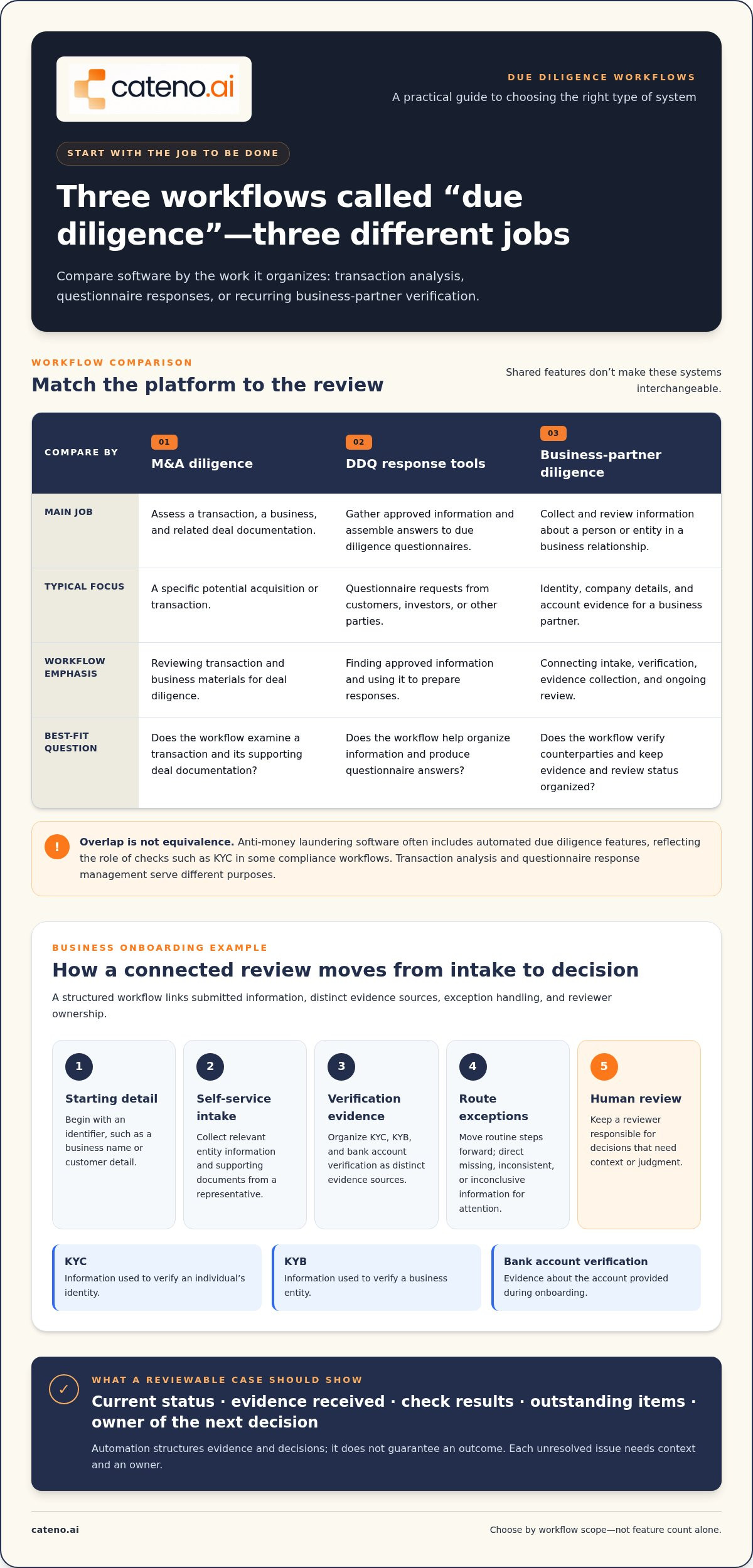
M&A diligence assesses a transaction, business, and related deal documentation. DDQ response tools help an organization gather approved information and assemble answers to questionnaires from customers, investors, or other parties. Business-partner diligence focuses on collecting and reviewing information about a person or entity, such as identity, company details, and account evidence.
These categories can overlap, but they aren’t interchangeable. Anti-money laundering software often includes automated due diligence features. This reflects the role of checks such as KYC in some compliance workflows. Transaction analysis and questionnaire response management serve different purposes.
Where automated due diligence software fits in onboarding
For business onboarding, a connected workflow can move from initial information to self-service intake, verification, document collection, and review. Configurable steps can move complete submissions forward and route missing evidence or exceptions for attention. Teams get a clearer view of what has been collected and what still requires review, instead of treating each check as a separate task.
Automation structures repeatable work; it doesn’t make every decision. Reviewers may still need to interpret evidence, resolve exceptions, and determine the appropriate next step. This is the distinction between business verification workflows and deal diligence: one organizes recurring checks on counterparties, while the other examines a specific transaction. For a closer look at how structured intake and process logic shape business onboarding, explore configurable onboarding workflows.
How automated due diligence software turns intake into a reviewable workflow
A reviewable process starts before a check runs. It begins with an identifier, such as a business name or customer detail, then gathers the information needed to assess that person or entity. Automated due diligence software can connect each stage so staff can follow a case from submission to review, rather than piecing together updates from separate tasks.
From one starting detail to structured evidence
A self-service form can ask a business representative to provide relevant entity information and submit supporting documents. Document management keeps those materials associated with the case, reducing repeated requests and data entry. The workflow can then organize distinct evidence sources:
- KYC checks contribute information used to verify an individual’s identity.
- KYB checks contribute information used to verify a business entity.
- Bank account verification contributes evidence about the account provided during onboarding.
These checks serve different purposes. A configurable workflow can set their sequence and direct the case to the next step based on what has been submitted or returned. For more detail on identity checks, readers can explore the KYC Verification Guide: Modernizing Compliance for 2026.
How to preserve reviewability as work is automated
Automation should make a case easier to understand, not obscure how it reached review. A useful record shows the current status, evidence received, check results, outstanding items, and who owns the next decision. This helps reviewers distinguish a complete submission from one waiting on evidence or requiring further assessment.
Configurable logic can move routine steps forward while directing missing, inconsistent, or inconclusive information to a defined exception path. For example, a missing document might trigger a request for additional evidence, while conflicting business details could be assigned for human review. Automated checks or compliance agents can support the workflow, but a designated reviewer should retain responsibility for decisions that require context or judgment.
Workflow automation structures evidence and decisions; it doesn’t guarantee an outcome. The goal is a traceable process in which each result has context and each unresolved issue has an owner. Cateno’s configurable onboarding workflows bring intake, verification, document management, and review into an organized process for business onboarding.
How to compare automated due diligence software before you buy
Compare tools against the workflow you need to run, not a feature list in isolation. Automated due diligence software for business onboarding should connect intake, verification, evidence, exception handling, and review. A system focused on deal documents or questionnaire responses may solve a different problem, even if its product description uses similar language.
Use a consistent scorecard across shortlisted platforms. For each capability, record whether it’s available, how it fits your process, and what you observed in a product demonstration. This helps separate demonstrable functions from broad claims about AI or outcomes.
| Evaluation area | What to assess |
|---|---|
| Workflow scope | Can the system support self-service intake as well as the internal team’s review steps? |
| Supported checks | Do identity, business entity, and bank account checks align with the use case? |
| Evidence handling | Can documents and verification reports be viewed alongside case status? |
| Exception routing | Can incomplete or inconsistent cases move to a defined review path? |
| Reports and visibility | Can reviewers see what was received, what checks returned, and what remains open? |
Workflow coverage, verification, and evidence
Trace a representative case from submission to review. For example, consider whether a business can provide entity details through a self-service form, submit documents, complete relevant KYB and bank account checks, and have the resulting evidence associated with its case. Check whether configurable steps can reflect different entity types or review requirements, rather than forcing every submission through an identical path. See Cateno’s platform workflow capabilities for product-level detail.
Look for a clear connection between each check and the evidence that supports its result. A report has more operational value when reviewers can interpret it alongside the case’s current status and outstanding items.
Controls, exceptions, and ongoing review
Test the workflow with incomplete, inconsistent, and inconclusive information. These cases should be visible and routable to an appropriate reviewer, rather than hidden behind a general completion status. Also assess how lifecycle updates or subsequent reviews fit into the process, and whether reports provide a usable record of case progress.
Separate observable capabilities from vendor outcome claims. A demonstration can show how a case is routed or how evidence appears in a report; broad promises about AI performance don’t establish fit on their own. Compare functions you can inspect, and assess reporting and record visibility without assuming that a software feature guarantees a particular compliance outcome or certification. If you’re mapping these criteria to a business verification process, you can discuss your due diligence workflow.
How to prepare for implementation without automating the wrong process
Automation can make a sound process easier to repeat, but it can also reproduce unclear handoffs and unnecessary steps. Before configuring automated due diligence software, document how a case should move from submission to review, including who owns each decision and what evidence supports it.
Start with one clearly bounded workflow, such as onboarding a defined type of business partner. Specify what counts as a complete case: the required information and evidence, the checks to be completed, and the review or approval needed to close it. If requirements vary by business context, map those differences instead of forcing every applicant through the same path. Explore industry-specific onboarding workflows for context on how onboarding needs can vary.
Map the current process and its decision points
Follow a case from beginning to end. Record where applicants submit information, where staff request documents, and where details are re-entered or passed between teams. Then identify evidence sources, checks, decision owners, and escalation paths. This map shows which steps are repeatable and which require judgment.
Also document relevant lifecycle events, such as a change in business details or a scheduled review, so the process accounts for what happens after initial onboarding. If you track baseline measures such as completion rates or handling time, use records your team can substantiate and define how each measure is calculated. Avoid setting targets based on assumptions.
Configure, test, and refine the workflow
Translate the process map into defined steps and routes. Before expanding beyond the initial workflow, test representative cases: a complete submission, missing evidence, inconsistent information, and a case that needs escalation. Check whether each case reaches the intended reviewer and whether its status and supporting evidence remain clear. For related guidance on designing intake, see the Self-Service Onboarding Guide for B2B Growth.
Map existing systems and handoffs before planning how information will move between them. Treat any integration requirement as something to validate against the specific workflow, rather than assuming it from general product language. Assign owners for workflow changes, report review, and ongoing maintenance; otherwise, configured steps can fall out of sync with actual practice.
Keep the first workflow narrow enough to evaluate, then refine it using observed cases and substantiated measures. If you’re preparing a business verification process, discuss your onboarding workflow with Cateno.
When Cateno fits an automated due diligence workflow
Cateno is most relevant when your due diligence process centers on business onboarding and partner verification: gathering information, checking identity and business details, validating bank account information, and organizing evidence for review. Its configurable workflows connect these steps into an operating process, rather than focusing on transaction analysis or questionnaire response management.
That distinction matters. M&A diligence examines a specific deal and its documentation. DDQ response tools help teams prepare answers to external questionnaires. Cateno supports business identity and onboarding workflows, where structured intake, verification, evidence, and review need to work together.
Match platform capabilities to the operating need
A self-service onboarding gateway and branded portal give applicants a structured way to provide information. Automated KYC and KYB checks, together with bank account verification, support distinct parts of a business verification workflow. Configurable steps organize how submissions move through the process, while document management keeps supporting evidence connected to the case.
Verification reports provide a record for operational review, and compliance agents can support repeatable process tasks. These capabilities help teams maintain visibility as cases move through onboarding and subsequent review, while leaving decisions that require judgment with the appropriate reviewers. Explore Cateno platform details to see how these capabilities relate to your workflow.
Turn the evaluation into a clear next step
Before evaluating fit, summarize your use case in practical terms: the kinds of businesses you onboard, the information and evidence you collect, the checks and workflow stages involved, and the people responsible for review or escalation. Then focus the discussion on the questions that matter to your process:
- How can workflow steps be configured for different entity types?
- How are submitted documents, verification results, and case status organized for review?
- How do incomplete cases or exceptions move to the right owner?
- What reports support operational visibility and ongoing review?
For commercial planning, review Cateno pricing information alongside the workflow capabilities relevant to your needs. A clear use case makes it easier to assess process fit and implementation scope without relying on generic automation claims.
If you’re evaluating automated due diligence software for business onboarding, talk through your due diligence workflow with Cateno.
Choose a workflow that keeps due diligence connected
The right automated due diligence software depends on the work it needs to support. First distinguish transaction analysis and questionnaire responses from ongoing business verification. Then compare how each option connects intake, checks, evidence, review, and exception handling, and define what a complete case means before automating the process.
For business onboarding, Cateno brings configurable workflows and self-service intake together with automated KYC and KYB checks, bank account verification, and document management. Autonomous compliance agents and advanced verification reports support structured operations and review, while human owners remain responsible for decisions that require judgment.
With your use case, entity types, workflow stages, and review owners clearly defined, you can assess fit against practical requirements instead of broad promises. Discuss your due diligence workflow with Cateno and explore how a connected process could support your business onboarding needs. A clear evaluation is a strong first step toward more organized, reviewable due diligence.
Frequently Asked Questions
What is automated due diligence software?
Automated due diligence software organizes the information, checks, evidence, workflow steps, and review records used to assess a person, business, or transaction. The term covers different needs: M&A teams may use tools to review deal documentation, while businesses may use onboarding platforms to collect identity, entity, and account evidence. The right category depends on what you’re assessing and how you need to document the review.
How does automated due diligence software work?
It guides a case through defined steps, from initial information collection to verification, document handling, and review. For business onboarding, an applicant might submit entity details through a self-service form, complete relevant KYC or KYB checks, and provide supporting documents. Configurable rules can direct information to the next step or route incomplete and inconsistent cases for attention. Reviewers can track status and evidence as the case progresses.
Is automated due diligence software the same as M&A due diligence software?
No. M&A due diligence software supports assessment of a specific transaction, business, and deal documentation. Business verification software supports recurring onboarding and review of customers or partners, including identity, company, and account checks. The categories may share document and workflow features, but their core purposes differ. Choose based on whether you’re analyzing a deal or verifying entities as part of an ongoing business relationship.
What features should I look for in automated due diligence software?
Prioritize features that connect to your actual process: self-service intake, configurable workflow steps, relevant KYC or KYB checks, bank account verification where needed, document management, exception routing, and clear review reports. Confirm that case status stays connected to submitted evidence and check results. Also assess whether the platform supports both applicant submissions and operational review, so staff can manage incomplete cases and decisions without relying on disconnected tools.
Can automated due diligence software replace human review?
No. Automation can structure intake, perform defined checks, organize evidence, and route cases, but it shouldn’t be treated as a substitute for every decision. Human reviewers may need to assess context, resolve conflicting information, or determine how to handle an exception. A well-designed workflow makes it clear which tasks are automated and which require a named owner, keeping decisions reviewable rather than presenting automation as an automatic approval.
How do I choose between KYC, KYB, DDQ, and M&A diligence software?
Start with the subject and purpose of the review. KYC supports identity verification for individuals; KYB focuses on verifying businesses. DDQ tools help teams assemble responses to external questionnaires. M&A diligence platforms support review of a transaction and its deal documentation. If you’re onboarding business partners, assess whether the workflow brings together entity information, relevant checks, evidence, and review. For a transaction or questionnaire process, evaluate tools designed around that distinct task.
How much does automated due diligence software cost?
Pricing varies with the workflow, verification scope, usage, and commercial model, so there isn’t one meaningful cost for every type of software. Some platforms use subscription pricing, while others may charge per transaction. Cateno’s business model includes subscription or per-transaction pricing; the applicable cost depends on the service arrangement. Compare pricing against the capabilities your process needs, such as configurable intake, checks, document management, workflow support, and reports.


