
A compliance workflow engine connects requirements to everyday business tasks. It routes work, captures evidence, manages approvals and exceptions, and brings records into a central view. This gives teams a clearer way to track compliance activity as it moves through operations.
Compliance work often involves policies, reviews, and documentation. The challenge is coordinating these activities across people and processes without losing ownership or context. A connected workflow makes responsibilities and task status visible while preserving human judgment for decisions that require it.
This article explains what a compliance workflow is and how it connects operational processes with approvals, evidence, exception handling, and centralized records. It also covers workflow design, where automation can help, and how a customizable workflow engine can organize onboarding and verification.
Key Takeaways
- Map compliance tasks to the business processes they affect so responsibilities and handoffs are clear.
- Build approvals, evidence capture, and exception paths into workflows while keeping people responsible for interpretation and decisions.
- Use centralized records and version tracking to make it easier to follow what changed, who acted, and which evidence supports a control.
- Assess workflow platforms by how well they fit your requirements, teams, existing processes, and need for oversight.
- For onboarding and verification workflows, consider how configurable routing, self-service intake, KYC and KYB checks, and bank account verification fit your operations.
What is a Compliance Workflow?
A compliance workflow connects a requirement to assigned work, evidence, review, and an outcome. A compliance workflow engine coordinates these steps and keeps each task’s owner and status visible.
Accuracy and Version Tracking
Accuracy and version tracking show which information, policy, and workflow version governed each action. That context matters when a requirement changes or someone corrects a record. For example, a reviewer can compare an earlier policy version with the current one and identify which version supported an approval. A compliance workflow engine can preserve these connections, helping teams investigate discrepancies without treating outdated documentation as current.
Audit Evidence and Documentation
Audit management organizes evidence around a control, task, or review, keeping documentation connected to its context. A workflow might capture an approval, supporting file, task owner, and completion status in one record. This helps reviewers distinguish missing evidence from work still in progress. Consistent records also support reporting across teams and reduce reliance on scattered email threads.
Audit Readiness Through Workflow Trails
An audit trail records the sequence of actions, changes, and approvals tied to a workflow. It helps reviewers see who completed a task, what evidence supported it, and how an exception was handled. Reviewers can follow the record from initiation to closure rather than reconstructing events from separate files. Human review remains essential for interpreting evidence and resolving complex findings.
These systems can support requirements associated with SOC 2, SOC 1, ISO 27001, and HIPAA, as well as the General Data Protection Regulation (GDPR). ISO 37301 covers establishing, implementing, evaluating, maintaining, and continually improving a compliance management system.
In the United States, compliance workflow software costs depend on factors such as workflow scope, integrations, users, and required capabilities. These factors shape how software is configured and priced.
Companies can measure effectiveness by tracking task completion, overdue work, evidence gaps, exception resolution, and reporting effort. Compare these measures before and after a workflow change, and review whether controls produce accurate, usable records.
Kestra is an example of workflows defined through YAML configuration. Teams can review configuration changes and associate workflow steps with documentation, such as an approval record or test output. YAML alone does not establish audit evidence. The record must preserve relevant outputs and explain how each change was reviewed.
For example, an internal access review can record its assigned reviewer, decision, supporting evidence, and closure status. A well-structured trail makes each item traceable while leaving policy interpretation and material decisions to responsible people.
Integrating compliance into business operations
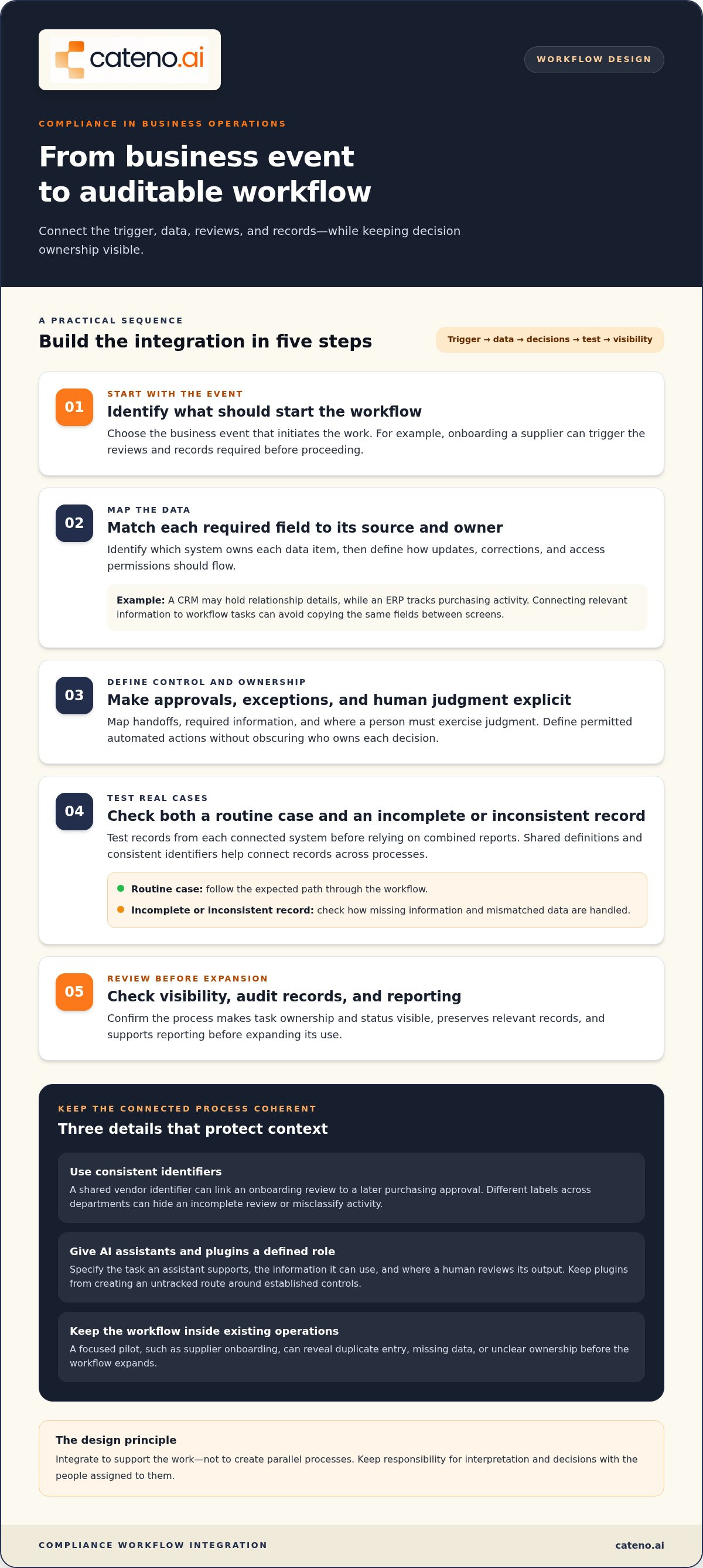
Compliance becomes operational when controls align with the processes employees already use. A compliance workflow engine can connect a business event, such as onboarding a supplier, with the reviews and records it requires. Integration should support the work without obscuring who owns each decision.
Start by mapping the process from trigger to outcome. For a new vendor, procurement might initiate a request, a designated team review information, and the business record approval before proceeding. Define each handoff, the required data, and where a person must exercise judgment. This reveals where manual steps cause delays or duplicate entry.
Existing systems often hold different parts of a process. A customer relationship management system may contain relationship details, while an enterprise resource planning system tracks purchasing activity. Integration connects relevant information to workflow tasks, so staff do not have to copy the same fields between screens. First identify which system owns each data item. Then define how updates, corrections, and access permissions should flow.
Data integration also affects analysis. Consistent identifiers for a customer, vendor, or transaction help teams connect records across processes. For example, a vendor identifier can link an onboarding review to a later purchasing approval. If departments use different labels, reports may misclassify activity or hide an incomplete review. Set shared definitions for key fields, then test records from each system before relying on combined reports.
AI assistants and plugins add another integration layer. For a workflow involving Luci AI Copilot, define which task the assistant supports, what information it can use, and where a human must review its output. A plugin should have a clear role, such as passing an approved field into a task, rather than creating an untracked route around established controls. Keep decision ownership and review steps visible.
To assess a proposed integration, use a practical sequence:
- Identify the business event that should start the workflow.
- Map required data to its source system and responsible owner.
- Define approvals, exceptions, and permitted automated actions.
- Test a routine case and an incomplete or inconsistent record.
- Review process visibility, audit records, and reporting before expanding use.
Compliance workflow automation should fit existing operations, not create parallel processes that employees must maintain. A focused pilot, such as supplier onboarding, can reveal duplicate entry, missing data, or unclear ownership before expansion. If you’re assessing how a workflow could connect to your operations, discuss your workflow requirements.
Designing workflows with approvals, evidence capture, and exception handling
A dependable workflow makes ownership, evidence, and decision points explicit. Its design should route routine work efficiently while preserving human oversight for significant judgments.
Approvals and Exception Handling
Approvals and exception handling define who reviews a task, what happens when it falls outside normal controls, and how resolution is recorded. This prevents unusual results from silently passing through a routine path. For example, an incomplete vendor record can pause onboarding and route the issue to an assigned reviewer.
To implement a workflow, map the trigger, assign owners, set approval conditions, specify required evidence, and define escalation paths. Test routine and exception cases with a small team, then revise the process based on the results.
Risk Assessments and Evidence Collection
A risk assessment identifies the exposure a workflow addresses and determines which controls and evidence matter. For a customer onboarding review, teams might assess identity information, business details, and account validation as distinct evidence needs. Compliance teams can then prioritize reviews by risk rather than applying identical scrutiny to every case.
Buyers should assess how a platform protects sensitive data, controls access, records activity, and supports privacy requirements. Review how the platform handles data, integrations, retention, and incidents against your organization’s risk criteria.
Evidence Collection and Management
Evidence collection captures records demonstrating that a control was performed, while evidence management keeps each record associated with its task and review. A workflow can request a document, record who submitted it, and route it for approval. This context helps teams distinguish current, relevant evidence from a file with no clear owner or purpose.
Define evidence requirements before enabling workflow automation. Specify acceptable record types, responsible submitters, reviewers, and what happens when evidence is missing or inconsistent. During a control review, a clear record should connect the evidence to the relevant task, decision, and status.
Collaboration also needs boundaries: assign each review to a role, limit access to necessary records, and document decisions. For example, a reviewer can return an incomplete submission with a reason, while an authorized approver handles unresolved exceptions. Review the workflow regularly with compliance and operational teams so controls remain aligned with the processes they govern.
Centralized compliance management and a single source of truth
A single source of truth gives an organization one governed view of compliance obligations, controls, owners, and current status. Centralized compliance software connects these records without requiring every department to abandon its operational systems. For example, a control owner can review the approved policy version and related evidence in one managed record.
Centralization is a governance model, not simply a shared folder. Define which system owns each record, who can update it, and how changes are approved. If a policy changes, the central record should identify the current version and responsible approver. Teams can then rely on that reference instead of local copies with conflicting dates or wording.
A framework map helps organize requirements across the organization. For example, a company working with ISO 27001 and SOC 2 can connect overlapping controls to the same underlying policy or evidence, while preserving each framework’s separate context. This reduces duplicate tracking, but it shouldn’t erase distinctions between control purposes, owners, or assessment criteria.
To make the central view useful, establish clear data rules:
- Assign an owner to each policy, control, and evidence record.
- Use consistent names for departments, systems, and control identifiers.
- Record approval status and the source of each update.
- Limit editing rights to roles responsible for maintaining the record.
- Review linked records when a process or framework changes.
These rules support useful reporting. A compliance lead can filter controls by owner, framework, or status, then identify records awaiting review. For instance, an update to a vendor-review policy can be linked to affected controls and workflows. This helps teams see which procedures need attention rather than treating each policy update as an isolated document change.
Centralized management also requires careful handling of conflicting information. If a department’s local procedure differs from the approved policy, route the conflict to the designated owner and preserve the decision. Don’t overwrite the older record without context. A change history should show what changed, who approved it, and which linked processes were affected.
Autonomous compliance agents can help organize compliance work around controlled records. Define their role within the organization’s governance: specify the information they can use, the tasks they can perform, and the decisions that remain with people. This distinction keeps automation aligned with approval authority and gives reviewers a clear basis for assessing updates.
Review the central structure whenever a framework, business process, or ownership assignment changes. A focused review can confirm that each control still points to the right policy, owner, and supporting record. This creates a maintained operational reference, not a static repository that becomes outdated as the organization evolves.
Which compliance workflow engines are best for businesses in 2026?
There isn’t one best platform for every organization. The right choice depends on the controls you need to manage, the systems involved, and how teams handle reviews. In 2026, compare tools against a real workflow, such as preparing evidence for an ISO 27001 assessment or reviewing customer onboarding.
Start with framework coverage. Compliance automation platforms can map controls across ISO 27001, SOC 2, HIPAA, and PCI DSS. Check whether the platform connects each requirement to your organization’s controls, owners, evidence, and review processes. Framework names alone don’t show how well a tool supports the work behind them.
Then assess the workflow itself. Can you configure task routing, approvals, deadlines, evidence requests, and exception paths around your existing processes? For example, a security control review might require an owner to submit evidence, a reviewer to assess it, and an approver to resolve outstanding issues. A practical demonstration should show that sequence, including an incomplete submission.
Integration is another selection criterion. Identify the systems holding relevant records, then determine whether the platform can use those records without unnecessary manual re-entry. Ask how it handles inconsistent information, permission boundaries, and changes to connected data. These details affect reporting accuracy and the effort needed to maintain workflows.
Consider how the engine supports human oversight. Automation can route tasks and surface exceptions, but people remain responsible for regulatory interpretation and material decisions. A useful system makes automated actions and review points visible. For instance, a flagged record should explain what needs attention and direct it to an accountable role.
Use a consistent evaluation checklist:
- Map platform capabilities to your priority frameworks and controls.
- Test a routine workflow and an exception case with real users.
- Review integration, permissions, evidence handling, and reporting.
- Confirm that process owners can maintain workflow changes.
- Compare implementation effort with the operational problem being addressed.
A market overview lists 12 compliance automation software solutions to consider, but the count doesn’t determine which fits your needs. Compare options against the same use case and criteria. A small compliance team may prioritize clear task ownership and risk-based workload visibility, while a larger organization may focus on multiple processes and connected systems.
Choose through evidence, not feature volume. Have compliance, operations, and technology teams assess one representative workflow together. Record gaps, usability issues, and required adjustments before expanding. If configurable workflows and autonomous compliance agents match your operational needs, discuss your compliance workflow requirements.
Cateno: Customizable Workflow Engine
Cateno helps organizations structure onboarding and verification with its Customizable Workflow Engine. Turn to it when partner intake involves multiple reviews, repeated information requests, or disconnected verification steps. Its Self-Service Onboarding Gateway supports intake, while Automated KYC and KYB Checks and Bank Account Verification address key verification needs within the process.
These capabilities connect intake with review and verification tasks for a more coordinated operational flow. The right workflow depends on the information required, the responsible reviewers, and the decisions that need human oversight. Define these elements around your process to create a clearer path from submission to review.
Contact Cateno to discuss how a customizable workflow could fit your onboarding operations.
Put Your Next Workflow into Motion
Identify one operational process where compliance work creates friction, then define what a clearer handoff should achieve. Starting with a focused process gives your team a practical way to assess ownership, information flow, and human review before extending the approach across the organization.
A compliance workflow engine becomes an operating model when it reflects your process, supports clear decisions, and accommodates exceptions. Cateno brings together a Customizable Workflow Engine, Self-Service Onboarding Gateway, and Automated KYC and KYB Checks for organizations connecting onboarding with verification. These capabilities support a coordinated flow from intake through review.
Discuss the process you want to improve and the operational requirements it must meet. Contact Cateno to discuss your workflows and take a considered next step toward a workflow that fits your operations.
Frequently Asked Questions
Can I automate policy acknowledgments and attestations?
Yes. A compliance workflow engine can assign a policy to selected roles, collect acknowledgments, and flag outstanding responses for follow-up. For example, after an access policy changes, a manager can assign it to employees who use the relevant system. Keep the policy version attached to each response so the record shows what someone acknowledged. Human review remains useful when an employee raises an exception or requests clarification.
Can I route incidents or risk reports automatically?
Yes. Configure routing rules around report type, affected process, urgency, and responsible team. For example, a report involving customer information could go to a designated privacy reviewer, while an access concern reaches the system owner. Record why the report followed that route, and allow authorized staff to update its assignment. Clear escalation criteria help prevent reports from sitting in a general queue without accountable ownership.
How can small compliance teams manage complex regulatory requirements effectively?
Small teams can prioritize work by risk and maintain a concise register of obligations, owners, and review dates. Group tasks when they share evidence, but keep distinct control responsibilities visible. For example, one owner might coordinate a shared policy review while separate control owners assess how it applies to their processes. A clear workload view helps the team identify overdue items and redirect effort as priorities shift.
What are compliance automation tools?
Compliance automation tools use software to coordinate recurring tasks and organize supporting records. Depending on the platform, they may assign reviews, request documentation, track approvals, or prepare reports. For example, a tool could prompt a control owner to complete a scheduled review and route the result for approval. Automation supports execution and visibility, while accountable people interpret requirements and make consequential decisions.
What are the biggest compliance challenges for companies scaling rapidly?
Rapid growth can make processes inconsistent as teams, systems, and business partners expand. A procedure that once relied on direct coordination may lose clear ownership across departments. For example, a growing onboarding operation can create duplicate information requests or inconsistent review records. Companies also need to keep procedures aligned as responsibilities change. Define process owners and shared data terms, then assess whether existing workflows still fit.
What are the core capabilities to look for?
A compliance workflow engine should support configurable task routing, role-based ownership, approval controls, exception escalation, and useful reporting. Assess whether it can connect to systems that hold operational records and preserve reviewable activity. For example, test whether an administrator can adjust a workflow after a process changes, then confirm the updated route still directs decisions to accountable people. Evaluate capabilities against a real operating scenario.
What is a compliance workflow engine and how does it work?
A compliance workflow engine coordinates compliance-related tasks according to defined business rules. It can respond to an event, such as a new partner application, by directing information through assigned reviews. For example, the system may request details, send the case to a reviewer, and record the outcome. It organizes the sequence; designated people remain responsible for interpreting requirements and approving decisions.
What features should a compliance workflow engine include?
Core features include configurable workflows, clear task ownership, approval routing, evidence association, exception paths, and traceable status history. Reporting should help teams identify stalled tasks, missing records, and recurring issues. Integrations can reduce duplicate entry when information sits in separate business systems, while access controls govern who can view or change it. Test a routine case and one requiring additional review.


