
A document workflow should do more than collect files. Automated document collection for onboarding coordinates requests, secure submissions, access controls, and status tracking. Customers get a self-service way to provide information, while teams can see what has arrived and what still needs attention. Submitted materials can then move through the onboarding process for review.
Paper forms, email attachments, and manual follow-ups can make it difficult to track each customer’s progress. A digital workflow brings those steps together while still allowing staff to review information and handle exceptions.
This article explains how automated document workflows operate, how access controls help protect customer information, and how tracking can flag missing documents. It also covers digital forms, reminders, and self-service portals, so you can see how these tools support a more organized onboarding experience.
Key Takeaways
- See how forms and eSignatures can connect with existing systems to keep onboarding information moving through a defined workflow.
- Learn how access controls and activity monitoring help teams manage sensitive documents and maintain visibility over submissions.
- Understand how automated tracking can surface missing forms and support consistent compliance processes.
- Explore how self-service portals let customers submit documents and complete onboarding tasks with fewer manual follow-ups.
- Identify when a customizable workflow and automated verification can help coordinate business-partner onboarding.
What is document workflow automation for customer onboarding?
Document workflow automation connects requests, forms, signatures, and records through defined software steps. For example, a submitted form can update a CRM record and trigger a review task.
An automated document collection for onboarding workflow reduces repetitive handoffs by connecting customer information with document generation, search, and follow-up tasks.
Forms and eSignature Integrations
Forms and eSignature integrations connect digital information requests with business software. Staff can track a document from the initial request to the signed copy without entering its details again.
For example, a customer completes an intake form, and its fields populate the matching CRM record. The workflow can then generate an agreement, send an eSignature request, and attach the signed file to that record. A linked task in a productivity tool can prompt staff to review an exception, while the customer receives a clear next step.
Platforms for Automated Collection
Automated collection is available through onboarding platforms, document management systems, CRM software with workflow automation, and eSignature tools connected to business applications. The category matters because it determines where requests, files, and status updates are managed.
A company might use its CRM to start a request, a document system to organize submissions, and an eSignature tool to complete approvals. Connections may use built-in integrations, connectors, or APIs. Before mapping a platform to your onboarding process, compare how it handles form fields, signed documents, search, permissions, and exception routing.
Automation Risks and Limitations
Automation can move incorrect data, use outdated templates, or grant overly broad access. These risks matter because an error can pass from a form into a CRM record or generated document.
For example, a changed CRM field may no longer match the form mapping, leaving a record incomplete. A failed connection can interrupt a signature request or keep a signed file from appearing in the expected folder. Assign ownership for template updates, test workflow changes, and route unusual submissions for human review.
Measuring Time Savings and Completion
Teams can assess automation by comparing the manual effort required and document completion before and after a workflow change. This shows whether a faster process also produces complete, usable records.
Before automation, record the time spent on requests, data entry, reminders, and filing. Track the same tasks afterward. Measure completion as completed requests divided by all requests in the same onboarding group, and note where submissions stall. A dashboard, for example, can distinguish between requests awaiting a customer and those awaiting internal review.
Data, Search, and Integration Costs
CRM integration maps customer fields to document templates, while search tools help staff find files by record, status, or document type. Linking a signed agreement to its CRM account, for example, lets a reviewer find it without searching email threads. Clear field names and consistent record identifiers reduce mismatches between connected software.
Plan costs typically depend on factors such as user seats, document volume, integration access, and configuration needs. Compare subscription tiers with the workflows you plan to run, including form creation, signatures, storage, search, and maintenance. A lower-tier plan may lack a required connector, so assess the full software setup rather than one feature alone.
Secure document collection and access monitoring
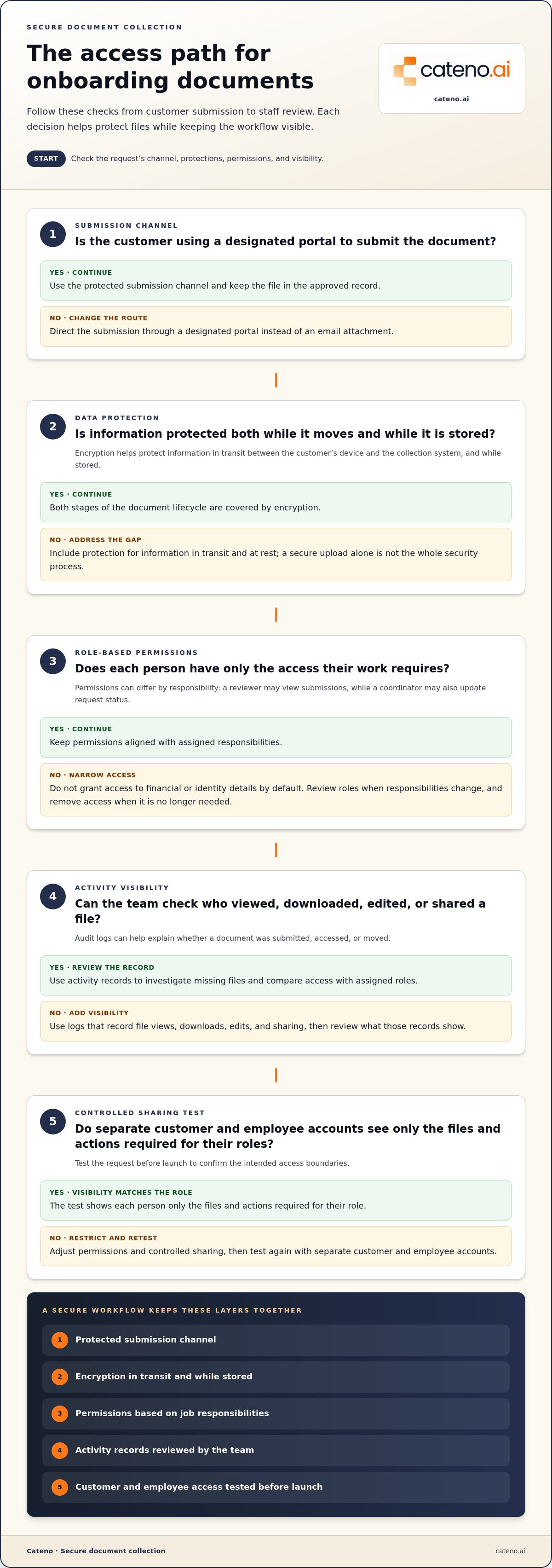
Secure collection combines protected submission channels with rules for viewing, sharing, and managing onboarding files. Document storage software can control who accesses files and data, helping protect client information. For example, a customer can upload an identity document through a designated portal instead of sending it as an email attachment. Staff can then use the approved record rather than creating extra copies.
Encryption helps protect information as it moves between a customer’s device and the collection system, as well as while it is stored. Access controls determine who can view, download, edit, or share a file. These measures address different stages of the document lifecycle: encryption safeguards data, while permissions limit who can use it. A structured workflow should include both, rather than treating a secure upload as the whole security process.
Role-based access assigns permissions according to job responsibilities. A reviewer might view submitted documents, while an onboarding coordinator can also update request status. People who do not need financial or identity details should not receive access by default. Review roles when responsibilities change and remove access when an employee no longer needs it. Clear ownership makes this process more reliable than informal, manual decisions.
Audit logs record events such as file views, downloads, edits, and sharing. If a document is missing, a team can use the log to see whether it was submitted, accessed, or moved. Logs also support routine reviews: compare access records with assigned roles and address permissions that no longer match an employee’s work. A log improves visibility, but teams still need to review what the records show.
Secure sharing means giving the intended recipient access through a controlled workflow, not forwarding a file broadly. For example, a reviewer can access one customer’s submission while other records remain restricted. Before launching a request, test it with separate customer and employee accounts. Confirm that each person sees only the files and actions required for their role.
Training helps employees apply these controls to real tasks. Use a sample onboarding record to demonstrate approved sharing, access requests, and how to report a misdirected file. Repeat the exercise when workflows or responsibilities change. Even a streamlined collection process can fail if staff share files outside it or bypass permissions to work faster.
For teams coordinating reviews across complex workflows, autonomous compliance agents can support structured compliance processes. Pair automation with defined access roles, reviewable activity records, and staff training. Together, these measures can make collection faster without treating visibility or accountability as an afterthought.
Regulatory compliance and security standards
Compliance workflows organize the documents, checks, and approvals required for each onboarding case. Their value depends on accurate templates, clear routing, and records that teams can review.
Background and Compliance Checks
Background and compliance checks are structured review tasks linked to an employee or business record. Tracking each task separately helps an organization monitor its status and identify missing information.
For employee onboarding, a workflow can track I-9 forms and flag missing or overdue paperwork. E-Verify steps can appear as distinct tasks, rather than being confused with document collection. That separation gives reviewers a clear view of which records have arrived and which checks remain open.
Background checks also need defined routing. A process might send a submitted record to an authorized reviewer, then record whether the review is pending or complete. Keep the check’s source and outcome connected to the correct person’s file. This helps teams trace decisions without treating an uploaded document as proof that the review is finished.
Pre-approved templates can standardize requests and reduce variation between onboarding cases. Assign an owner to review template changes, then test the updated version against a sample record. When a form changes, update its field mapping and routing together. Otherwise, an outdated template may keep requesting information or direct it to the wrong step.
Security Standards and Encryption
Security standards are the controls and procedures that govern how onboarding information is collected, accessed, and retained. Applying them consistently matters because compliance records can contain sensitive employee or business information.
Encryption protects data as it moves between systems and while it is stored. Access permissions determine who can view or handle each record. A reviewer, for example, may need access to a background-check status but not every document in an employee file. Set permissions according to job responsibilities, then review them when roles change.
Structured routing supports accountability by recording where documents go and who reviews them. Keep an audit trail of key actions, such as submission, access, edits, and approval. A record showing the source document, template version, and review status can help teams investigate an incomplete case and identify where the process stopped.
Automation can support compliance processes, but it does not determine which rules apply to every organization. Teams should define the checks and templates relevant to their workflow, then assign people to review exceptions. This keeps automated reminders and routing useful without treating software status as a substitute for the underlying review.
Automated collection of tax forms, identity documents, and policy acknowledgments
An onboarding workflow can request tax forms, identity documents, and policy acknowledgments through one structured intake. It can also track each request, making outstanding actions visible to both the employee and the onboarding team.
Automated Intake Forms and Questionnaires
Automated intake forms collect information through digital fields and route responses into an onboarding record. Clear requests help employees submit complete information without repeated administrative follow-up.
For example, a U.S. employee workflow can route the employee to a W-4 form. The system can record whether the form was requested, uploaded, or still outstanding. Automated tracking can flag missing or overdue onboarding documents, including I-9 forms and tax paperwork, before deadlines are missed. A coordinator can then act on the specific incomplete request instead of reviewing every record manually.
Identity-document intake can use a separate request that explains which document to upload and where. The workflow should connect the upload to the correct employee record and display its review status. If the submission is unreadable or incomplete, a clear follow-up request shows what to do next. This keeps onboarding moving without treating an upload as approval.
Questionnaires can gather information needed to prepare other forms. Use required fields for essential answers and conditional questions only when a response calls for them. For instance, an answer can trigger an additional document request. This keeps the form relevant and helps teams maintain consistent records.
Role-Specific E-Forms and Checklists
Role-specific e-forms and checklists give each employee tasks relevant to their position. This matters because a single generic request can add unnecessary steps or omit an action required for a particular role.
A checklist might group tax paperwork, identity-document uploads, and policy acknowledgments as separate actions. Each item can show whether it is requested, submitted, or awaiting review. Acknowledgment records should identify the policy presented and capture the employee’s response, so the organization can distinguish reading a policy from completing another form.
Templates help standardize requests, but teams should assign an owner to maintain them. When a policy or form changes, update its version and the workflow that sends it. Add a review step to confirm the correct template appears before the next request goes out. This helps prevent confusion caused by outdated documents.
To support efficiency, give employees a clear status for each action and send reminders about open requests. Track submission separately from approval, since staff review may still be required. A coordinator can then prioritize records with missing forms while keeping completed items visible in the employee’s checklist.
Digital documentation and self-service portals
A self-service portal gives customers one digital place to complete onboarding tasks and submit documents. Instead of searching email threads, customers can sign in, see requested actions, upload files, and follow each item’s status. This turns disconnected requests into a structured journey. Make the next action clear at every stage.
For example, a business partner could open a portal and see separate requests for company details, identity documents, and a signed agreement. The portal can show which items are submitted and which still need attention. This shared view helps customers understand their progress and gives internal teams a consistent record to review. It also clarifies whether a document reached the right workflow.
A digital portal can connect each task to a defined next step. After a customer submits a form, the workflow might route it for review, request a correction, or display another required action. Automated systems can send documents, signature requests, and reminders. This turns manual email follow-ups into visible, organized tasks, while leaving reviewers responsible for decisions that require judgment.
Use consistent status labels across devices and customer types, such as “requested,” “submitted,” and “under review,” so customers and onboarding teams interpret progress the same way. A platform should also explain the purpose of each requested document and how to upload it. For example, a prompt can ask for a company registration document rather than simply saying “upload file.”
Self-service does not mean every case follows the same path. A customer’s responses may trigger different documents or review steps. Design the standard path first, then make exceptions visible rather than hiding them in email. Reviewers should be able to identify why a task appeared, what information it depends on, and what action moves the case forward. This makes workflows easier to maintain as requirements change.
To assess the portal, review a complete onboarding journey from the customer’s perspective. Check that each request has a clear purpose, each upload has a visible status, and each reminder points to an unfinished action. Then examine the internal view to confirm staff can locate the same record and see its progress. To shape a portal around your onboarding workflow, discuss your onboarding process.
Cateno: Customizable Workflow Engine
Cateno’s Customizable Workflow Engine coordinates document intake and onboarding steps for business partners. Use it when forms, verification, and follow-up need to move through a connected process rather than separate manual handoffs.
The Self-Service Onboarding Gateway gives partners a self-service way to submit information, while Automated KYC and KYB Checks support verification workflows. Bank Account Verification can also be part of onboarding. Together, these capabilities organize intake and verification around the information provided, with workflows tailored to the business process.
For teams building a more structured partner onboarding journey, Cateno brings document management and workflow automation into the process. Contact Cateno to discuss your onboarding workflow.
Build a Clearer Path Through Onboarding
Start by identifying where customers or employees encounter friction, then shape the workflow around those decisions. A well-designed process for automated document collection for onboarding makes each person’s next action clear and gives your team a consistent way to move records forward. Begin with one onboarding journey, define the information it requires, and decide where human review remains essential.
Cateno’s Customizable Workflow Engine can structure that journey, while its Self-Service Onboarding Gateway gives customers a digital submission route. Automated KYC and KYB Checks can support verification within the process. Together, these capabilities connect intake and verification without treating every onboarding case as identical.
If you’re ready to consider how a more coordinated workflow could fit your operations, discuss onboarding with Cateno. A clear starting point can make the next process improvement easier to define and put into motion.
Frequently Asked Questions
What is onboarding software?
Onboarding software coordinates the tasks, information, and decisions needed to begin a customer or employee relationship. For a business partner, it might connect an intake record to identity checks and an internal approval queue. For a new employee, it might organize forms, acknowledgments, and review tasks. The key distinction is whether the software manages a connected process or simply stores files.
How does automated onboarding document collection work step by step?
A typical workflow begins when a customer or employee record is created. The system identifies the relevant document requests, assigns them to the responsible person, and records submissions against that record. It can then route completed items for review and create follow-up tasks for missing or unclear information. For example, an incomplete business profile can be returned for correction before the case advances.
Which onboarding documents can be collected and verified automatically?
Workflows can collect identity documents, tax forms, business records, bank details, signed agreements, and policy acknowledgments. Collection and verification are separate: receiving a file does not establish that its information is accurate or acceptable. Verification may involve checking identity or business information against relevant data sources. Define which items need human review, especially when a document is unclear or submitted details conflict.
How do leading onboarding document collection tools compare on features and pricing?
Compare tools by workflow flexibility, customer-facing portals, integrations, document search, verification capabilities, permissions, and reporting. A form or signature tool may handle a narrow task, while a broader platform can coordinate intake and review across systems. Assess pricing alongside the features your workflow needs. Cateno’s platform uses a subscription or per-transaction model; the appropriate structure depends on the use case.
What does automated onboarding document collection software cost in the United States?
Software pricing depends on the use case and is provided after a quote request. Cost factors include the number and type of workflows, transaction volume, integrations, verification needs, configuration, and user access. Compare the full cost of the required setup, not just a headline subscription tier. For example, a workflow that includes business verification may have different requirements from one limited to collecting and routing forms.
How can companies protect personal data and secure onboarding documents?
Limit document access to employees who need it for their assigned work, and review permissions when responsibilities change. Use secure submission channels, encryption, and audit records to support controlled handling. Define how long to retain records, who can approve sharing, and how staff should report a misdirected file. For example, a response plan should identify who investigates an unexpected download and records the follow-up.


