
What if the biggest gap in compliance monitoring isn’t detecting a change, but making sure someone owns what happens next? An initial check can become outdated as partner information and risk context evolve. Ongoing compliance monitoring software is useful when teams can connect review findings to clear follow-up, reliable evidence, and accountable owners.
Organizations may want more automation and a current view of risk, but ongoing monitoring can mean different things. Tracking internal controls is not the same as verifying the entities and partners a business works with. This guide explains what monitoring software can support and where its scope ends. It also offers practical criteria for comparing coverage, evidence, and workflows, and shows how to connect a review to documented follow-up.
For teams managing partner and entity lifecycles, Cateno combines automated KYC and KYB checks, self-service document collection, customizable workflows, and advanced verification reports in an onboarding and ongoing monitoring platform. These capabilities help teams organize information and review activity, while leaving compliance decisions with the organization.
Key Takeaways
- Match monitoring capabilities to the subject you need to oversee, whether that’s an entity, a control, a system, or a third party.
- Use a defined review lifecycle to connect information collection, evidence review, decisions, and follow-up.
- Compare ongoing compliance monitoring software by coverage, evidence handling, workflow configuration, reporting, and human oversight.
- Start with a focused monitoring use case, then expand as review responsibilities and evidence needs become clear.
- For entity and partner lifecycle workflows, Cateno brings onboarding, KYC and KYB checks, document management, and verification reports into one platform.
What Ongoing Compliance Monitoring Software Covers, and What It Does Not
Ongoing compliance monitoring software helps teams organize recurring oversight, capture evidence, and manage follow-up. It supports a review process; it does not make every compliance decision automatically. Scope varies by platform and program. A tool designed to review business entities, for example, may not monitor internal controls or cloud configurations.
This distinction matters because an onboarding check captures information at a particular point in a relationship. A partner’s ownership, business activities, submitted documents, or risk context may later change. If the original record remains the only reference, teams may be relying on information that no longer reflects the relationship. Recurring reviews give organizations a way to revisit relevant information and record how they respond.
Ongoing monitoring is a repeatable review and follow-up process; one-time verification is a snapshot of information at a single point in time. A software workflow can help manage that process, but it cannot establish that every relevant risk has been identified or every obligation has been met.
What does ongoing compliance monitoring software do?
In practice, software can organize selected checks, make evidence easier to collect and review, and connect findings to follow-up tasks. A lifecycle may include defining what needs review, gathering or validating information, assessing evidence, recording a decision, and assigning next steps. Automation can support parts of the work, while people remain responsible for judgment and action.
Capabilities vary by product. Before selecting a platform, identify its intended use, the workflows it supports, and the information available to those workflows. Don’t assume a system monitors every obligation, data source, or type of risk because it is described as continuous or ongoing. Treat monitoring as a managed cycle, not a single automated pass.
Which compliance use cases belong in scope?
Start by naming what the organization is monitoring. Entity and partner oversight focuses on the identity and verification information associated with a business relationship. Internal compliance and technology monitoring address different subjects, such as whether policies and controls are followed or whether cloud environments meet specified configuration requirements. These use cases may sit within a broad compliance program, but they need different evidence and workflows.
- KYC supports verification of an individual’s identity.
- KYB supports verification of a business entity.
- Bank account verification focuses on bank account information; it does not replace KYC or KYB.
- Control or cloud-configuration monitoring reviews internal processes or technical settings, rather than verifying a partner’s identity.
Set scope according to your organization’s obligations and risk model. For an entity-focused use case, define which relationships are included, what information supports review, and how decisions and follow-up will be recorded. This boundary helps you select ongoing compliance monitoring software for the work you need to manage, rather than assuming a platform’s broad coverage means it fits every monitoring need.
How Ongoing Monitoring Turns Entity Reviews Into Traceable Workflows
A reliable entity review needs more than a request for updated information. Teams need to know what is in scope, which evidence they reviewed, who made the decision, and what remains to be done. A structured workflow connects these steps to the relevant business or partner record, so a reviewer can pick up the work without relying on scattered messages or individual memory.
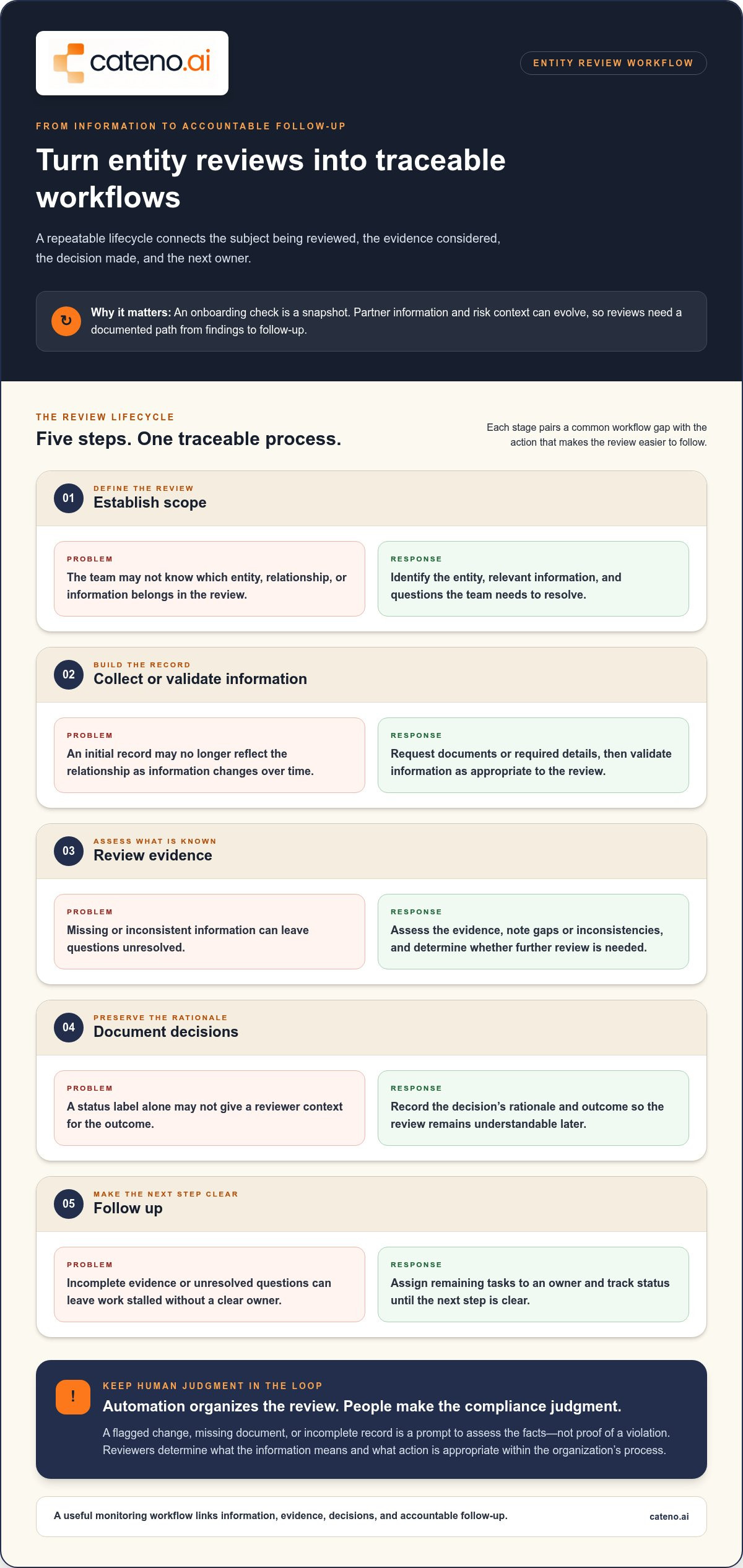
IBM’s overview of The Importance of Compliance Monitoring places monitoring within an organization’s broader compliance process. For entity oversight, teams can organize that process as a repeatable lifecycle:
- Establish scope. Identify the entity, the information relevant to its review, and the questions the team needs to resolve.
- Collect or validate information. Request documents or other required details, then validate information as appropriate to the review.
- Review evidence. Assess what was provided, note missing or inconsistent information, and determine whether further review is needed.
- Document decisions. Record the rationale and outcome so the review has context beyond a status label.
- Follow up. Assign remaining tasks to an owner and track their status until the next step is clear.
Automation organizes the review; it doesn’t make every compliance judgment. A flagged change, missing document, or incomplete record is a prompt to assess the facts, not proof of a violation. Human reviewers determine what the information means and what action is appropriate within the organization’s process.
From onboarding information to ongoing review
Initial KYC or KYB information gives teams a starting record for later oversight. A workflow can keep entity context together as teams collect or validate additional information, review submitted documents, and use verification reports to support an assessment. Define who handles each step and where an unresolved question goes, so a review doesn’t stall when evidence is incomplete.
Customizable workflows let organizations structure steps around their review process and associate work with the relevant entity. Self-service intake supports document collection, while the team remains responsible for evaluating information, making decisions, and escalating unresolved issues.
What makes a monitoring workflow auditable?
A useful record lets a reviewer reconstruct the work later. Capture the information considered, evidence reviewed, decision and rationale, responsible owner, and follow-up status. Consistent documentation helps distinguish an issue awaiting clarification from a decision that has already been assessed.
Set a practical standard for each record: what must be written down, who updates it, and how open actions are marked. This gives the workflow operational clarity without treating software as proof that a review was adequate.
For entity-focused workflows, Cateno’s onboarding and compliance platform brings customizable workflows, self-service intake, KYC and KYB checks, document management, and advanced verification reports together. Connect with the Cateno team to discuss how these capabilities fit into an entity review process.
How to Compare Ongoing Compliance Monitoring Software
Compare tools against the work your team needs to manage, not just a feature list. A platform designed to monitor cloud configurations may offer little support for verifying business entities. An entity-focused workflow may not assess internal controls. First identify the monitored subject: an entity, control, system, or third party. Then assess whether the software connects relevant evidence to clear review ownership and follow-up.
Use the same comparison framework for each use case. Record what the platform supports, what requires a separate process, and what needs validation before selection. This makes gaps visible instead of assuming one tool should cover every risk domain. For context, Compliance Monitoring in Cybersecurity describes a security-focused perspective on monitoring that should not be conflated with entity verification.
| Criterion | What to compare | Practical evaluation question |
|---|---|---|
| Scope | Monitoring for entities, controls, systems, or third parties | Does the tool address the subject and review needs in scope? |
| Evidence | Information, documents, and verification reports that can support review | Can reviewers understand what evidence informs an outcome? |
| Workflow configuration | Ability to shape steps around the team’s review process | Can the process reflect how work is assigned and completed? |
| Reporting | How review information and outcomes are presented | Can responsible teams interpret the record and identify next steps? |
| Human oversight | Where reviewers assess exceptions and make decisions | Does the workflow preserve space for contextual judgment? |
Compare monitoring coverage and evidence
Map each requirement to the evidence needed to support it. For an entity review, identify the KYC or KYB information, documents, or reports the process relies on. Separate documented capabilities from claims that need validation. Ask for a clear explanation of what the product handles and what remains outside its scope. A defined gap is easier to plan for than an assumed capability.
Compare workflow control and human oversight
Evaluate whether teams can configure steps that match their actual review process. Look for clear ownership, a defined route for unresolved issues, and decision records that retain useful context. A status such as “flagged” or “incomplete” should direct review, not present an unverified concern as a confirmed violation.
Automation can structure and route review work, but it can’t guarantee compliance or replace human judgment. Reviewers still need to interpret evidence, resolve exceptions, and decide what action is appropriate. Check whether the workflow makes these responsibilities visible instead of hiding them behind an automated status.
When assessing ongoing compliance monitoring software, consider whether a reviewer could later understand what information was considered, who acted, and why the outcome was recorded. The best fit is the tool whose scope, evidence, and workflow align with the program’s real responsibilities, not necessarily the one with the broadest feature list.
How to Prepare an Ongoing Compliance Monitoring Program
A monitoring program works best when its operating rules are clear before software is configured. Define which entities are in scope, what each review is meant to establish, what evidence supports it, and who is responsible for decisions and follow-up. Then use a bounded use case to test whether the workflow reflects how teams actually work.
A useful baseline is a scoped population, documented review steps, and accountable owners. Build toward it in sequence:
- Define the entities. Select a specific partner group or entity type for the initial population. State what qualifies for inclusion and who maintains that list.
- Scope the reviews. Identify the questions each review should address and what circumstances require additional assessment. Keep the scope aligned with your organization’s obligations and risk model.
- Map the evidence. List the information, documents, and verification reports teams use, including what they do when a record is incomplete or inconsistent.
- Assign owners. Name the roles responsible for gathering information, reviewing evidence, making decisions, and resolving open exceptions.
- Measure completion. Track whether reviews reach a recorded outcome, whether records contain the required context, and whether follow-up actions have a clear status.
Keep the initial use case narrow enough to evaluate. A team might begin with one defined category of business partner rather than trying to bring every third party, internal control, and technology system into one workflow. A clear boundary makes it easier to find process gaps before expanding coverage.
Set a workable scope and ownership model
Write down the starting population and the roles that support it. A reviewer may assess information, a designated decision-maker may resolve an exception, and an operational owner may track remaining work. One person may hold more than one role, but each responsibility should be explicit. Choose practical measures, such as completed reviews, records with a decision rationale, and open follow-ups with assigned owners.
Define what “complete” means for the pilot. A closed record might require the relevant evidence, an outcome, and a clear note for any action still in progress. These measures help teams assess workflow quality, not just the number of reviews initiated.
Plan workflows, evidence, and change management
Before configuring a workflow, map existing onboarding, document collection, and review practices. Note where information is first captured, how teams find supporting documents, and where decisions are recorded. Preserve useful steps, remove unnecessary handoffs where practical, and decide how records and reports should be presented so staff can use them consistently.
Prepare staff guidance for common tasks, exceptions, and escalation routes. Then review the process against actual workflow completion and record quality. Adjust the scope or instructions when the review process changes; software configuration alone won’t keep a program fit for purpose.
For an entity-focused program, discuss your workflow with Cateno and explore how customizable workflows, self-service intake, and verification reports support onboarding and ongoing review.
Where Cateno Fits in Ongoing Compliance Monitoring
Cateno helps organizations connect business onboarding with entity verification and partner lifecycle workflows. Its role in the broader category is specific: the platform supports collecting and reviewing business information, KYC and KYB checks, and organized follow-up through configurable workflows and verification reports.
This focus is useful when teams want entity records and verification work connected in a structured process. It differs from software centered on internal control testing or cloud-configuration monitoring. Choose a platform based on the subject you need to oversee and the evidence and review steps your team needs to manage.
Connect onboarding and ongoing entity oversight
Onboarding creates a foundation for later entity reviews by collecting information and documents associated with a business relationship. Cateno’s self-service gateway supports intake, and its automated KYC and KYB checks provide verification capabilities. Document management and advanced verification reports support organized review, while customizable workflows structure the steps teams follow.
These capabilities support a workflow; they don’t establish a review schedule or determine how an organization should respond to every finding. Teams define their scope, review responsibilities, decisions, and follow-up. For broader context on identity checks and their role in compliance processes, read Cateno’s KYC verification guide.
Choose a next step based on your monitoring needs
Assess fit by mapping your entity lifecycle to the platform’s capabilities. Consider whether your process needs a consistent place for entity records, configurable verification workflows, document collection and management, and reports reviewers can use. Identify where human assessment and follow-up fit, too. These questions help establish whether an entity-focused platform suits your needs or whether your primary requirement is monitoring controls, systems, or cloud environments.
Choose based on the workflow you need to support, not the broadest interpretation of “monitoring.” Cateno focuses on onboarding and entity verification, with KYC and KYB checks, customizable workflows, self-service intake, document management, and advanced verification reports. These capabilities help organize review activity, but they don’t guarantee compliance or replace the organization’s own decisions.
If your priority is connecting partner onboarding with entity verification and documented review work, discuss your workflow and requirements with Cateno. A clearly scoped use case gives the conversation a practical starting point: which entities are involved, what information teams handle, and how review steps should be organized.
Turn Your Monitoring Priorities Into a Practical Next Step
Translate your monitoring priorities into a workflow your team can own. Start with the entities that matter most, identify the information needed for review, and make responsibility for decisions and follow-up explicit. That foundation helps you assess whether ongoing compliance monitoring software supports the process you intend to run, rather than adding another disconnected record or queue.
For organizations focused on entity onboarding and partner oversight, Cateno brings together a customizable workflow engine and self-service onboarding gateway with automated KYC and KYB checks, bank account verification, and advanced verification reports. These capabilities support organized intake, verification, and review, while your team remains responsible for its compliance decisions.
Bring your intended use case, current workflow, and follow-up needs into the conversation. Discuss your compliance monitoring workflow with Cateno and explore a practical path from your priorities to an accountable process.
Frequently Asked Questions
How much does ongoing compliance monitoring software cost?
There’s no single cost for ongoing compliance monitoring software because pricing depends on the program’s scope and required workflows. Cateno’s platform is offered on a subscription or per-transaction basis. Compare what each proposal includes, such as verification activities and workflow capabilities, rather than comparing headline figures alone.
Can ongoing compliance monitoring software support existing business partners?
Yes. A platform can support oversight of existing partners when its capabilities and configured process cover the relevant entity records and review work. A business can bring current partners into a defined workflow and identify which information needs to be collected or assessed. Before starting, decide how existing records will be handled, who owns each review, and how the team will document follow-up. Cateno supports partner onboarding and lifecycle workflows.
Is ongoing compliance monitoring software suitable for a small business?
It can be, if the software addresses a real need without creating more process than the team can maintain. A small business might begin by organizing reviews for one partner category, then assess whether the workflow is manageable before expanding. Consider who will maintain records, review evidence, and resolve exceptions. Ease of use and clear responsibilities may matter as much as the number of features.
Can ongoing compliance monitoring software connect with existing systems?
Integration capabilities vary by platform and by the systems involved. List the information your team needs to move, where it originates, and where staff need to use it. Distinguish a connection to a specific system from a general integration statement or future roadmap item. This helps identify manual handoffs and process changes that may be needed before rollout.
Does every monitoring exception mean a compliance violation?
No. An exception may show only that information is missing, inconsistent, or needs clarification. A record with an absent document, for example, is an item for assessment, not a conclusion about the partner. Define how staff categorize exceptions, record the basis for decisions, and escalate unresolved issues. Software can organize that process, while authorized personnel assess context and determine the appropriate response.
Can one platform support both KYC and KYB workflows?
Yes, a platform can support both individual and business verification when it includes the relevant capabilities and the workflows are configured for each population. The records and information needed for an individual check differ from those used to verify a business. Cateno provides automated KYC and KYB checks within its onboarding and compliance platform. Define the populations and intended review steps so each workflow reflects its purpose.


