

What if faster merchant intake came from automating the flow of evidence, not handing approval decisions to a machine? Repeated document requests, manual data entry, and inconsistent case reviews can slow onboarding and make ownership harder to track. Automated merchant onboarding can reduce that friction, but speed alone isn’t enough. Teams need clear controls and a defined path for exceptions.
The goal is a consistent intake process that handles repeatable tasks without obscuring how decisions are made. This guide explains how to structure merchant onboarding around self-service information and document collection, automated KYC and KYB checks, and bank account verification, while preserving review points for cases that need human judgment.
You’ll learn how to map the workflow, decide which steps are suitable for automation, and establish records, escalation paths, and accountable owners. You’ll also see how an orchestration layer, such as Cateno’s customizable workflow engine and self-service gateway, can connect intake with structured review and ongoing monitoring. The result is a practical framework for reducing repetitive work while keeping verification and approval decisions under control.
Key Takeaways
- Separate onboarding workflow tasks from payment processing, underwriting, and final approval so each decision has a clear owner.
- Structure intake as distinct checks for the business, its owners, and the bank account to make review more consistent.
- Use automated merchant onboarding for repeatable steps, while defining which exceptions require human judgment.
- Map every handoff, review point, and record before configuring a workflow to strengthen accountability and auditability.
- See how Cateno can bring document collection, verification, and lifecycle workflows into a configurable onboarding process.
Automated Merchant Onboarding: What It Covers, and What It Does Not
Merchant onboarding is the process of collecting information, verifying a business and its associated parties, reviewing the evidence, and setting up a payment relationship. It establishes whether an applicant can proceed through the organization’s defined process. It is related to payment services, but it is not the same as processing transactions: authorization, settlement, and other payment operations happen outside the intake workflow.
“Automated merchant onboarding automates the collection, verification, and routing of application evidence; it does not automatically approve a merchant or replace accountable review.” That distinction keeps the scope clear. Automation can organize tasks and surface results, while underwriting, risk decisions, and final approval remain with the people or authorities assigned to those decisions.
Onboarding can involve several teams and systems. If each uses a separate form, mailbox, or tracking method, staff may re-enter the same details, request documents the applicant has already supplied, or pass a case along without recording why. Reviewers can then struggle to see what has been received, what remains outstanding, and who owns the next action. A structured workflow gives each item a defined place and each handoff a clear purpose. For a general overview of onboarding as a staged process, see What is Onboarding?
Which businesses manage merchant onboarding?
Payment service providers, payment facilitators, and platforms that enable business customers to accept payments may all manage merchant intake. Their workflows can differ. A platform may collect information as part of a broader business signup, while a provider may have distinct verification and review stages. Application volume, the range of business models, and the complexity of submitted evidence all affect how teams organize work. No single process or approval structure applies to every organization.
What does automation change in the process?
Digital intake gives applicants a structured way to submit business details and supporting documents, reducing reliance on free-form email exchanges. Workflow rules can direct submitted information to relevant checks, identify missing items, and route cases for human review when they need closer attention. In an onboarding workflow platform, configurable steps can connect collection with verification and review. The organization still defines its decision criteria, review responsibilities, and authority.
Keep the boundaries explicit. Business information, owner identity details, and bank account data are distinct evidence categories, even when they move through one coordinated process. Automated checks can support their assessment and provide structured results for reviewers, but a check result is not the same as an approval. Automation alone does not guarantee acceptance, eliminate risk, or establish compliance. The practical objective is repeatable intake with visible review paths and accountable decisions.
How Automated Merchant Onboarding Moves from Application to Review
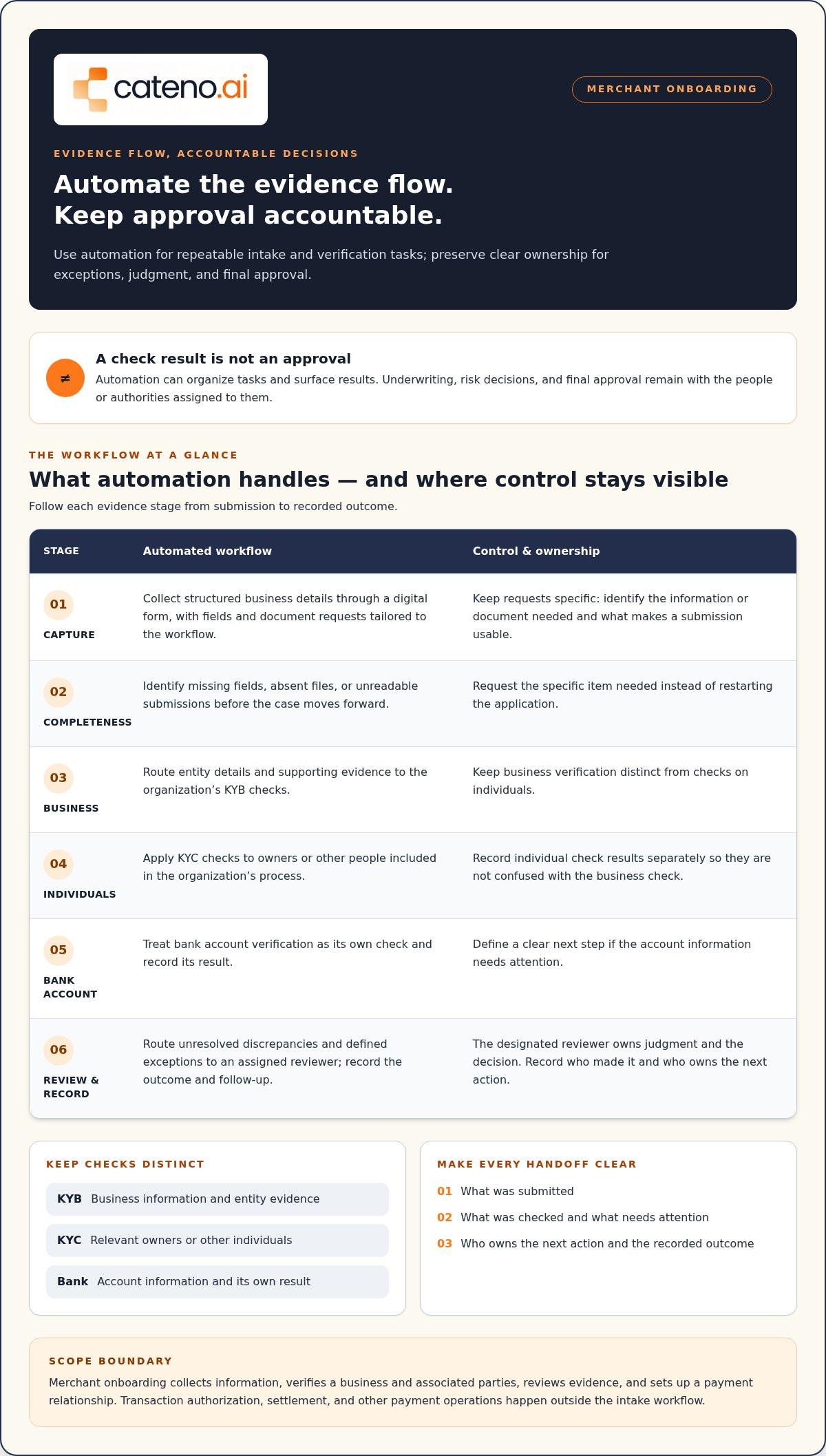
A controlled workflow separates evidence collection from verification and approval. Each stage should produce a clear handoff: what was submitted, what was checked, what needs attention, and who owns the next action. Automated merchant onboarding works best when the sequence is visible to both the applicant and the review team.
Automation can capture the application, organize documents, run distinct verification checks, route exceptions, and record the outcome, while designated reviewers retain responsibility for judgment and approval.
- Capture the application. Collect structured business details through a digital form, with fields and document requests tailored to the organization’s workflow.
- Check completeness. Identify missing fields, absent files, or unreadable submissions before the case moves forward. Request the specific item needed instead of restarting the application.
- Assess business information. Route entity details and supporting evidence to the organization’s KYB checks. Keep business verification distinct from checks on individuals.
- Verify relevant individuals. Apply KYC checks to the owners or other people included in the organization’s process. Record the result separately so it is not confused with the business check.
- Validate bank account information. Treat bank account verification as its own check, with a recorded result and a clear next step if information needs attention.
- Route for review and record the outcome. Send unresolved discrepancies or other defined exceptions to an assigned reviewer. Document the decision, its owner, and any follow-up required.
Collect merchant information and supporting documents
Structured forms create consistent fields for the information an organization needs to assess. A self-service submission path lets applicants provide documents within the same intake process. Make each request specific: identify the document or detail needed and what makes a submission usable. Keep requests proportionate to the workflow and applicable requirements. This helps avoid broad, repeated follow-ups that leave applicants unsure what to provide.
Verify, route, and record the application
Keep checks distinct in both workflow design and case records. KYB checks concern business information; KYC checks concern relevant individuals; bank account validation addresses account details. A successful result in one category should not silently stand in for another. Routing rules can move complete evidence onward and send exceptions to the appropriate review queue with the check result and reason attached.
Define exception triggers before launch. Missing information can prompt a targeted request; inconsistent details can pause progression for review; an unreadable document can be returned for a clearer submission. Reviewers should be able to see what triggered the exception, which evidence was assessed, and what action was taken. Record outcomes such as further information required or review completed without implying that a system check alone grants approval. This creates a traceable workflow while keeping decision authority explicit.
Manual vs. Automated Merchant Onboarding: Where Human Review Still Matters
Manual processes give staff direct control over each step, but they can depend on repeated data entry, individual follow-ups, and personal tracking methods. Automated merchant onboarding can standardize repeatable tasks and make case status easier to follow. It shouldn’t remove every reviewer. The aim is to reserve human attention for exceptions and decisions that require context, not to treat a workflow rule as approval authority.
The distinction is practical: software can move information through defined steps, while people remain responsible for interpreting evidence and making decisions assigned to them. A clear workflow should show where automation acts and where a person takes ownership.
| Workflow area | Automation supports | Human role and authority |
|---|---|---|
| Intake | Collects structured details and supporting files through consistent fields. | Sets appropriate information requests and resolves unusual submissions. |
| Consistency | Applies configured steps and routing rules to similar cases. | Interprets differences that don’t fit the defined rules. |
| Workload | Routes information, tracks status, and handles routine follow-up steps. | Monitors assigned cases and focuses on questions requiring judgment. |
| Exceptions and decisions | Flags conditions defined in the workflow and sends cases for review. | Assesses context and exercises the approval authority assigned by the organization. |
Which tasks are suitable for automation?
Start with work that follows a repeatable pattern: collecting documents, checking whether required fields are present, routing information to the relevant verification step, and updating case status. Configurable workflows can apply the same sequence to similar applications, reducing variation in how routine tasks are handled. Keep each rule understandable and aligned with the organization’s review policy, so staff can see what triggered an action and what happened next.
When should an application reach a person?
Define reviewer handoffs for missing evidence, mismatched details, unreadable documents, or cases that need interpretation beyond a preset rule. Give reviewers the relevant documents, check results, exception reason, and recorded case history. That context helps them assess the issue without reconstructing the application from scattered messages. The organization must set applicable review thresholds and approval authority. Automation can route a case, but it shouldn’t silently assume that authority.
For example, a workflow can identify a difference between submitted business details and verification information, then pause the case and assign it for review. The reviewer can assess the available evidence, record the resolution, and determine the next step within the organization’s process. This creates a controlled division of work: automation handles defined tasks, while people remain accountable for judgment and decisions. The right balance depends on the workflow’s purpose, the evidence involved, and the organization’s decision structure.
How to Design an Automated Merchant Onboarding Workflow
Build the workflow around the work your team actually performs, not a feature list. Before configuring automated merchant onboarding, identify where information enters, which checks follow, who owns each decision, and what happens when a case cannot proceed. This map turns process gaps into clear design requirements and gives teams a practical basis for setting controls and measures.
Map the process before selecting automation
Trace an application from submission to its documented outcome. Record each evidence request, verification step, system handoff, decision owner, and applicant communication. Mark where staff re-enter information, cases stall, or responsibility becomes unclear. Business models can require different intake paths, so compare workflows across applicant types and use industry-specific onboarding workflows as a reference when shaping those variations.
- Document the current path. Follow a typical application through the forms, teams, tools, and checks it touches. Note where information is copied or requested again.
- Assign ownership. Name the role responsible for each check, handoff, exception, and decision. A queue without an owner is a predictable point of delay.
- Define exception paths. Specify what happens when evidence is missing, details conflict, or a check needs interpretation. Decide who reviews the case, what context they need, and how the resolved case returns to the workflow.
- Configure only after the map is clear. Automate repeatable collection, routing, and status steps, while keeping decision rules visible to the people responsible for the process.
Set controls and measures for a reliable workflow
Controls should be part of the design, not an afterthought. Define which evidence belongs in each case, which roles can access it, what review actions must be recorded, and who owns escalation. Keep records sufficient to explain what information was considered, what step occurred, and who handled the decision. Apply data access permissions according to organizational policy, and have qualified reviewers assess legal or regulatory interpretations relevant to the workflow.
Choose operational measures that help identify bottlenecks without treating them as guaranteed outcomes. For example, track:
- Application completion, including where submissions commonly stop.
- Rework, such as repeated requests or corrections to submitted information.
- Queue age, to identify cases waiting for a check or owner.
- Escalation volume and reasons, to assess whether rules and exception paths need refinement.
Review these measures together. A change in escalation volume may reflect a changed applicant mix, a revised rule, or an unclear request. Use the underlying case records to understand the cause before changing the workflow. A configurable orchestration layer can connect intake, checks, review, and recorded outcomes while preserving defined ownership. Learn more about how Cateno supports onboarding workflows at talk with the Cateno team.
How Cateno Supports Automated Merchant Onboarding
Cateno provides an orchestration layer for merchant intake and verification workflows. Its customizable workflow engine connects self-service information and document collection with verification steps, review paths, and lifecycle processes. Teams can configure a workflow around their onboarding process and manage the movement of evidence through defined stages.
Bring intake and verification into a configurable workflow
Cateno’s self-service onboarding gateway and branded customer portal give businesses a structured way to submit information and supporting documents. Within the configured process, automated KYC and KYB checks address relevant individuals and business information, while bank account verification remains a distinct check. Document management and advanced verification reports bring evidence and check results into the broader workflow for review.
This structure helps teams see where an application sits and what information or review action comes next. Autonomous compliance agents and ongoing monitoring capabilities also support lifecycle workflows beyond initial intake. They assist repeatable processes and surface information for the organization’s defined review paths, rather than making every decision on its behalf. A verification result does not itself guarantee acceptance or compliance.
Explore the Cateno onboarding platform to see how configurable workflows bring intake, checks, and review steps together. Organizations retain responsibility for their policies, review criteria, and approval authority.
Assess fit and plan a focused next step
Workflow orchestration can support payment platforms, marketplaces, and business service providers that onboard business customers. Their application paths may differ, so begin with one merchant journey that creates repeated requests, manual handoffs, or unclear ownership. Map the information collected, checks performed, exceptions encountered, and roles responsible before expanding automation to other journeys.
A focused starting point makes it easier to define what the workflow should handle and where human review remains necessary. It also gives teams a concrete basis for discussing document collection, verification steps, records, and escalation ownership. From there, they can assess how Cateno’s configurable workflow engine, gateway, checks, and reports align with their process without treating automation as an approval shortcut.
To discuss your onboarding workflow and the process you want to improve, contact the Cateno team.
Turn Your Intake Priorities into a Clear Next Step
Start with one merchant journey and decide what a better operating process should make possible for both applicants and reviewers. Which handoff needs clearer ownership? Where should an exception pause progress? What information should a reviewer see before acting? Answering these questions gives your team a practical way to shape automated merchant onboarding around operational needs, rather than pursuing automation for its own sake.
Keep the workflow adaptable. As business models and internal processes change, review whether its rules, responsibilities, and measures still reflect how your organization works. Treat exceptions as useful signals: recurring issues may point to an unclear request, a missing route, or a decision that needs a defined owner. This creates a disciplined basis for refinement without making speed the only measure of success.
When you’re ready to turn those priorities into a workable plan, start a conversation about your onboarding requirements. Bring one process map or a specific intake challenge, and focus the discussion on where automation can help and where human responsibility should remain clear. A considered next step can move your team toward a more controlled, manageable onboarding process.
Frequently Asked Questions
Does automated merchant onboarding approve merchants automatically?
No. Automated merchant onboarding can run configured checks and move cases between workflow stages, but the organization’s assigned decision-makers retain approval authority. For example, a completed verification result may still require review under internal policy before a merchant proceeds. Make the distinction visible in case statuses: “check completed” shouldn’t be presented as “approved.” This helps staff and applicants understand what has happened and which decision remains outstanding.
How long does automated merchant onboarding take?
There’s no single timeframe for every merchant or onboarding program. Timing can depend on complete submissions, the checks involved, system connections, and whether reviewers need to assess an exception. To understand your own process, record when each stage starts and ends. Separate time spent waiting for applicant information from time in an internal review queue, so teams can identify where cases pause instead of relying on one overall duration.
Can automated onboarding verify a merchant’s bank account?
Yes, a workflow can include bank account validation as a distinct step. Its result should be recorded separately from business and identity checks, so reviewers can see which evidence each outcome relates to. Define what the workflow does when a result is inconclusive, such as holding the case for assessment rather than treating uncertainty as an automatic failure. The available method and information depend on the verification process being used.
Does automated merchant onboarding guarantee compliance?
No. Automation can help teams apply configured workflow steps and retain records, but it can’t establish that every obligation has been met. Requirements depend on the organization’s role and applicable rules. Treat workflow configuration as an operational control, not a legal determination. Qualified compliance or legal professionals should assess the organization’s obligations and review relevant policies as they change. A recorded check result documents a process step, not a guarantee of compliance.
What happens when a merchant submits incomplete or inconsistent information?
The workflow should identify the specific gap and assign a clear next action. For instance, if a required field is blank, the applicant can receive a targeted request rather than a general message to resubmit everything. If submitted details conflict, a reviewer can assess the discrepancy. Keep the original submission and record later updates, so the case history shows what changed and how the team resolved the issue.
Can automated merchant onboarding work for marketplaces and payment facilitators?
Yes, it can support organizations that collect and review information from business participants, including marketplaces and payment facilitators. The workflow should reflect the organization’s participant types, evidence requests, and internal oversight process rather than assume every applicant follows an identical path. A practical starting point is to map one representative onboarding journey, note where requirements differ by participant type, and define who owns those variations before extending the process.


