

What if onboarding delays aren’t caused by missing documents, but by gaps between intake, verification, and compliance workflows? When business information arrives through email, forms, and separate systems, teams may repeat checks or manually move records. The right entity onboarding software connects these steps so information and decisions are easier to manage throughout the relationship.
Choosing a platform involves more than comparing digital forms or document storage. It should support entity-specific intake, coordinate KYC and KYB verification, and give teams visibility into onboarding decisions and ongoing compliance activity. A generic onboarding tool may collect information without connecting it to the checks teams use to assess a business or partner.
This guide explains what entity onboarding software does and how to evaluate platforms against your workflow and verification needs. You’ll learn what to compare, from configurable workflows and structured document intake to verification reports and ongoing monitoring. The goal is a more consistent process, with fewer manual handoffs and clearer oversight from initial submission through the broader entity lifecycle.
Key Takeaways
- Assess entity onboarding software by how well it connects business intake, verification, review, and outcome records in one workflow.
- Keep entity onboarding distinct from individual customer or employee onboarding by defining the business information and verification steps each process requires.
- Compare platforms on workflow flexibility, entity checks, document handling, and reporting to identify gaps between general workflow tools and integrated onboarding.
- Map your current process, owners, exception paths, and handoffs before evaluating demonstrations so you can prioritize operational requirements.
- Cateno brings configurable workflows and self-service intake together with KYC and KYB checks, bank account validation, document management, and verification reports.
What Is Entity Onboarding Software, and How Is It Different?
Onboarding gets more complex when a new relationship is with an organization rather than an individual. Entity onboarding software coordinates business intake, verification, document handling, and review steps from submission to a recorded decision. Rather than treating forms, checks, and reviews as separate tasks, it provides a structured process for collecting information about an entity and managing what happens next.
The distinction matters because an organization and the people who represent it are related but not interchangeable. A business may have its own legal name, registration details, ownership information, and bank account data. Its representatives have individual identity details and may provide information or documents as part of the business’s verification. The workflow should preserve the relationship between the people and the entity without confusing a representative’s identity with the entity’s record.
General onboarding can mean many things. What is Onboarding? describes the broader concept of helping newcomers adjust to an organization, often in an employment context. Entity onboarding applies a structured process to a business relationship. It differs from customer onboarding focused on an individual and employee onboarding designed to prepare a new hire for a role.
Which business relationships use entity onboarding workflows?
These workflows can support business customers, vendors, marketplace sellers, and financial or other organizational partners. Each relationship may need a different intake path. A vendor process might collect business and payment details, while a business customer process may require entity information and verification. Requirements can also vary with the nature of the relationship, the organization’s risk approach, and the decisions it needs to make.
Start by separating entity-level information from representative-level details. Then define which information and documents apply to each relationship, who reviews them, and how exceptions are handled. This helps prevent a generic form from collecting irrelevant details or leaving important steps to informal follow-up.
When does a general onboarding tool stop being enough?
A general tool may coordinate tasks effectively. It can assign work, collect form responses, or show whether a step is complete. The gap appears when the process also needs to connect entity information and documents with verification and review. If one team gathers information, another repeats checks in a separate system, and operations manually transfers the outcome, task tracking alone may not provide a coherent entity workflow.
Those handoffs can obscure status and create duplicate effort. For example, a reviewer may not know whether a missing document is still being collected or whether verification has already flagged an exception. A connected workflow engine can bring intake and verification into a configurable process, while a self-service gateway gives businesses a structured way to submit information.
A dedicated platform is not automatically necessary. If an existing system already handles entity records, documents, verification, and review with clear ownership and status visibility, it may be sufficient. The practical test is whether the process keeps the organization, its representatives, its evidence, and its decisions connected without repeated manual handoffs.
How Entity Onboarding Software Connects Intake, Verification, and Review
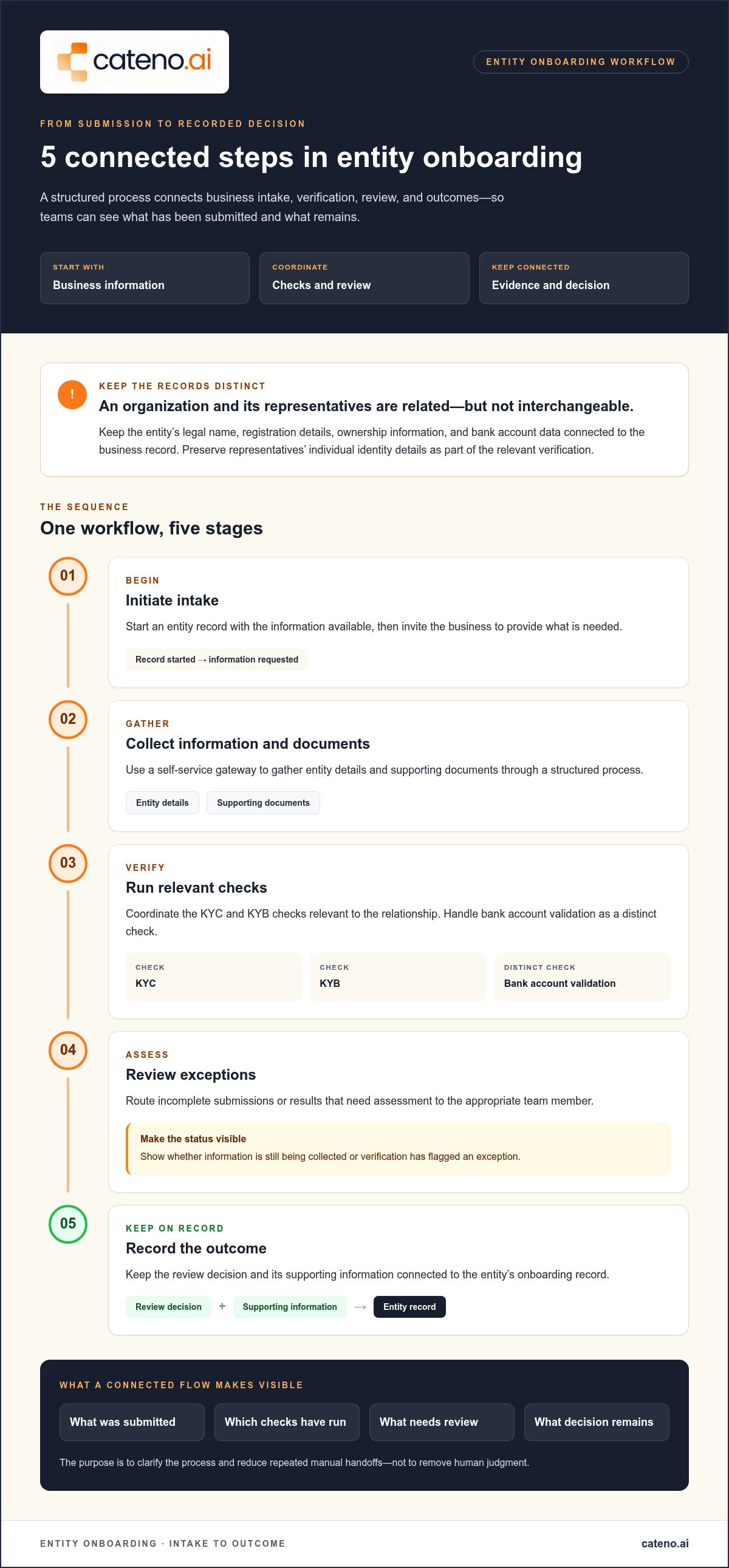
A controlled onboarding process links each stage to the next. Entity onboarding software can start with an initial business detail, collect the information and documents needed for the relationship, coordinate verification, and route exceptions for review. The goal isn’t to remove human judgment. It’s to make clear what has been submitted, which checks have run, and what decision or follow-up remains.
A configurable workflow can organize the sequence around defined business requirements:
- Initiate intake. Start a record from the information available, then invite the business to provide what’s needed.
- Collect information. Use a self-service gateway to gather entity details and supporting documents through a structured process.
- Run checks. Coordinate relevant KYC and KYB checks, with bank account validation handled as a distinct check.
- Review exceptions. Route incomplete submissions or results requiring assessment to the appropriate team member.
- Record outcomes. Keep the review decision and supporting information connected to the entity’s onboarding record.
These steps work best as a connected flow, not a series of isolated tools. If information is missing, for example, the process should make that status visible rather than leaving another team to discover the gap and request the same item again. Entity verification workflows bring intake, checks, and review into a coordinated process shaped around the organization’s requirements.
What happens after a business submits its information?
A self-service gateway gives a business a structured way to submit entity information and documents. The workflow can then coordinate automated KYC and KYB checks, which address relevant individual and business verification needs. Bank account validation serves a separate purpose: it assesses account details but doesn’t replace verification of the entity itself. Keeping these checks distinct helps teams understand what each result contributes to the review.
Automation can handle defined checks and route their results, while people assess cases that need context. A name discrepancy, an incomplete submission, or a result requiring further assessment may need human review. Routing should reflect the organization’s process rather than treating every exception as an automatic approval or rejection.
How do workflows support decisions and ongoing records?
Document management keeps submitted materials associated with the relevant onboarding process, while advanced verification reports help present check results for review. Together, these capabilities support a clearer record of what information was received and what findings informed a decision. They also help teams follow defined review steps without relying solely on scattered messages or manually transferred records.
Onboarding is also part of a wider entity lifecycle. Ongoing monitoring can extend the workflow beyond initial acceptance, with reports supporting continued visibility into compliance activity. Cateno combines configurable workflows, a self-service gateway, verification capabilities, document management, and monitoring within its entity onboarding offering. Cateno’s onboarding workflow brings these capabilities together for intake, verification, and ongoing compliance activity.
How to Compare Entity Onboarding Software with Confidence
A useful comparison starts with your process, not a feature count. Entity onboarding software should fit how your organization collects business information, conducts checks, handles exceptions, and maintains visibility after onboarding. Score each capability against a real process gap, then separate essential requirements from additions that would be useful but aren’t necessary to address current friction.
Use this scorecard to compare platforms consistently:
For each row, record whether the capability is essential, useful, or outside the current scope. Add a short example of the problem it should address, such as collecting different information for vendors and business customers or making exception ownership clearer. This keeps demonstrations focused on requirements rather than features that may not change the process.
Which capabilities should appear on an evaluation scorecard?
Assess configurable workflows, self-service intake, KYC and KYB checks, and account validation against actual steps in your process. Then consider document management, a branded portal, advanced verification reports, and ongoing monitoring. These capabilities may matter differently across business contexts, so industry onboarding workflows can help frame how requirements vary. Mark a feature essential when its absence creates a current gap; prioritize other capabilities only when they support a defined need.
Does entity onboarding software replace a CRM or verification tool?
Not necessarily. A CRM typically supports relationship records and interactions, while a verification tool performs a specific check. An onboarding platform coordinates steps across intake, verification, and review, but it doesn’t automatically become every system’s record of authority. Map where information is first captured, where results are stored, and who transfers them between teams. That reveals overlap and handoffs without assuming one platform must replace every tool.
Compare operating models, too. A self-service process may shift information collection to the business, while internal review remains with your team. Look for a clear view of each case’s status and next action, including exceptions and lifecycle activity. The strongest fit connects the steps you need while preserving necessary roles for existing systems.
Before finalizing a shortlist, test the same representative workflow in each demonstration: submission, required checks, an incomplete case, review, and a recorded outcome. Note where staff must leave the process or repeat data entry. Cateno’s workflow and verification capabilities bring intake and checks into a coordinated onboarding process.
How to Assess Readiness, Adoption, and Operational Fit
Platform fit depends on the process your team needs to improve. Before selecting entity onboarding software, document how an entity enters the workflow, who owns each decision, and where information or verification results move between teams. This creates a practical baseline for comparing options and prevents a polished demonstration from obscuring unresolved handoffs.
Capture the process from initial submission through review and ongoing recordkeeping. For each entity type, note what information and documents are needed, which checks occur, who handles the results, and what happens when a submission is incomplete or requires further assessment. Include the systems involved and mark every repeated check or manual transfer.
What should teams document before implementation?
Build a concise process map that records the current state, not just the intended one. Include the people responsible for collecting information, conducting checks, reviewing exceptions, and recording decisions. Document what evidence supports an outcome and where that evidence is stored. This detail can reveal whether delays come from unclear ownership, fragmented records, or steps that don’t match the needs of a particular business relationship.
- Entity types: Identify the business customers, vendors, or partners covered by the workflow.
- Requirements: Record the information, documents, and checks expected for each process.
- Handoffs: Note where staff re-enter data, repeat checks, or transfer records between systems.
- Exceptions: Define who reviews incomplete or unusual cases and what records explain the decision.
Use the map to prioritize. If the main issue is unstructured intake, start with a consistent submission route. If it’s unclear who owns exceptions, define routing and decision responsibilities before adding automation. Broader business onboarding workflow design can provide useful context, but your requirements should reflect your own entity types and operating model.
How can teams evaluate performance after launch?
Set a baseline before changing the workflow. Track measures the team can define consistently, such as completed submissions, cases returned for rework, items waiting for review, and whether staff can see the current owner and next action. Compare the same measures after launch, using the same definitions. This helps distinguish a genuine process improvement from a change in how cases are counted.
Start with a bounded pilot around one representative entity workflow. Choose a process that reflects real intake, verification, review, and exception handling, then define its scope, owners, and success criteria in advance. Gather feedback from internal teams and participating businesses, and record where the process remains unclear or requires manual work. Avoid expanding the scope until the team understands what the pilot revealed.
Review the pilot against the baseline. Are fewer cases returned for missing information? Are review queues easier to interpret? Can staff locate the records behind a decision and identify the next action? Use the findings to refine requirements, training, and workflow configuration before extending the process to other entity types. Cateno’s entity onboarding workflow brings configurable intake and verification into one process.
How Cateno Supports Entity Onboarding from Intake to Monitoring
Cateno brings business intake and verification into a configurable entity onboarding workflow. Its customizable workflow engine works with a self-service onboarding gateway, so an organization can submit information through a structured process while teams coordinate the steps that follow. Onboarding can begin with a single piece of information, giving the workflow a starting point without requiring every detail to be gathered up front.
Within that process, automated KYC and KYB checks, bank account validation, document management, and advanced verification reports support different parts of onboarding. Each capability has a distinct role: account validation complements, but doesn’t replace, entity verification, while reports help teams access verification findings. A branded customer portal provides a consistent, business-facing intake experience. Autonomous compliance agents and ongoing compliance monitoring extend the offering beyond initial submission.
How Cateno fits an entity onboarding operating model
Configurable workflows can be shaped around the organization’s requirements, such as the business relationship being onboarded and the checks or documents relevant to that process. The workflow engine and self-service gateway work together to structure intake and coordinate verification activity. For a deeper look at the architecture behind digital KYB, see this guide to digital KYB verification.
This connected approach helps teams consider more than the submission form alone. They can define how KYC and KYB checks, account validation, and document handling fit into the broader process, and how verification reports support review. Cateno’s capabilities also include ongoing compliance monitoring, making lifecycle activity part of the operating model rather than limiting the process to initial intake.
What to clarify before discussing a platform fit
A focused platform evaluation starts with the workflow your team needs to support. Outline the organizations you onboard, the information and documents involved, the checks performed, and the teams responsible for review and decisions. Include where handoffs occur, how staff see case status, and what ongoing monitoring means for your process. These details help connect platform capabilities to operational requirements.
- Entity types: Identify the business customers, vendors, or partners in scope.
- Process steps: Note required information, documents, KYC and KYB checks, and bank account validation.
- Ownership: Clarify which teams handle intake, exceptions, reviews, and decisions.
- Visibility needs: Describe how staff should follow case status, access reports, and support ongoing monitoring.
With those requirements defined, you can assess how Cateno’s entity onboarding workflow aligns with your intake and verification needs. Cateno’s entity onboarding workflow connects configurable intake with verification and monitoring capabilities.
Make Your Next Onboarding Decision Practical
Turn your process map into a clear implementation priority. Choose the handoff, information gap, or review bottleneck that most affects your team, then define what a better process should make visible and manageable. This gives your evaluation a practical anchor: assess whether entity onboarding software can support the workflow you need, not simply whether it offers a long list of features.
Cateno brings a customizable workflow engine and self-service onboarding gateway together with KYC and KYB checks, bank account validation, document management, verification reports, and ongoing compliance monitoring. Evaluate how these capabilities align with your entity types, review responsibilities, and lifecycle needs.
Bring your workflow requirements into the conversation and identify where a connected process could fit. Discuss your entity onboarding workflow with Cateno to take the next step toward a more deliberate onboarding operation.
Frequently Asked Questions
What is entity onboarding software?
Entity onboarding software manages the workflow for establishing a relationship with an organization. For example, a marketplace may need to associate a seller’s business details with information about its authorized representative without treating them as the same record. That distinction supports consistent review as the relationship progresses. Before evaluating a platform, define what belongs in the entity record, how related people are represented, and which evidence teams may need to reference later.
Is entity onboarding software the same as customer onboarding software?
Not always. Customer onboarding may guide an individual through account setup or product adoption, while an entity workflow handles a relationship with an organization. A business customer could involve both: the company’s information is reviewed as an entity, while an employee or owner may provide individual details. Map the records and tasks involved in each journey. Some platforms can support both, but the category name alone won’t tell you how well the workflows align.
Can entity onboarding software automate KYC and KYB checks?
Some platforms coordinate automated KYC and KYB checks, but automation doesn’t mean every case can be resolved without a person. A check may return a result that needs context or further assessment. During evaluation, trace what happens from data submission to the check result, exception routing, and final record. Clarify which actions are automated, which require human review, and who remains responsible for decisions and compliance processes.
Does entity onboarding software replace a CRM?
Not necessarily. A CRM may remain the primary place for sales activity and relationship history, while an onboarding platform manages verification tasks and supporting records. For example, sales may create a prospect record, then operations may need to review business information before activation. Identify which system owns each piece of information and how teams access the current status. This reveals whether the platforms have complementary roles or whether a process handoff needs redesign.
How much does entity onboarding software cost?
Pricing depends on the vendor’s commercial model and the capabilities and usage relevant to your workflow. Cateno offers subscription or per-transaction pricing. Compare the pricing structure with the processes you plan to run, the checks required, and expected transaction volume, rather than judging by a headline figure alone. For current information about Cateno’s pricing approach, review the platform pricing details.
How long does entity onboarding software implementation take?
There isn’t one implementation timeline that applies to every organization. Timing can depend on how clearly requirements are defined, whether relevant business information is ready, and how many workflows need configuration. A team with one well-documented process may be in a different position from one still clarifying ownership and exception handling. Define an initial scope, identify decision-makers, and agree on what must be tested before expanding to additional workflows.
Who uses entity onboarding software?
Internal users often include people responsible for operations, compliance, risk, or business relationships, with responsibilities varying by organization. A vendor manager might initiate an onboarding case, while a separate reviewer assesses information or exceptions. External business customers and partners may also submit details through a self-service experience. To plan access and adoption, identify who creates records, who reviews them, who makes decisions, and which external users need to provide information.
What should a business measure after adopting entity onboarding software?
Measure whether the platform addresses the problems it was selected to solve. For example, define a returned case as one sent back for missing or corrected information, then compare that measure over consistent periods. You can also monitor open cases by review stage, identify where work is waiting, and check whether teams can locate the evidence behind a decision. Interpret changes alongside shifts in workflow volume or requirements, not as proof of software impact alone.


