

What if compliance automation made work easier to track without making compliance decisions for you? When evidence sits across disconnected systems, spreadsheets, and teams, even routine reviews can become repetitive and difficult to oversee. Automated regulatory compliance can standardize parts of that work, but a software workflow cannot guarantee that your organization meets every obligation.
Automation can reduce friction and improve consistency when you know which tasks it can handle, where human judgment remains essential, and who owns each step. This article explains common forms and emerging trends in compliance automation, from workflow orchestration and evidence collection to AI-assisted monitoring.
You’ll also see where automation can improve visibility, how to introduce it with practical controls, and why accountable review still matters. Identity verification and business-partner workflows offer a concrete example: Cateno supports self-service KYC and KYB checks, document collection, verification reports, and ongoing monitoring. The goal is not to remove people from compliance, but to give them more consistent processes and clearer information to review.
Key Takeaways
- Automated regulatory compliance can coordinate repeatable tasks and evidence, but it cannot interpret every obligation or guarantee compliance.
- Map how information moves through intake, verification, exception handling, and recordkeeping to spot duplicate effort and disconnected handoffs.
- Keep human review in decisions that require context, escalation, or accountable approval. Test workflows for flawed rules and missed nuance.
- Introduce automation in stages: map processes, prioritize friction, configure and test workflows, then monitor them with clear owners and escalation conditions.
- Build toward connected compliance operations across onboarding and ongoing review, prioritizing interoperability and governance over automation for its own sake.
Automated Regulatory Compliance: Why Is It Changing?
Automated regulatory compliance uses technology to coordinate repeatable compliance tasks, evidence collection, and review workflows. It can move information through defined steps, prompt people for missing documents, and make records easier to track. It does not interpret every regulatory obligation, provide legal advice, or guarantee that an organization is compliant. Those responsibilities remain with the people accountable for the program.
The shift is from periodic, manual evidence gathering toward more connected, repeatable processes. Instead of assembling records from separate tools only when a review is due, organizations can structure intake, verification, and follow-up as an ongoing workflow. This broader category of Regulatory Technology (RegTech) applies across regulated operations. KYC, KYB, and partner onboarding are useful examples, but they are only part of what compliance automation can support.
Which compliance tasks are commonly automated?
Systems can route an intake request, collect information, request supporting documents, and organize verification evidence against a defined process. In KYC or KYB onboarding, for example, a workflow might guide a person or business through identity or business checks, then assemble the resulting records for review. A configurable process can also use a single piece of information to initiate entity onboarding, reducing repeated requests for the same details. The same logic applies to digital privacy, where platforms like Conzent automate cookie consent collection and recordkeeping to address GDPR and ePrivacy mandates.
Automation can schedule recurring checks, send review reminders, and maintain evidence as a relationship continues. These functions improve consistency and make outstanding tasks easier to see. They do not remove the need to assess exceptions. Unclear records, conflicting information, or higher-risk decisions may require trained human review and escalation.
Why are organizations reconsidering manual workflows?
Disconnected systems create operational drag. Staff may enter the same information in multiple places, chase documents through email, and track review status in spreadsheets. Each handoff can cause delays or inconsistent records, while making it harder to see which evidence supports a decision and who approved it.
Changing requirements and growing volumes of customers or business partners can intensify the strain. A process that works for occasional reviews may become difficult to manage when intake, evidence requests, and follow-ups span multiple teams. Connecting those steps creates a clearer record of what was requested, received, checked, and escalated.
Automation can standardize compliance tasks, but the organization remains accountable for its decisions and obligations. Effective workflows make activity more consistent and visible. Human owners remain responsible for setting appropriate rules, reviewing exceptions, and determining whether the process meets the organization’s needs.
How Automated Compliance Workflows Connect Data, Checks, and Evidence
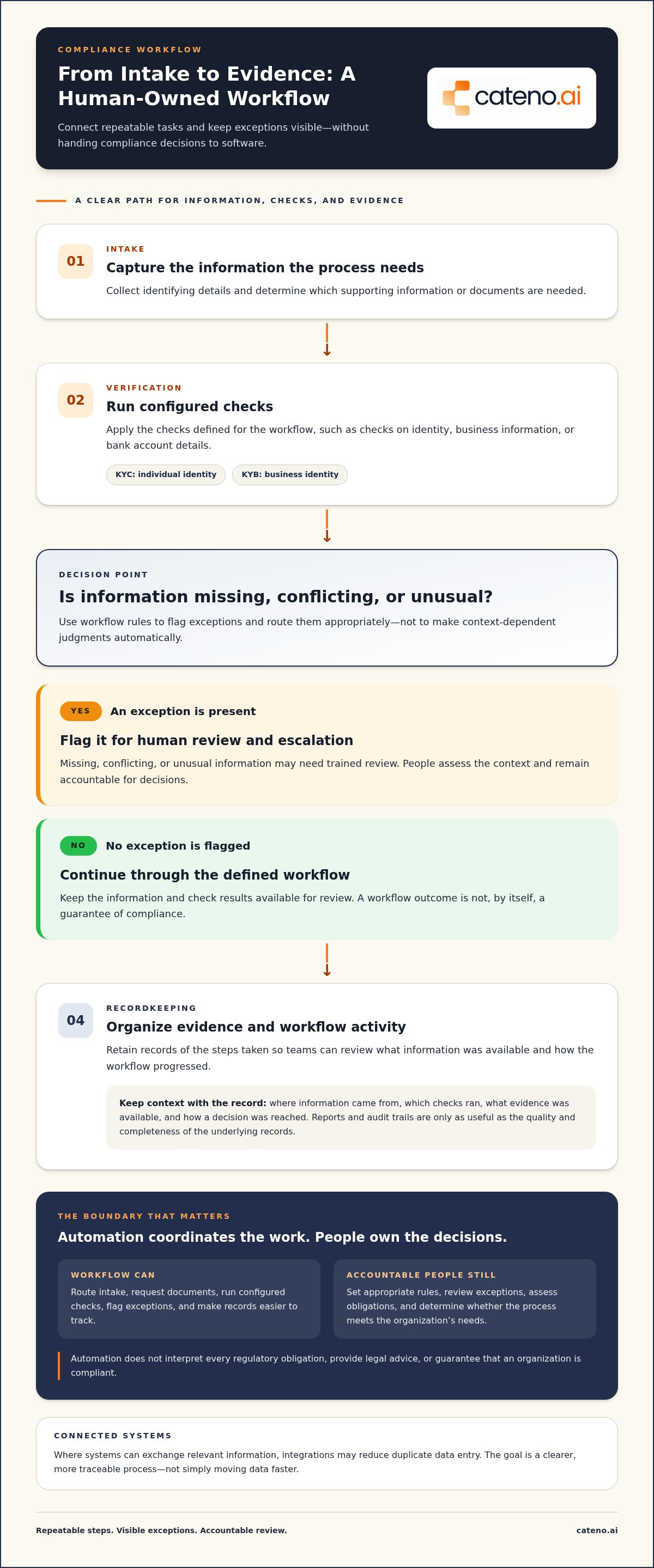
A well-structured workflow gives each piece of information a clear path from intake to review. For example, a business partner provides identifying details through an onboarding portal. The process can then request relevant documents, initiate configured verification checks, route incomplete or inconsistent information for review, and retain records of the steps taken.
That sequence connects data, checks, and evidence rather than treating each task as a separate manual handoff. For a closer look at identity checks, see this KYC verification guide.
- Intake: Capture information and identify which details or documents are needed.
- Verification: Apply configured checks to identity, business information, or bank account details.
- Exception handling: Flag missing, conflicting, or unusual information for human review.
- Recordkeeping: Organize evidence and record workflow activity for later review.
Where systems can exchange relevant information, integrations may reduce duplicate data entry. The goal is not simply to move data faster. A useful workflow preserves its source and context: where information came from, which checks ran, what evidence was available, and how a decision was reached. Reports and audit trails can help teams reconstruct what happened and when, though their usefulness depends on the quality and completeness of the underlying records.
How does automated identity and business verification fit?
KYC focuses on verifying an individual’s identity; KYB focuses on verifying a business. A partner onboarding workflow might gather business identity details, collect ownership information, and validate a bank account, then organize the results for review. These examples show how automated regulatory compliance can connect verification steps without defining the full scope of compliance automation. For technical detail on business verification design, explore the digital KYB architecture guide.
What roles do workflow rules and compliance agents play?
Workflow rules define configured requirements and routing, such as which information to request or where to send an incomplete case. They do not independently interpret regulations. Compliance agents can support intake and evidence handling within a process, while keeping exceptions visible for escalation.
Automation can process evidence and route cases, but approval authority stays with accountable people. That division helps teams gain consistency without treating a system output as a substitute for judgment. Learn how connected verification workflows could fit your operations in a conversation about your workflow needs.
Where Automation Helps, and Where Human Oversight Still Matters
Automation is most useful when a task is repeatable and its inputs, steps, and expected outputs are clear. It can route cases, check whether required fields are present, organize documents, and flag records that do not match configured criteria. These functions can improve consistency and help reviewers focus on cases that need attention.
But a workflow can miss nuance or apply a flawed rule consistently. A record that appears incomplete may have a reasonable explanation; a match may be misleading because key details differ. Automated regulatory compliance should support review, not turn system outputs into unexamined conclusions. This boundary matters most when decisions carry consequences or depend on context the workflow cannot reliably assess.
Which decisions should remain subject to human review?
Escalate ambiguous evidence, conflicting records, unusual ownership structures, and cases that fall outside configured criteria. The reviewer can assess relevant context, document the rationale, and record who made the decision. This creates a clear path from system alert to accountable judgment.
There is no universal threshold for human review. Appropriate controls depend on an organization’s processes and applicable jurisdictional requirements. Define escalation conditions with the people responsible for the workflow, and ensure reviewers can access the evidence behind an alert rather than seeing only a pass-or-fail result.
How can teams prevent automation from creating false confidence?
Test configured rules against realistic exceptions before expanding their scope. Include incomplete submissions, inconsistent details, and scenarios that should trigger escalation. This helps reveal whether a rule routes cases as intended or quietly pushes an edge case through the standard path.
Then review the controls over time. Check data quality, user permissions, system outputs, and whether escalation paths still reach the right decision-makers. Where a system provides confidence indicators, treat them as signals to examine, not proof that a result is correct. Preserve source records and the reason for each decision so reviewers can challenge an output and understand how it was produced.
- Automate: Repeatable routing, completeness checks, reminders, and evidence organization.
- Escalate: Ambiguity, conflicting information, exceptions, and decisions requiring contextual judgment.
- Review: Rule performance, data quality, permissions, outputs, and documented decision rationales.
Automation can improve consistency, but it cannot transfer accountability from the organization to the software. Clear ownership and effective human review keep efficiency aligned with responsible risk management.
How to Evaluate and Introduce Compliance Automation Responsibly
Effective adoption starts with the work itself, not the software. Before implementing automated regulatory compliance, map the processes, people, and evidence involved. This helps ensure automation addresses a defined operational problem rather than adding another disconnected system. A staged approach keeps scope manageable and gives teams a way to assess whether the workflow is working as intended.
- Map obligations and processes. Inventory recurring tasks, the processes they support, the systems and evidence sources involved, review roles, and known bottlenecks. Assign a process owner who can explain how the workflow operates and who is accountable for decisions.
- Prioritize friction. Identify repetitive handoffs, duplicate data entry, delays, or hard-to-track evidence. Set a baseline using relevant indicators such as completion time, rework, and exception volumes. Without a baseline and measurement plan, teams cannot substantiate improvement.
- Assess dependencies. Document who needs access to data, how evidence is retained, which integrations the process depends on, and how changes to rules or source systems will be managed. Clarify escalation conditions before automating decision steps.
- Configure, test, and monitor. Build the workflow around documented requirements, validate it with realistic cases, and review its performance after deployment.
For an example of how workflow architecture can coordinate business onboarding, see this business onboarding workflow engine guide. The same principle applies beyond onboarding: make each step, owner, input, and outcome visible.
What should an initial automation assessment include?
Record the current process before changing it. Note where information originates, which teams handle it, what evidence they use, and where cases stall or require rework. Select indicators that reflect the specific workflow, such as elapsed time from intake to completion or the volume of exceptions requiring manual handling. Treat these as measures, not promised outcomes, and establish a reliable baseline first.
How should teams test and govern a new workflow?
Start with a bounded pilot and documented acceptance criteria. Test routine cases alongside incomplete submissions, conflicting records, and escalation scenarios. Define rollback procedures so the process can return to a controlled state if the workflow behaves unexpectedly. Assign an owner to review outputs, permissions, data quality, and changes to dependencies over time.
Configurable onboarding workflows offer one practical example of this approach. Explore the Cateno platform overview to see how workflow configuration can support onboarding processes. To discuss how a configurable workflow could fit your operations, talk with Cateno about your workflow.
The Next Phase: Connected Compliance Operations Across the Entity Lifecycle
The next phase of automated regulatory compliance is less about adding more automated tasks and more about connecting work across an entity’s lifecycle. Intake, verification, evidence management, reporting, and ongoing review can form a coordinated process, giving teams a clearer view of how information moves and where action is needed.
What does lifecycle-based compliance operations mean?
A one-time onboarding check creates a snapshot. Lifecycle-based operations treat verification as the beginning of a relationship, with relevant entity information supporting later monitoring and review. For example, verified business identity details or bank account validation may provide useful context for subsequent partner workflows, rather than requiring teams to rebuild the record from disconnected sources.
Reuse requires controls. Evidence should retain its provenance, so reviewers can identify where it came from and when it was collected. Access controls help limit who can view or change records, while appropriate refresh processes help teams identify when information may need review. Reuse should preserve context, not turn an old result into a permanent assumption.
Cateno supports KYC and KYB verification, bank account validation, document management, and ongoing business-partner monitoring. Its workflows, branded portal, reports, and compliance agents connect steps across partner processes. These capabilities support operations without guaranteeing that an organization meets every regulatory obligation.
How can organizations prepare for the next phase?
Start with interoperability and governance. Connected data is valuable only when teams understand its source, permitted use, and role in a workflow. Rules should be explainable to the people who review their outputs, and each process should have a clear human owner with authority to manage exceptions.
These controls need regular attention. Regulatory expectations, business models, data sources, and risk profiles can change, so organizations should reassess whether workflow rules, review roles, and escalation paths remain appropriate. Automation that once fit a process may need adjustment as the process evolves.
A practical first step is to map one high-friction workflow, from the information it receives to the evidence it produces and the people responsible for review. Identify disconnected handoffs, then define what a better-connected process should preserve and improve. This focused assessment creates a sound basis for deciding whether and how to expand automation.
To discuss how connected KYC, KYB, bank validation, and partner workflows could fit your operations, discuss your compliance workflow needs.
Make Compliance Workflows More Connected and Accountable
Effective automated regulatory compliance is not about handing responsibility to software. It connects repeatable tasks, evidence, and review steps so teams can see what happened, identify exceptions, and act with clearer ownership.
Start with a workflow that creates unnecessary friction, then map its inputs, evidence, decision points, and human review. Automate structured tasks where they can improve consistency, but retain escalation paths for ambiguous cases and involve accountable people in decisions. As processes connect across onboarding and ongoing reviews, data provenance, access controls, and regular monitoring remain essential.
Cateno supports entity onboarding and verification through customizable workflows, self-service KYC and KYB checks, and bank account verification. Document management, a branded portal, and verification reports can also support evidence collection and review. These capabilities help organize compliance operations; they do not guarantee regulatory compliance or replace human oversight.
Ready to assess where a more connected workflow could support your process? Discuss your compliance workflow with Cateno and take a practical next step toward clearer, more manageable operations.
Frequently Asked Questions
What is automated regulatory compliance?
Automated regulatory compliance uses technology to coordinate repeatable compliance tasks, evidence collection, and review workflows. A system might collect information, request documents, apply configured checks, route exceptions, and organize records for review. Automation can make these steps more consistent and visible, but it does not determine every regulatory obligation or replace accountable judgment. People remain responsible for setting appropriate processes and assessing whether they meet the organization’s requirements.
Can compliance automation guarantee regulatory compliance?
No. Compliance automation can support processes such as evidence collection, verification, and review tracking, but it cannot guarantee that an organization complies with every applicable obligation. A workflow may use incomplete data, outdated rules, or unsuitable settings, and it may not recognize relevant context. Organizations still need people to oversee the process, review exceptions, maintain appropriate controls, and seek qualified legal guidance when interpreting their obligations.
Which compliance tasks can be automated?
Repeatable tasks with clear inputs and steps are often suitable for automation. Examples include routing intake, requesting documents, checking for missing information, organizing verification evidence, sending review reminders, and preparing reports. Systems can also support recurring checks and flag cases that do not match configured criteria. Ambiguous evidence, conflicting records, and higher-risk decisions may need human review, so define escalation conditions instead of treating every automated result as a final decision.
How does automated KYC or KYB support compliance workflows?
Automated KYC supports workflows for collecting and checking an individual’s identity information, while automated KYB supports business verification. These processes may include gathering entity details, ownership information, and bank account data, then organizing results for review. Cateno provides a self-service gateway for KYC, KYB, and bank account verification, alongside document management and verification reports. These capabilities support operational workflows, but do not guarantee regulatory compliance.
What is the difference between compliance automation and GRC software?
Compliance automation describes the use of technology to coordinate compliance tasks and workflows. GRC software refers more broadly to tools that support governance, risk management, and compliance activities, which may include controls, assessments, reporting, and audit processes. The categories can overlap: a GRC platform may automate compliance tasks, while a workflow tool may focus on a narrower process such as onboarding or evidence collection. Compare capabilities against the processes your organization needs to manage.
How should an organization start automating compliance?
Begin by mapping one recurring workflow, including its inputs, systems, evidence sources, handoffs, and review roles. Identify a specific friction point, such as duplicate data entry or hard-to-track document requests, and establish a baseline using measures like completion time, rework, or exception volume. Assign a process owner, define escalation conditions, then configure and test a bounded workflow before expanding its scope. Monitor results and adjust as the process changes.
What are the risks of automated compliance workflows?
Automated workflows can apply flawed rules consistently, miss nuance, or produce unreliable results when source data is incomplete or incorrect. Poorly managed access, weak evidence records, integration failures, and unclear escalation paths can also undermine review. Reduce these risks by testing routine and unusual cases, preserving source and decision context, reviewing permissions and data quality, and keeping accountable people involved. Treat system outputs as inputs to review, not proof that a decision is correct.


