

What if automation made partner onboarding easier to oversee, not harder to control? You can automate business partner onboarding without removing the checks and decisions that protect your organization. The key is to connect each step in one governed workflow.
If teams re-enter information across systems, chase documents by email, or aren’t sure who owns an approval, another form won’t solve the underlying problem. Suppliers, vendors, resellers, and affiliates may need different information, but disconnected handoffs make it harder to keep intake consistent and exceptions visible.
Automation doesn’t mean handing every decision to software. It means routing information and routine checks consistently, while giving people clear responsibility for judgment calls, exceptions, and relationship-building.
This guide explains how to build a controlled workflow from partner intake through verification, document collection, approvals, and ongoing updates. You’ll learn how to define ownership, avoid repeated requests, and decide where automated checks should end and human review should begin. The goal is a more traceable process and a clearer partner experience without weakening oversight.
Key Takeaways
- Map each partner type’s intake, verification, and approval needs before designing a shared workflow.
- To automate business partner onboarding, connect information, documents, checks, and decisions through a traceable process.
- Use automation for repeatable collection and routine validation, while assigning people responsibility for policy decisions and ambiguous exceptions.
- Start with a clearly defined partner segment, identify ownership and handoffs, then expand the workflow based on what you learn.
- Plan for ongoing updates as well as initial intake; Cateno’s customizable workflows, self-service gateway, document management, and verification reports support this operating model.
What Does It Mean to Automate Business Partner Onboarding?
To automate business partner onboarding is to move partner information, verification checks, documents, decisions, and updates through a controlled workflow with defined steps and owners. Partner onboarding automation coordinates partner data, evidence, checks, and decisions from intake through approval. It is more than a digital version of a paper form.
This applies the principles of Business process automation to establishing a business relationship. A digital form can collect details, but it won’t necessarily check whether the submission is complete, send evidence to the right reviewer, track an exception, or prompt a follow-up. A workflow connects those actions and records their progress.
Keep the scope clear. Partner onboarding collects and reviews information before a relationship is approved or established. It isn’t recruitment, which identifies and selects prospective partners; integration setup, which connects systems or technical processes; or account activation, which enables an account or service. It also isn’t the whole of relationship management, which continues after approval through performance, communication, and change management.
When requests arrive through disconnected forms, emails, and spreadsheets, teams may enter the same data more than once, lose track of documents, or be unsure who owns the next step. A governed workflow can standardize routine execution and make handoffs visible. People still need to interpret policy, assess risk, approve relationships, and resolve information that doesn’t fit expected criteria.
Which business partners can an automated workflow support?
Workflows can support suppliers, customers, distributors, and service providers. The information and evidence required should reflect the relationship and the organization’s risk policy. A supplier providing critical services may need a different review path from a customer or distributor. Define distinct requirements where needed instead of sending every partner through identical checks and document requests.
Which onboarding tasks are suitable for automation?
Automation suits repeatable process steps: collecting data through a self-service gateway, requesting documents, routing validation results, sending status updates, and reminding partners when information is outstanding. These steps create a consistent sequence and help teams see where each case stands.
Approvals and unresolved exceptions need clear human ownership. A workflow can direct a case to the appropriate reviewer and present available information, but a routine check shouldn’t be treated as a compliance guarantee or as a decision for every situation. For a deeper look at workflow architecture, explore this business onboarding workflow engine guide.
How an Automated Business Partner Onboarding Workflow Operates
A practical workflow gives each partner a clear path through submission, verification, review, and approval. To automate business partner onboarding, organize these stages around a partner record that carries relevant information and status from one step to the next. A platform may connect workflow steps in that record; connections to other systems depend on the tools and integrations an organization has configured.
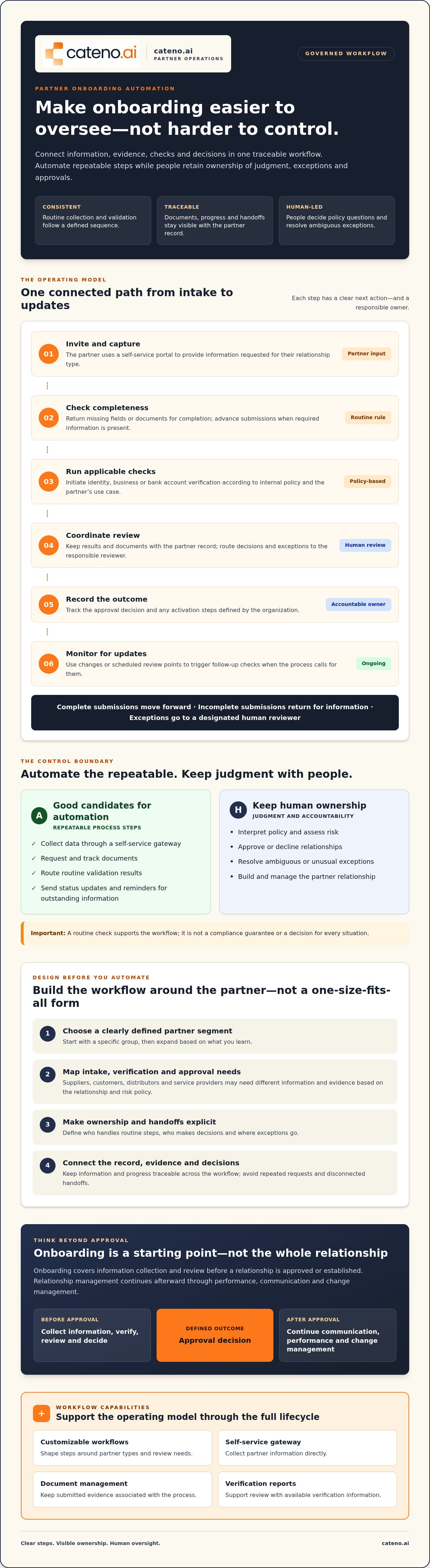
A typical sequence looks like this:
- Invite and capture: Invite the partner to a self-service portal to submit information requested for their relationship type.
- Check completeness: Send missing fields or documents back to the partner, then advance complete submissions.
- Run applicable checks: Initiate identity, business, or bank account verification according to internal policy and the partner’s use case.
- Coordinate review: Associate results and submitted documents with the partner record, then route decisions or exceptions to the responsible reviewer.
- Record the outcome: Track the approval decision and any organization-defined activation steps.
- Monitor for updates: When the process calls for it, use changes or scheduled review points to trigger follow-up checks.
Workflow rules can route complete submissions to the next step, incomplete submissions back for information, and exceptions to the designated human reviewer. This makes routine movement consistent while preserving a clear path for judgment and escalation.
Connect intake, identity checks, and KYB verification
Collect only the details relevant to the partner relationship and applicable risk policy. A supplier, for example, may follow a different verification path from a distributor. The workflow can use defined criteria to route the appropriate identity or business checks, then associate their status with the partner record. For more on verification architecture, see this digital KYB verification guide.
A self-service portal gives partners one place to submit requested information and see what remains outstanding. Cateno’s self-service onboarding gateway and customizable workflows can coordinate intake and checks in a governed process. The portal’s specific status and submission capabilities depend on how the workflow is configured.
Coordinate documents, account validation, and decisions
Keep document requests, submissions, and review status connected to the partner record. Reviewers can then see what has arrived and what still needs attention. If the relationship requires bank account validation, treat it as a distinct workflow step rather than assuming every partner needs it. For technical API considerations, consult this bank account validation API guide.
Automation can also support partner lifecycle processes beyond initial setup, as illustrated by IBM’s partner lifecycle automation offering. To explore how a governed intake and verification process could fit your operation, discuss your onboarding workflow.
Automation vs. Manual Review: What Should Stay Under Human Control?
Strong onboarding automation makes routine steps predictable without turning important judgments into blind rules. A completeness check can identify a missing field, but it can’t determine whether conflicting evidence is acceptable under your policy. The boundary is straightforward: workflow automation standardizes execution while people retain policy ownership.
| Onboarding task | Suitable for automation | Human responsibility |
|---|---|---|
| Repeatable data collection | Present approved questions, capture responses, and flag missing fields. | Set which information is needed for each partner type. |
| Routine validation | Apply defined format or completeness checks and route results. | Assess mismatches, uncertain evidence, or limitations in a check. |
| Policy decisions | Route a case to the relevant approver and record its status. | Interpret policy and make or authorize the decision. |
| Ambiguous exceptions | Flag the issue, assign an owner, and track resolution. | Review context, document the rationale, and determine the next step. |
Use automation to surface evidence and direct attention, not to claim that a partner is compliant or that a required review is complete without accountable assessment. If information is incomplete, send the partner a specific request. If details conflict, route the record to a reviewer rather than silently choosing one version. Set the escalation path before the workflow goes live, especially when a check needs interpretation.
Which onboarding decisions can be rule-based?
Rules work best when both the condition and action are unambiguous: a required field is blank, a document hasn’t been submitted, or a completed step should move to a designated queue. Approved reminders and status changes can follow the same logic. Judgment-based decisions and uncertain evidence need a person. Document each rule’s owner, purpose, and approval process so a change doesn’t alter policy by accident.
How should teams handle exceptions and auditability?
Design an exception queue with a named owner, a clear reason for referral, and a defined next step. Keep relevant verification evidence and decision notes with the partner record, including who reviewed the issue and how it was resolved. Before automating a high-impact decision, agree on escalation criteria and who can approve an outcome. These controls support traceability, but don’t guarantee a particular regulatory or audit result.
Organizations that automate business partner onboarding should review rules regularly to confirm they still reflect approved policy. This keeps routine execution consistent while preserving human accountability for decisions that require context.
How to Plan Business Partner Onboarding Automation
Start with the process you have, not the platform you hope to use. Before you automate business partner onboarding, trace how a partner moves from initial request to approval. Include informal steps too, such as an email requesting a missing document, a spreadsheet tracking status, or a manual check outside the stated workflow. These often reveal delays and unclear ownership.
Map the current process and select a first workflow
Inventory intake channels, repeated requests, manual checks, approvals, data sources, and systems. For each step, record the owner, the information or evidence needed, and what happens if it’s missing or unclear. Then choose a partner segment or workflow with defined boundaries and visible operational friction. A focused starting point is easier to assess and refine than an attempt to automate every partner journey at once.
Before configuring the workflow, confirm the required evidence, decision owners, and exception paths. Compare partner workflows when it helps clarify different needs, such as by reviewing Cateno’s industry onboarding use cases. Don’t assume a process suitable for one partner type will fit another.
Set integration, governance, and measurement requirements
Specify what information needs to move between workflow steps and other systems, and document the purpose of each exchange. Verify available integrations and their requirements with vendors before making commitments. Assign owners for workflow rules, user access, data quality, and future changes. When evaluating a customizable onboarding platform, compare it against this requirements list, including how it handles exceptions and human review, rather than relying on feature lists alone.
Set a baseline before launch so you can evaluate the workflow using evidence. Useful measures include:
- Completion rates: How often do partners submit the requested information?
- Exception volumes: How many cases need clarification or manual assessment?
- Handoff counts: How often does a case move between teams or owners?
- Elapsed time: How long does the process take from intake to decision?
Define each measure consistently, including where timing starts and ends. Review results after implementation and investigate unexpected changes. A lower handoff count, for example, matters only if required decisions and controls remain in place.
Once your scope, requirements, and baseline are clear, discuss your onboarding workflow with Cateno to explore how its onboarding technology may fit your process.
Build a Continuous Partner Lifecycle, Not a One-Time Intake
Approval isn’t the end of the process. Partner details may change, a document may expire, account information may need review, or internal policy may call for new evidence. If your organization defines these events as review triggers, a lifecycle workflow can route the relevant record for follow-up instead of treating onboarding as a one-time task.
Keep partner records current after activation
Set review triggers according to internal policy and the type of relationship. For example, a reported change to partner information could prompt a request to confirm details, while a document reaching its review date could create a task for an assigned owner. A policy update may also require teams to identify records that need attention. Before configuring the process, define the trigger, responsible reviewer, evidence needed, and resolution path.
Verification reports can help teams review outcomes and identify follow-up needs. Cateno’s platform also includes customizable workflows, a self-service onboarding gateway, and document management to support coordinated intake and review. Autonomous compliance agents are another platform capability. Confirm their specific tasks, boundaries, and human oversight requirements with the provider before relying on them in a workflow. These tools support onboarding and compliance operations, but don’t replace internal policy ownership or legal compliance consulting.
Evaluate whether a unified workflow fits your process
Consider whether teams need coordinated ownership of partner intake, verification, documents, and account checks. Map the systems involved and list the data exchanges you require. Then verify available integrations and configuration details with a platform provider instead of assuming every system can connect in the way you need.
Compare those requirements with Cateno’s onboarding platform capabilities, including customizable workflows, a self-service gateway, document management, and verification reports. Assess how the process would handle partner-specific review paths and changes after activation, not just initial submission.
A well-designed lifecycle workflow makes follow-up responsibilities and evidence easier to track. If you’re ready to assess how to automate business partner onboarding across intake and later reviews, discuss your partner onboarding workflow with Cateno.
Make Your Partner Onboarding Workflow Easier to Govern
A dependable onboarding process connects intake, verification, document collection, and follow-up in a defined workflow. The aim isn’t to automate every decision. It’s to make routine steps consistent, route exceptions to accountable reviewers, and keep the process clear for teams and partners.
Start by mapping one partner workflow, clarifying who owns each decision, and setting a baseline for completion, exceptions, handoffs, and elapsed time. Then build on what you learn. A continuous lifecycle approach also gives your team a way to route relevant changes and follow-up reviews after initial approval.
Cateno’s customizable workflows can connect intake with relevant verification and document steps. Its self-service gateway supports KYC, KYB, and bank account verification, bringing key onboarding activities into a coordinated process. If you’re ready to explore how to automate business partner onboarding around your organization’s requirements, discuss your partner onboarding workflow with Cateno.
Frequently Asked Questions
Which parts of business partner onboarding can be automated?
Organizations can automate repeatable tasks such as sending invitations, collecting information, requesting documents, checking whether required fields are complete, routing verification results, and sending status updates or reminders. A workflow can also assign exceptions to a designated reviewer. Define suitable tasks according to your policy and partner types instead of assuming every partner follows the same process or needs identical checks.
Can business partner onboarding be automated without human review?
Automation can handle routine steps, but it shouldn’t remove human review from decisions involving policy interpretation, uncertain evidence, or conflicting information. A workflow can flag a mismatch and assign it to a reviewer, but a person may need to assess what it means. Define approval roles and escalation paths in advance, especially for decisions with important operational or risk implications.
How does KYB fit into automated business partner onboarding?
Know Your Business (KYB) checks can be one stage in an automated onboarding workflow. Based on the partner type and the organization’s policy, the workflow can collect business details, route applicable checks, associate results with the partner record, and send uncertain cases for review. KYB automation supports information gathering and verification processes; it doesn’t guarantee compliance or replace an organization’s responsibility to set its own review requirements.
What documents should an automated partner onboarding process collect?
There isn’t one document list that suits every partner. Determine the evidence needed based on the relationship, internal policy, and applicable requirements, then configure requests for the relevant partner type. The workflow can show outstanding submissions, associate received documents with the partner record, and route them for review. Confirm that the requested documents and the platform’s document handling capabilities meet your process needs.
How do you measure the success of partner onboarding automation?
Set a baseline before changing the process, then track measures such as completion rates, exception volumes, handoff counts, and elapsed time from intake to decision. Define each measure consistently so comparisons are meaningful. Review results alongside process quality: fewer handoffs are useful only if required checks and approvals still occur. Use exceptions and delays to identify where the workflow needs adjustment.
Does automating partner onboarding replace a compliance team?
No. Automation can route information, support KYC and KYB checks, manage document workflows, and make case status easier to track. People still own policy, oversight, and decisions requiring judgment. A platform can support compliance operations, but it isn’t a substitute for your team’s responsibilities or legal compliance consulting. Assign clear owners for rules, approvals, exception handling, and workflow changes.
How should a company start automating business partner onboarding?
Start by mapping one partner workflow from intake to approval. Identify the information and evidence required, the systems and teams involved, recurring delays, decision owners, and paths for incomplete or unusual cases. Choose a focused process with clear boundaries, establish baseline measures, and verify platform requirements such as integrations before implementation. Review the results, refine the workflow, and expand when controls and ownership are clear.


