

What if a detailed report still leaves your team unsure what to do next? Business verification reports can combine company records, ownership information, screening results, and status labels. The findings help only when reviewers understand what each item means and how it should affect a decision.
That uncertainty is familiar: business identity checks can be mistaken for credit or financial-risk reports, and manual reviews can lead to inconsistent outcomes. A report is evidence, not a decision. Its value depends on how your team interprets it, records its reasoning, and follows up.
This guide explains what different business report types can show, where their limits lie, and how to compare them using consistent criteria. You’ll learn how KYB differs from KYC and financial reporting, how to assess findings proportionately to risk, and how to turn results into documented onboarding and monitoring actions.
It also shows how reports fit into a broader workflow. Configurable processes can connect evidence collection, automated KYB checks, review, and follow-up, rather than leaving a report as a standalone file.
Key Takeaways
- Use business verification reports as evidence to inform onboarding, due diligence, and monitoring, not as decisions on their own.
- Compare report scope, data sources, timestamps, and explanations to understand what a report can and cannot support.
- Separate confirmed information from potential matches, missing evidence, and unresolved discrepancies before deciding what happens next.
- Apply a consistent review sequence: confirm the entity, assess exceptions, document the rationale, and set follow-up actions.
- Connect report findings to workflows that coordinate information intake, automated checks, document management, and review.
What Are Business Verification Reports, and What Decisions Do They Support?
A business verification report brings together evidence and checks related to a business entity in a structured format. Depending on its scope, it may help a reviewer assess whether a business is identifiable and whether key details align across available records. Report content varies with the checks performed, available data, and the business being reviewed. Read it as an evidence summary, not a complete account of the organization.
Teams use business verification reports to inform onboarding, due diligence, internal review, and ongoing monitoring. For example, an onboarding team might compare a company’s submitted legal name and identifying details with available records, then route the application for approval or additional review. A report can also support the broader process of What is Due Diligence? by organizing information relevant to a business relationship.
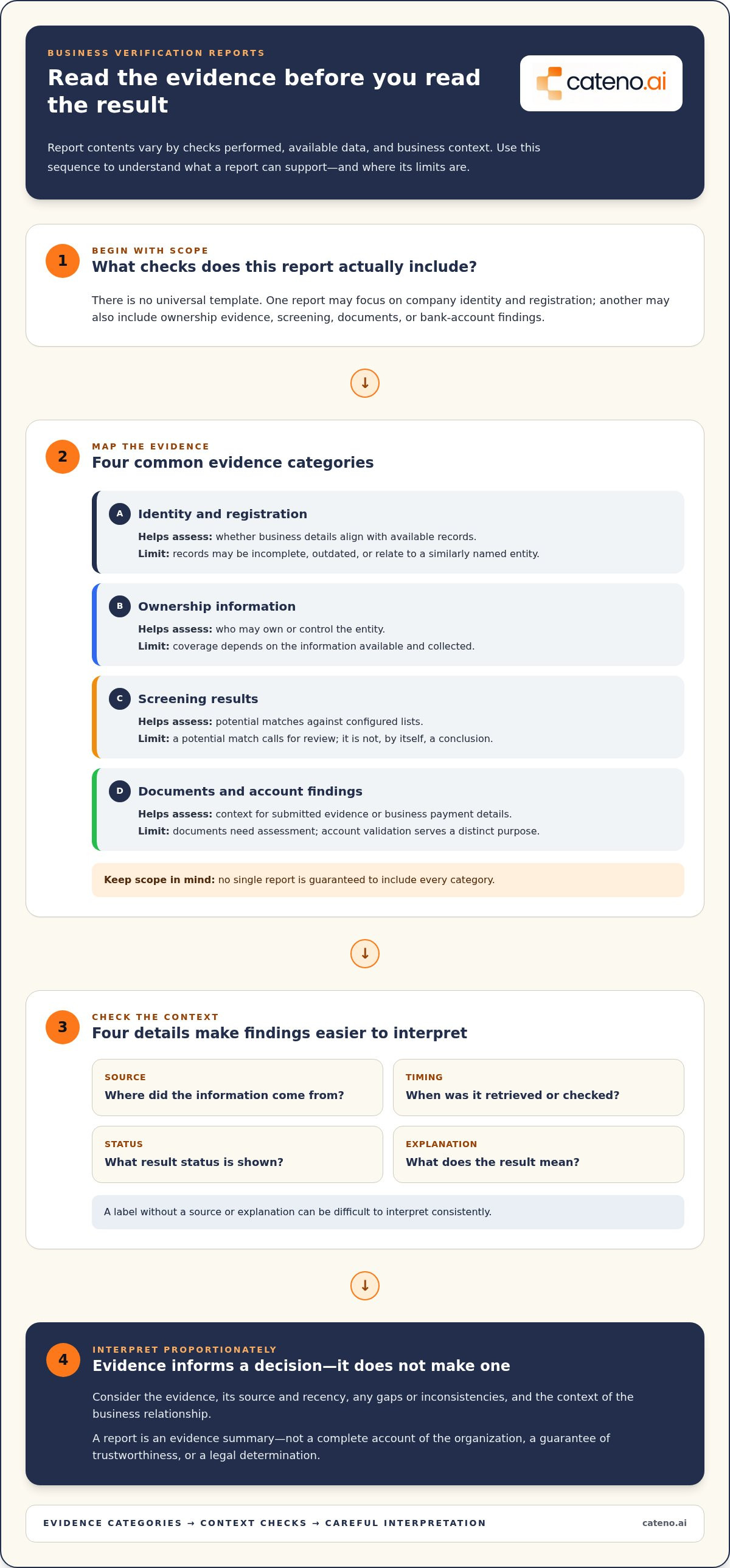
The distinction matters: a report supports a decision but doesn’t make one. A status label or potential match may require further assessment under the organization’s policies. Verification isn’t a guarantee that a business is trustworthy, nor is it a legal determination. Reviewers need to consider the evidence, its source and recency, any gaps or inconsistencies, and the context of the proposed relationship.
Business verification report vs. business credit report
These reports answer different questions. A business verification report focuses on establishing or assessing a business’s identity and related evidence, such as registration or ownership details when those checks are included. A business credit report focuses on credit-related information used to assess credit history or financial risk. A consumer credit score concerns an individual, not the verification of a company’s identity. Organizations may use both business verification and credit reports when their decision and internal policies call for separate identity and credit assessments.
Who uses business verification reports, and when?
Compliance, risk, finance, and onboarding teams may review a prospective business customer, supplier, or other partner before establishing a relationship. Their responsibilities differ, but a structured evidence record gives each team a shared reference point for its part of the review.
Use doesn’t have to end at onboarding. Evidence gathered at the start can serve as a baseline for later checks, helping teams spot information that has changed or requires follow-up. Monitoring decisions should reflect the organization’s policies and the evidence available at the time. Linking reports to a documented review process helps teams explain what they assessed and why they chose a particular next step.
What Should a Business Verification Report Include?
There’s no universal template. Business verification reports vary according to the checks performed, available data, and business context. One report may focus on company registration and identity, while another may also include ownership evidence, screening results, supporting documents, or bank-account findings.
Assess each finding in context. Look for the information source, when it was retrieved or checked, the result status, and an explanation of what the result means. A label without a source or explanation can be difficult to interpret consistently. The table below outlines common evidence categories and their limits. No single report is guaranteed to include them all.
| Evidence category | What it helps assess | Limitations |
|---|---|---|
| Identity and registration | Whether business details align with available records | Records may be incomplete, outdated, or relate to a similarly named entity |
| Ownership information | Who may own or control the entity | Coverage depends on available and collected information |
| Screening results | Potential matches against configured lists | A match may require review and is not, by itself, a conclusion |
| Documents and account findings | Context for submitted evidence or business payment details | Documents need assessment; account validation serves a distinct purpose |
Identity, ownership, and business-registration evidence
Entity identifiers, legal names, addresses, and registration details can help distinguish businesses with similar names. Information may come from business registries or other available sources. Ownership and beneficial-owner information, sometimes described as UBO information, can add context about who owns or controls an entity when it is collected and available. Don’t assume every report includes registry coverage or UBO details.
Screening, documents, and account-validation findings
Sanctions or watchlist screening may be included when configured, but it isn’t a universal report element. Treat possible matches as prompts for assessment, not automatic conclusions. Supporting documents can help reviewers interpret automated data and resolve inconsistencies. Review them for relevance and alignment with the other evidence.
Bank-account findings address a separate question: whether business payment details can be validated. They don’t replace checks of the entity’s identity, ownership, or risk. For a deeper look at that distinct process, see Cateno’s business onboarding and verification platform, which connects verification capabilities within broader workflows.
How to Compare Business Verification Reports and Providers
Start by identifying the decisions your team needs to make. Assess whether each report covers the checks relevant to your use case, then examine how clearly it shows its sources, timestamps, results, and explanations. The goal isn’t to collect the most data. It’s to determine whether reviewers can understand the evidence, identify its limits, and apply internal policies consistently.
Coverage and evidence quality
Check which identity, ownership, screening, document, or account checks are included and whether they match your review needs. For each finding, look for its source and a timestamp or other recency indicator. These details help reviewers judge the evidence in context instead of treating a status label as self-explanatory.
Pay close attention to how the report represents uncertainty. A missing result means evidence wasn’t returned or available; it isn’t the same as a negative finding. A potential match is not automatically a verified match. Conflicting or inconclusive information should remain visible for review, rather than being presented as resolved without an explanation.
Workflow fit, review controls, and monitoring
Reports should fit the work around them. Consider whether findings can move through intake, review, escalation, and recordkeeping in a way that reflects your internal policies. Consistent workflows can standardize routine handling while giving reviewers a clear path for exceptions. Check whether the information can support later monitoring and follow-up, rather than being difficult to revisit after onboarding.
| Comparison area | What to assess | Useful question |
|---|---|---|
| Coverage | Relevant identity, ownership, screening, document, and account checks | Does the report address the decision we need to make? |
| Evidence visibility | Sources, timestamps, status definitions, and explanations | Can a reviewer trace and interpret each finding? |
| Workflow integration | Connections to intake, review, escalation, and recordkeeping | Can teams apply policy and document their reasoning? |
| Monitoring | Ability to revisit evidence and manage follow-up | Can the same process support later reviews? |
Use these criteria to compare business verification reports against your actual workflow, not just a feature list. Cateno’s customizable workflows connect evidence intake, automated checks, document management, and review as part of an onboarding and compliance process. To discuss how a verification-report workflow could fit your operations, discuss your verification-report workflow.
How to Interpret Findings and Turn Them Into Consistent Actions
A report finding is a starting point for review, not an instruction to approve or reject a business. Apply the same sequence across cases, while allowing policy-based escalation when evidence is incomplete, conflicting, or ambiguous. This helps reviewers distinguish what the report establishes from what still needs assessment.
A five-step report review process
- Confirm the entity. Match the report to the intended legal entity using available identifiers and registration details. Similar names alone aren’t enough to establish that two records refer to the same business.
- Inspect the evidence. Review sources, dates, statuses, and supporting documents. Note what is verified and what depends on submitted or third-party information.
- Classify exceptions. Separate verified information from potential matches, missing evidence, and unresolved discrepancies. A missing result isn’t a negative finding, and an automated flag isn’t proof of misconduct or a definitive compliance status.
- Route for review. Follow established escalation paths for mismatches or incomplete evidence. Policies should guide the response, with qualified human review for consequential or unclear cases.
- Document and follow up. Record the decision, evidence considered, rationale, and any next steps. Set a follow-up point when monitoring is appropriate under your policies.
That record makes the decision easier to understand later. It also helps teams apply criteria consistently without treating every exception as identical. For example, an unresolved name discrepancy may call for clarification or further review, while missing information may require a defined evidence-gathering step. The right action depends on the case and the organization’s documented policy.
From one-time report to ongoing business monitoring
Onboarding establishes a point-in-time view. Later changes in business details or other relevant evidence may prompt a new review, depending on your monitoring approach and internal policies. Preserve the context: what information supported the original decision, what changed, and how the team responded. Document management and ongoing monitoring can help maintain that record across the business relationship.
Connect the report to a workflow that carries evidence from intake through checks, review, escalation, and follow-up. Cateno’s customizable workflows bring advanced verification reports together with automated KYB checks, document management, and ongoing compliance monitoring. To structure a consistent review and monitoring process, discuss your verification workflow.
How Cateno Connects Business Verification Reports to Onboarding Workflows
A report is more useful when its evidence stays connected to the process that collected it, reviewed it, and determines what happens next. Cateno’s advanced verification reports sit within an onboarding and compliance platform, where configurable workflows can link business information intake, automated checks, document management, and team review.
Connect report evidence to intake and review
A business can submit information and supporting documents through a self-service onboarding gateway. Automated KYB checks and report findings can then enter configured workflows, helping route information for review and follow-up. Teams can also use document management to keep supporting materials accessible alongside the relevant onboarding process.
Workflow configuration helps organize operational steps, but it doesn’t make policy decisions. Your organization defines its review criteria, escalation paths, and decision authority. The workflow provides a structure for applying those rules and recording actions consistently, including when evidence needs further assessment.
Explore the customizable compliance workflow platform to see how onboarding and verification capabilities fit together. Depending on the relationship, a workflow may also include bank-account verification, which addresses business payment details separately from entity checks.
Design reporting around business use cases
Start with the decisions your team needs to support. Identify the business entities involved, the evidence relevant to those relationships, and the review or follow-up steps your policies require. A supplier onboarding process, for example, may have different information needs from a business customer review. Defining the use case first helps keep reporting focused and prevents teams from treating every finding as equally relevant.
Cateno’s self-service onboarding and ongoing compliance monitoring support different stages of a business relationship, from information intake through later review. Customizable workflows help organize the process around the operating context and the evidence the team needs to manage.
When business verification reports connect to intake, checks, documents, and review, teams can manage findings within a defined process instead of treating each report as a standalone file. Discuss your business verification workflow with Cateno.
Make Verification Findings Part of a Clearer Workflow
Business verification reports are most useful when teams can connect evidence to a consistent decision and a documented next step. Compare reports by their coverage and transparency, distinguish verified details from gaps or potential matches, and apply your internal review and escalation policies before acting on ambiguous findings.
Keep the process connected beyond initial onboarding. Cateno brings advanced verification reports together with customizable onboarding and compliance workflows, automated KYC and KYB checks, document management, and ongoing monitoring. This helps teams manage information and follow-up as part of the business relationship lifecycle, rather than treating each report as a standalone file.
Build a process that gives reviewers a clear path from evidence to action. Discuss your business verification workflow with Cateno and explore how these capabilities can support your onboarding and monitoring approach.
Frequently Asked Questions
What is a business verification report?
A business verification report is a structured summary of evidence and checks related to a business entity. It may help a team assess whether submitted details align with available records and support onboarding, due diligence, or review. The report is evidence for a decision, not a guarantee of trustworthiness or a legal determination. Its value depends on the relevance, source, and recency of its findings, as well as the reviewer’s assessment.
What does a business verification report typically include?
Contents vary according to the checks performed, available data, and business context. A report may include identity and registration details, ownership information, screening findings, document checks, or account-validation results. These categories aren’t universal. Review each item’s source, timestamp, status, and explanation to understand what the finding supports. A missing result, for example, is different from a negative finding, and a potential match may need further assessment.
Is a business verification report the same as a business credit report?
No. A business verification report focuses on assessing a company’s identity and related evidence, such as registration or ownership information when available. A business credit report focuses on credit-related information used to assess credit history or financial risk. They support different decisions. An organization may use both if its policies and the relationship require separate identity and credit assessments. A consumer credit score concerns an individual, not a business entity’s identity.
How do I evaluate the accuracy of a business verification report?
Assess whether the report identifies its information sources and shows when each check was performed. Compare key details, such as the legal name and available entity identifiers, with appropriate records and submitted documents. Review status definitions and explanations instead of relying on a summary label alone. Treat incomplete or conflicting data as an exception to investigate, not proof that the report is inaccurate or that the business has passed or failed review.
Can business verification reports support ongoing monitoring?
Yes. A report can provide a reference point for later reviews, while monitoring processes help teams revisit evidence when relevant information changes. The appropriate review cadence and triggers depend on the organization’s policies and the business relationship. Preserve context by recording what evidence informed the initial decision and what prompted any subsequent review. Document management and ongoing compliance monitoring can help keep records and follow-up connected over the relationship lifecycle.
How should a team handle a potential match or conflicting business information?
First, confirm that the report concerns the intended legal entity using available identifiers and supporting evidence. Then examine the source, date, and details behind the match or discrepancy. Keep potential matches, missing information, and unresolved conflicts distinct from verified findings. Follow internal escalation procedures and use qualified human review for ambiguous or consequential decisions. Document the evidence considered, rationale, and next action. An automated flag alone isn’t proof of misconduct or a compliance conclusion.
Can business verification reports be integrated into onboarding workflows?
Yes. A workflow can connect information intake and supporting documents with automated KYB checks, report review, escalation, and recordkeeping. Cateno’s platform combines advanced verification reports with a self-service onboarding gateway, customizable workflows, automated KYC and KYB checks, document management, and ongoing monitoring. Configuration can organize how evidence moves through operations, while the organization’s policies and reviewers remain responsible for decisions. This keeps report findings connected to onboarding and later follow-up.


