

The platform with the most verification checks may still be the wrong choice. The right business identity verification software should verify the entities you work with and fit how your team collects information, handles exceptions, and completes onboarding.
Manual business checks can create handoffs, repeated document requests, and disconnected results. A point solution may confirm details but leave staff to transfer evidence into an onboarding workflow and decide what happens next. Look beyond check volume to how evidence moves through your business, and how the process provides oversight when a case needs review.
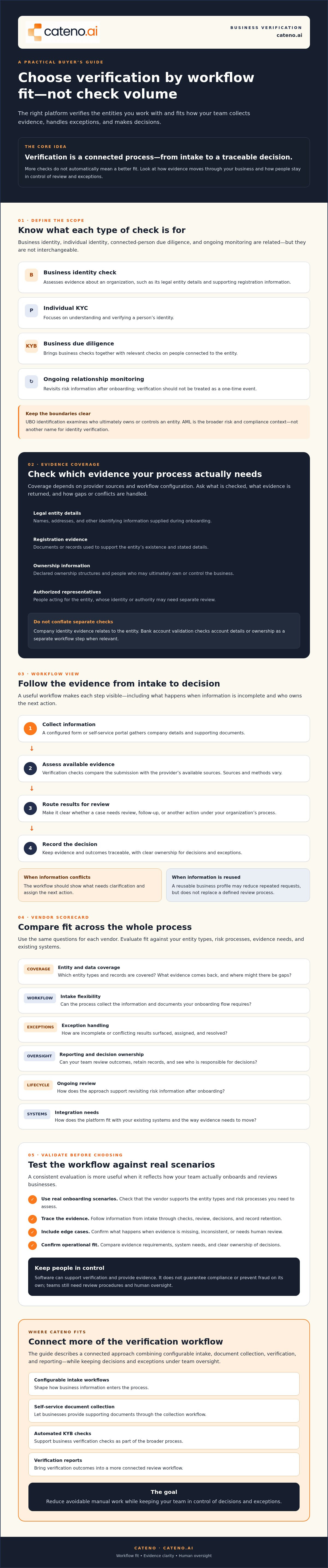
This guide compares verification approaches, workflows, and evaluation criteria to help you assess vendor fit against your entity types, risk processes, and existing systems. It covers data coverage, exception handling, ongoing review, and integration needs, without assuming every business needs the same checks. You’ll also see how customizable intake workflows, self-service document collection, automated KYB checks, and verification reports can support a more connected process. The goal is to reduce avoidable manual work while keeping your team in control of decisions and exceptions.
Key Takeaways
- Distinguish business identity checks from individual KYC, KYB workflows, and ongoing relationship monitoring so you can define what your process needs to verify.
- Assess business identity verification software by how evidence moves from intake through checks, review, decisions, and record retention, not by check volume alone.
- Use a consistent scorecard to compare entity and data coverage, workflow flexibility, exception handling, reporting, and ongoing review.
- Validate vendors against real onboarding scenarios, existing systems, evidence requirements, and clear decision ownership before making a selection.
- Consider whether configurable intake, self-service document collection, verification checks, and reporting can connect more of your workflow while preserving human oversight.
What Business Identity Verification Software Actually Verifies
Business identity verification software collects and assesses evidence about a business and relevant people to support onboarding and risk decisions. Depending on its coverage and configuration, it may check whether an entity’s details align with available records, help identify owners or representatives, and flag information for further review. The software supports a decision, but it doesn’t guarantee compliance or prevent fraud on its own.
Keep the scope clear. A business identity check assesses evidence about an organization. Individual Know Your Customer (KYC) checks assess a person’s identity. Know Your Business (KYB) workflows bring business checks together with relevant checks on people connected to the entity. Ongoing relationship monitoring is a separate lifecycle activity. It revisits risk information after onboarding rather than treating verification as a one-time event.
What information can a business verification workflow assess?
Depending on vendor coverage and your workflow configuration, business verification may assess:
- Legal entity details: Names, addresses, and other identifying information supplied during onboarding.
- Registration evidence: Documents or records used to support the entity’s existence and stated details, such as corporate filings accessed directly or through resources like the Secretary of State Directory.
- Ownership information: Declared ownership structures and people who may ultimately own or control the business.
- Authorized representatives: People acting on the entity’s behalf, whose identity or authority may need separate review.
These are evidence categories, not a promise that every platform checks every item in every jurisdiction. Ask vendors which records and entity types they cover, what evidence they return, and how they handle gaps or conflicting results. Company identity evidence is also different from bank account validation. The first relates to the entity; the second checks account details or ownership as a separate workflow step when relevant.
How are KYC, KYB, UBO, and AML related?
KYC focuses on understanding and verifying an individual. KYB applies due diligence to a business entity, often alongside checks on connected individuals. For a general overview of how KYB extends customer due diligence to organizations, see Know Your Business (KYB).
UBO, or ultimate beneficial owner, refers to a person who ultimately owns or controls an entity. Identifying UBOs means examining ownership or control, not simply confirming the company’s registered details. AML, or anti-money laundering, describes a broader risk and compliance context. Identity verification can contribute evidence to AML processes, but it isn’t synonymous with them. Teams still need defined review procedures and human oversight for exceptions and decisions.
How Business Identity Verification Software Moves from Intake to Decision
Verification is a workflow, not just a collection of checks. A business submits information, the platform assesses available evidence, and the results move to a review or decision point. Strong workflow design makes each step clear, including what happens when evidence is incomplete and who is responsible for resolving the issue.
A reusable business profile can help avoid requesting the same information repeatedly, but profile reuse alone doesn’t define the buyer’s process. Teams also need to know how new submissions enter, how evidence is assessed, and how exceptions reach the right reviewer. Workflow design determines whether verification evidence becomes a traceable decision or another manual handoff.
What happens after a business submits its information?
A configured intake flow can collect company details and supporting documents through a form or self-service portal. Verification checks then assess the submission against the provider’s available sources. Sources and methods vary, so confirm what each check covers rather than assuming vendors use identical records.
Results can be routed for review, follow-up, or a decision under your organization’s process. For example, if a submitted company name doesn’t align with an available record, the workflow should show what needs clarification and assign the next action. Ask how the platform records outcomes, requests for additional evidence, and case status. Also establish how your organization will retain relevant evidence and decision records under its own requirements.
Where do automation and human review fit?
Automation can support repeatable tasks such as collecting required fields, routing cases, running configured checks, and prompting applicants for missing information. Business identity verification software can reduce repetitive handling when these steps connect within one workflow. Automation isn’t a substitute for judgment: unclear evidence, conflicting details, or elevated risk may require a person to assess the case.
For financial institutions assessing their processes, the Federal Register outlines the core elements of customer due diligence (CDD). Buyers should assess applicable requirements with appropriate internal expertise, then check whether software can support their defined procedures.
- Missing evidence: Can the workflow request the specific information needed and keep the case open for follow-up?
- Inconsistent evidence: Can it flag the discrepancy and route it to an assigned reviewer?
- Inconclusive results: Can the case remain unresolved until an authorized person records an outcome?
During a vendor review, ask how the platform documents decisions, exceptions, reviewer actions, and changes to case status. Cateno’s contact page includes an option to discuss workflow requirements.
Compare Business Identity Verification Software with a Practical Scorecard
Compare vendors against the same operational criteria, not just the number of checks they advertise. A single-purpose tool may perform a defined verification task, while a reusable business profile emphasizes collecting and sharing information across applications. A configurable onboarding platform can connect intake, checks, review, and reporting. These approaches address different needs, so score each against the workflow you actually require.
Use the questions below in demonstrations and request evidence, such as documentation or a walkthrough using representative cases. Weight each criterion according to your entity types, risk processes, and existing systems.
| Criterion | Buyer question | Evidence to request | Operational significance |
|---|---|---|---|
| Data and entity coverage | Which entity types, jurisdictions, records, and ownership details are supported? | Coverage documentation and sample verification output for your use cases. | Reveals where manual research or another process may still be needed. |
| Workflow configurability | Can intake and required evidence vary by business model or risk tier? | A demonstration of your onboarding paths, including different evidence requirements. | Shows whether the platform can fit operations without forcing one process on every applicant. |
| Exception handling | How are missing, conflicting, or inconclusive results routed? | A walkthrough showing queues, assignments, follow-up, and reviewer actions. | Clarifies how unresolved cases reach the right person and remain visible. |
| Reporting and ongoing review | Can teams review case history, outcomes, and later changes relevant to their process? | Sample reports and a demonstration of available history and monitoring controls. | Helps operations and compliance teams understand evidence and follow-up needs. |
| Systems and integration fit | How would results move into the systems used in your onboarding process? | Current API or integration documentation, prerequisites, and a walkthrough for your use case. | Surfaces dependencies and potential handoffs before selection. |
Ownership coverage deserves careful scrutiny. Ask how a vendor identifies people who ultimately own or control an entity, what evidence supports those results, and where human review is expected. FinCEN’s Beneficial Ownership Information (BOI) reporting page provides current U.S. reporting context. Don’t assume a government reporting process and a vendor’s ownership assessment are interchangeable. Confirm the role each plays in your workflow.
Test the shortlist with representative cases, including incomplete records and exceptions. For each platform, document supported evidence, review responsibilities, implementation assumptions, and integration dependencies using vendor materials. Compare the operational effort and controls each approach would require. Don’t treat an unverified performance claim or an assumed price as a substitute for evidence of fit.
How to Select and Validate a Business Verification Platform
Selecting business identity verification software is a staged evaluation, not a feature checklist. Start with the decisions your team needs to make, the evidence required to support them, and the systems that must receive the results. Then test whether each shortlisted platform handles those needs in practice.
Define requirements and prepare scenarios
Document your onboarding paths, entity types, evidence requirements, risk tiers, and current handoffs. Identify who owns decisions and who reviews exceptions. Include existing systems in scope, but verify integration claims against vendor documentation and your specific use case.
Build representative test cases before vendor demonstrations. Include a routine application, a business with more complex ownership, missing documents, and an inconclusive result. Ask teams to trace each applicant’s journey from submission through checks, review, follow-up, and recorded outcome. Note where the workflow fits, where staff must intervene, and which questions remain unanswered.
Run a pilot against your own baseline
Use the same scenarios across vendors and compare results with your current process. Establish a baseline first, then measure outcomes that matter to your operations:
- Completion: Can applicants and staff move through the required steps to a recorded outcome?
- Exceptions: Are missing or conflicting details visible, assigned, and actionable?
- Manual effort: Which repetitive tasks are reduced, and what review work remains?
Record staff effort, process gaps, integration dependencies, and unresolved cases during the pilot. Don’t rely on a polished demo alone. Confirm the vendor’s implementation assumptions and ask which setup and ongoing maintenance responsibilities sit with your team.
Confirm oversight and ongoing fit
Before final review, clarify who configures workflows, manages data handling, reviews exceptions, and updates processes as requirements change. Ask how verification reports and case changes can support your organization’s own review procedures. Reports may provide useful evidence, but your team remains responsible for deciding how that evidence informs its decisions.
For additional perspective, consult the Digital KYB architecture guide and business onboarding scale article when mapping platform choices to broader system design and growth needs. If you operate a marketplace, the KYB for marketplaces guide can help frame sector-specific questions without assuming the same model applies to every business.
Document your scenarios and pilot findings before making a decision. Cateno’s contact page provides a way to discuss onboarding workflow requirements, including configurable intake and verification capabilities.
When Cateno Fits a Business Identity Verification Workflow
Cateno may fit teams looking to connect business verification with configurable onboarding, rather than manage intake and checks as disconnected steps. Its cloud-based platform combines customizable workflows and a self-service onboarding gateway with automated KYC and KYB checks. Bank account verification is a separate capability for workflows where account details are relevant. It isn’t a substitute for confirming a company’s identity.
Which requirements align with Cateno’s confirmed capabilities?
A configurable workflow can structure the information and supporting documents a business is asked to submit. The self-service gateway and branded customer portal provide an intake route, while automated KYC and KYB checks support identity verification within the onboarding process. Autonomous compliance agents can support operational flow, but shouldn’t be treated as a guarantee of fully automated decisions or a replacement for staff oversight.
Verification reports can give teams information for their own ongoing review processes. Their usefulness depends on the evidence and reporting details relevant to your operations, so assess report content against your internal requirements. Not every workflow needs every capability. For example, bank account verification may matter when account validation is part of onboarding, but may not be needed for every business relationship.
What should a team confirm before choosing Cateno?
Fit depends on your use case, not a feature list alone. Review the Cateno platform overview, then confirm the details that determine whether it can support your process:
- Coverage: Ask whether the entity types, jurisdictions, data sources, and ownership evidence you require are supported.
- Systems: Confirm available integrations and technical requirements against your existing onboarding environment. Don’t assume compatibility without documentation.
- Workflow scope: Clarify what can be configured, including required documents, routing, and follow-up steps.
- Review controls: Ask how autonomous compliance agents route cases, what actions they take, and when staff review or intervention is expected.
- Reports and oversight: Check what verification reports contain and how your team can use them in its ongoing review process.
Bring a representative onboarding scenario to the discussion, including an exception that requires staff attention. This helps clarify what the platform supports, what your team remains responsible for, and which implementation assumptions need further discussion. If those requirements align with Cateno’s capabilities, its contact page is available to discuss your workflow fit.
Choose a Verification Workflow Built for Your Operations
The right business identity verification software does more than run checks. It supports the full path from information intake to evidence review and recorded decisions, with clear handling for exceptions. Compare vendors against your entity types, systems, and oversight needs, then validate fit with representative onboarding scenarios.
Cateno combines a customizable workflow engine and self-service onboarding gateway with automated KYC and KYB checks. Bank account verification can support workflows where account validation is relevant, while advanced verification reports can inform ongoing review. These capabilities support your process, but your team retains responsibility for its decisions and review controls.
If configurable intake and verification in one onboarding platform match your requirements, discuss your business verification workflow with Cateno. Bring your use cases, system requirements, and exception scenarios to the conversation to assess fit.
Frequently Asked Questions
What is business identity verification software?
Business identity verification software collects and assesses evidence about a company and, depending on the workflow, relevant people connected to it. It can support checks on entity details, ownership information, representatives, or submitted documents. Coverage varies by vendor, data sources, and configuration. The software supports onboarding and risk decisions, but it doesn’t independently guarantee compliance or prevent fraud. Buyers should confirm which checks fit their entity types and evidence requirements.
How does business identity verification software work?
Business identity verification software typically collects company information and supporting evidence, runs configured checks, then routes results for review or a decision. A workflow might request missing information, flag inconsistent details, and record follow-up for an operations team. Providers don’t necessarily use the same data sources or verification methods, so ask what supports each result. Automated steps can reduce repetitive handling, while unclear or inconclusive cases may still need human review.
What is the difference between KYC and KYB software?
KYC software focuses on collecting and assessing evidence about an individual. KYB software focuses on a business entity and may include relevant checks on people connected to it, such as owners or representatives. The terms describe related but distinct due diligence activities, not interchangeable checks. A platform may offer both within an onboarding workflow. Buyers should confirm which person and business checks are available, what evidence they assess, and how results reach reviewers.
Can business identity verification software verify beneficial owners?
Some business verification workflows can help identify and assess people who ultimately own or control an entity, but coverage and methods vary by vendor. Ask whether the platform supports ownership assessment for your entity types and jurisdictions, which evidence or data sources inform results, and how complex ownership structures are handled. Confirm when a reviewer must investigate further. Don’t assume that verifying a company’s registered details also verifies its beneficial owners.
Does automated business verification replace manual review?
No. Automation can collect information, run configured checks, route cases, and flag missing or inconsistent evidence. A person may still need to review unclear results, elevated-risk cases, or exceptions that require judgment. Before selecting a platform, ask how unresolved cases reach staff, what actions reviewers can take, and how decisions and changes are recorded. Automation should support your defined process, not be treated as a guarantee or replacement for oversight.
How do I compare business identity verification vendors?
Compare vendors against the same onboarding scenarios and criteria: entity and data coverage, ownership assessment, workflow flexibility, exception handling, reporting, ongoing review, and system fit. Request documentation and test cases with missing documents or inconclusive results. Track how each platform handles evidence, staff review, and follow-up. Use your own operational baseline to assess completion and manual effort, and verify integration requirements directly. Avoid relying on check volume or unverified performance claims alone.
Can business verification software validate a bank account?
Some platforms offer bank account verification as a separate capability from checks on a company’s identity. It may be relevant when your onboarding process needs to assess account details, but it isn’t required for every business workflow. Confirm what account information a vendor can assess, what evidence or sources it uses, and whether results connect to your onboarding process. Cateno offers bank account verification alongside automated KYC and KYB checks.


