

Automation alone doesn’t make onboarding better; clear, reviewable workflows do. The benefits of a self-service onboarding portal come from giving applicants a straightforward way to provide information while helping teams reduce repeated document requests and manual follow-ups. Without clear instructions and visibility into progress, however, a portal can simply move the friction online.
Applicants need to know what’s required and what happens next. Teams need consistent intake without losing oversight or control. A well-designed workflow supports both: it makes routine steps easier to complete and gives staff a structured way to review information, resolve exceptions, and move applications forward.
This practical guide explains which onboarding tasks suit self-service, when assisted or hybrid workflows make more sense, and how to assess operational and customer benefits without assuming automation solves everything. It also covers how a branded gateway and configurable workflow connect intake with verification and ongoing monitoring while keeping human accountability in place.
Key Takeaways
- Assess the benefits of a self-service onboarding portal across applicant effort, intake completeness, team workload, workflow consistency, visibility, and continuity.
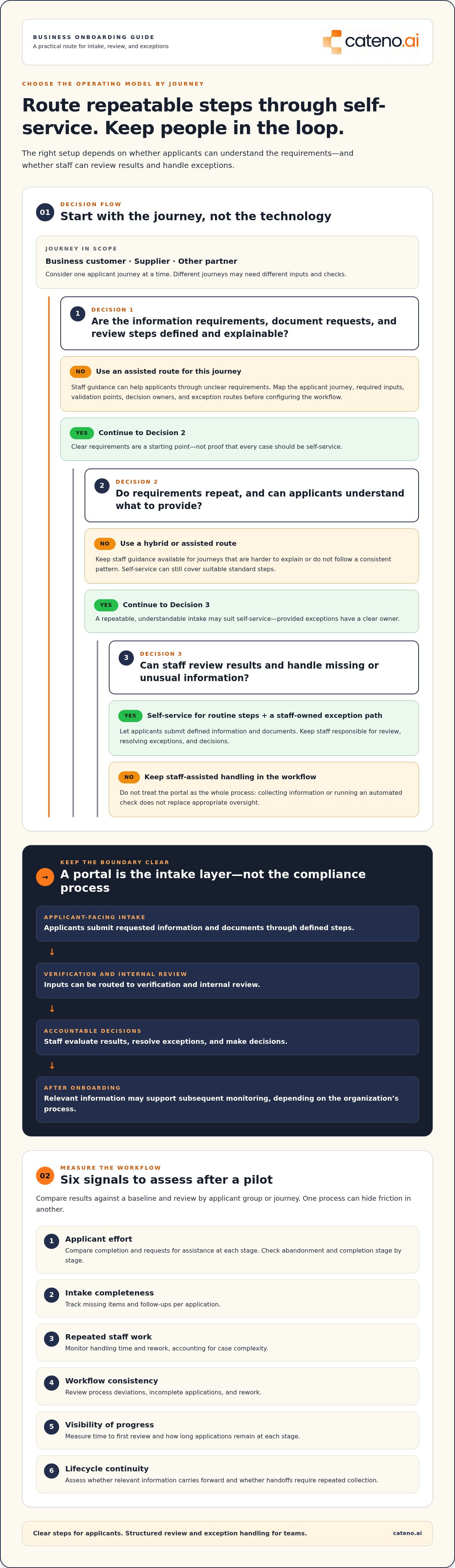
- Match the operating model to the work: route repeatable steps through self-service and retain assisted support for exceptions or complex decisions.
- Before configuring a portal, map the applicant journey and document required inputs, validation points, decision owners, and exception routes.
- Measure the workflow after a pilot to find friction and refine the process based on how applicants and teams use it.
- Evaluate how a branded gateway, configurable workflows, document management, and automated KYC and KYB checks can support your onboarding process.
What a Self-Service Onboarding Portal Changes in Business Intake
A self-service onboarding portal is a digital entry point where applicants provide requested information and documents through defined steps. It gives business customers, suppliers, or other partners a structured way to begin an onboarding journey. The portal is not the whole workflow: the broader process also includes how information is checked, who reviews it, how decisions are made, and what happens after intake.
“Self-service portal” can describe very different tools. Employee portals support internal HR tasks, while IT help desks handle service requests and customer support knowledge bases help users find answers. Employee Self-Service (ESS) in Human Resource Management Systems concerns employee-facing HR activities. Business onboarding instead collects and routes information about an external entity so a team can assess and establish a business relationship.
Which onboarding journeys can use a self-service portal?
Potential applicants include business customers, suppliers, and other partners. A portal is most suitable when a journey has defined information requirements, document requests, and review steps that can be explained clearly. For example, a supplier intake process might request consistent business details and supporting documents, while a business customer journey may require different inputs and checks.
Suitability depends on the journey, not simply on whether an organization wants to digitize intake. Consider how often requirements repeat, whether applicants can understand what to provide, and how staff will handle missing or unusual information. Complex cases may need an assisted route, such as staff guidance or a separate review path. Self-service can still handle standard steps without forcing every applicant through an identical process.
Where self-service fits in the onboarding process
A portal typically sits at the applicant-facing start of a broader sequence. Applicants submit information and documents; the workflow can then direct those inputs to verification and internal review. Staff remain responsible for evaluating results, handling exceptions, and making decisions. After onboarding, relevant information may support subsequent monitoring, depending on the organization’s process.
Think of the portal as the intake layer, not the compliance process itself. Collecting a document does not establish that it is accurate, and an automated check does not remove the need for appropriate oversight. Clear ownership and review paths connect applicant actions to accountable decisions. Configurable workflows can structure different journeys around defined requirements rather than treating every applicant as the same case. Cateno’s onboarding and compliance platform combines a branded self-service gateway with configurable workflows and automated KYC and KYB checks.
Understanding this boundary helps organizations evaluate the benefits of a self-service onboarding portal realistically. The value depends on how well applicant-facing steps connect to verification, review, exception handling, and ongoing processes, not on the portal alone.
Six Benefits of a Self-Service Onboarding Portal, and How to Assess Them
The benefits of a self-service onboarding portal depend on what it changes in the workflow, not simply on putting a form online. Clear steps can reduce applicant uncertainty, and structured inputs can help teams collect information consistently. Track results against a baseline and review them by applicant group or journey so that one process doesn’t conceal friction in another.
How self-service can improve the applicant experience
Applicants should understand what information is needed, why it’s requested, and what happens next. A branded portal with plain instructions can make separate requirements feel like parts of one coherent process. Measure abandonment and completion at each stage, along with requests for assistance, to find where applicants need clearer guidance.
- Less applicant effort: Guided steps can make requirements easier to follow than scattered instructions. Compare completion and assistance requests by stage.
- More complete intake: Defined fields and document prompts can help applicants submit requested information together. Track missing items and follow-ups per application.
- Less repetitive staff work: Standardized submissions can reduce manual re-entry and repeated requests for the same information. Monitor handling time and rework, accounting for case complexity.
- More consistent workflows: A configured sequence can route similar cases through the same steps. Review process deviations, incomplete applications, and rework to see whether teams follow the intended path.
- Clearer visibility: Statuses and assigned owners can make pending or incomplete applications easier to identify. Measure time to first review and how long applications remain at each stage.
- Better lifecycle continuity: Connecting intake with verification, review, and subsequent monitoring can give teams a more coherent view of the relationship. Assess whether relevant information carries forward and whether handoffs require repeated collection.
Structured intake presents applicants with defined fields and document requirements, helping submissions follow a common collection pattern. Consistency doesn’t guarantee accuracy or remove the need for review. It gives teams a clearer basis for identifying gaps and applying their process.
How structured intake can support operational efficiency
Efficiency comes from reducing avoidable handling, not from assuming every application can proceed without staff input. When submissions follow an agreed structure, teams can spend less time locating details across messages and more time on verification, decisions, and exceptions. Workflow visibility also clarifies who owns an incomplete or pending application, helping prevent unclear handoffs. A well-defined workflow connects applicant steps to the review and verification work that follows.
Choose a small set of indicators that reflect the journey: completion rate, time to first review, missing-information follow-ups, rework, and assistance requests. Compare them over a consistent period and investigate changes before attributing them to the portal. If you’re assessing how configurable intake could support your process, discuss your onboarding workflow with Cateno.
Self-Service vs. Assisted Onboarding: Choosing the Right Operating Model
Choosing an onboarding model isn’t a choice between technology and human judgment. Self-service can handle clearly defined applicant steps, while staff retain responsibility for review and decisions. Assisted onboarding offers more direct guidance, and a hybrid model combines applicant-led intake with staff support where needed. The right balance helps realize the benefits of a self-service onboarding portal without expecting every case to follow a fully automated path.
| Model | Applicant effort | Staff involvement | Exception handling |
|---|---|---|---|
| Self-service | Applicants complete defined steps independently using clear instructions. | Staff oversee the workflow and review submitted information. | Exceptions move to a designated review path. |
| Assisted | Applicants provide information with direct staff guidance. | Staff are involved throughout intake and follow-up. | Staff address issues as they arise in the guided process. |
| Hybrid | Applicants complete routine steps independently and receive help when needed. | Staff focus on review, support, and cases requiring judgment. | Exceptions are escalated for individual handling. |
When self-service is a strong fit
Self-service suits repeatable intake steps with predictable information and document requirements. Applicants can complete these tasks independently when instructions explain what to submit and the workflow provides clear status and next steps. For example, an applicant may enter business details and provide requested documents before the team reviews the submission. Routine does not mean unchecked: staff still determine how information is assessed.
When a hybrid path is more appropriate
Some applications need more than a standard route. Missing submissions, conflicting information, or unusual ownership structures may require clarification and reviewer judgment. A hybrid workflow lets applicants complete straightforward steps while directing exceptions to staff for further review. This avoids forcing complex cases through a process designed for routine intake and gives applicants a route to assistance without making every submission staff-led from the outset.
Use the comparison to decide which tasks are repeatable, what verification each journey requires, and where human review must occur. Then define the escalation route: who receives an exception, what information they need, and how the applicant learns what happens next. A portal need not eliminate human review or support. It can organize routine steps while preserving staff oversight and a clear route for cases that need attention.
The right model depends on case complexity, verification needs, and applicant support requirements. A configurable workflow can distinguish routine intake from exceptions while keeping ownership visible. To discuss how those paths could fit your process, discuss your onboarding workflow with Cateno.
How to Plan a Self-Service Onboarding Portal That Delivers Value
A portal delivers value when its steps reflect how applicants and review teams actually work. Start with the process, not the interface. Document the information required, validation points, decision owners, and exception routes before configuring technology. This gives the workflow a clear operating model and helps teams assess the benefits of a self-service onboarding portal against observable needs rather than assumptions.
- Map the current journey. Record each applicant action alongside internal review steps, handoffs, repeat requests, and waiting points. This shows where instructions or ownership may be unclear.
- Define applicant inputs. Specify each required field and document, why it is needed, and how the team will use it. Separate requirements that apply to every applicant from conditional items triggered by a particular case.
- Design workflow paths. Set out validation points, decision owners, status changes, and exception routes. A configurable workflow can represent these requirements as distinct steps and paths.
- Pilot a defined journey. Begin with a specific applicant group or workflow. Observe where people pause, submit incomplete information, or need staff support before expanding the process.
- Measure and refine. Compare results with a documented baseline, then use process data and applicant feedback to prioritize adjustments.
Design the journey around applicants and review teams
Map applicant actions and internal review in the same view. This reveals handoffs where a submission sits without a clear owner, as well as points where applicants are asked for information more than once. Keep mandatory inputs distinct from conditional requirements, use plain-language instructions, and explain what applicants should provide. Design for accessibility, explain how submitted information is handled, and make the route to support clear when an applicant cannot proceed.
Before launch, confirm who handles incomplete submissions and other exceptions, what they need to review, and how applicants receive an update or next step. These decisions prevent digital intake from becoming a dead end. The defined requirements and review paths can then be represented through configurable onboarding workflows, connecting applicant steps to the process behind them.
Measure adoption, quality, and process performance
Agree on metric definitions before the pilot so comparisons remain meaningful. Track completion, incomplete submissions, review turnaround, and manual follow-up. Define where each measure starts and ends. For example, distinguish time from submission to first review from total time to a decision. Compare these results with the documented baseline before claiming improvement, and segment findings by workflow where requirements differ.
Use applicant feedback alongside process data. A low completion rate at one step may point to unclear wording, an unnecessary request, or a need for assistance. Make targeted changes, then observe whether the same measure changes. To put this planning framework into practice, discuss your onboarding workflow with Cateno.
How Cateno Supports Self-Service Business Onboarding
Once you’ve defined which steps applicants can complete independently, how exceptions reach reviewers, and what you’ll measure, consider how those requirements fit together in a platform. Cateno brings a branded self-service gateway and configurable workflows together with document management and automated KYC and KYB checks. These capabilities connect applicant intake with verification and review steps, supporting the practical benefits of a self-service onboarding portal while leaving decisions and oversight with the responsible team.
Connect applicant intake with verification workflows
A branded gateway gives applicants a defined place to provide information and documents. Configurable workflows organize the steps that follow, helping teams structure different onboarding journeys for different entities rather than relying on one fixed sequence. The workflow should reflect your requirements: what information applicants submit, what needs verification, where staff review results, and how exceptions are handled.
Cateno’s platform includes automated KYC and KYB checks and bank account verification. These capabilities can form part of a broader intake and verification process, alongside document management. Advanced verification reports and ongoing monitoring support needs that extend beyond initial submission. Automation can support defined checks, but it doesn’t remove human accountability for review, decisions, or exception handling. Teams still need clear ownership and review criteria suited to their process.
This distinction matters when evaluating fit. A portal is most useful when its applicant-facing steps connect to the workflow your team actually operates. Consider whether the process can represent different entity types, conditional requirements, and escalation paths, and whether your team can maintain visibility as applications move through review. The platform’s configurable structure should support the process you’ve mapped, not dictate an unsuitable one.
Evaluate fit for your organization
Start with your applicant journey. Identify who submits information, what verification is required, which decisions need staff review, and what happens when a case is incomplete or unusual. Then compare those needs with the platform capabilities and measures you established during planning. For organizations with different applicant groups or requirements, comparing workflows can clarify where processes need to vary and where a consistent structure remains useful.
Commercial planning is also part of evaluating fit. Consider the workflows, applicant groups, and verification requirements your team needs to support, along with the work required to manage them. A sound assessment looks beyond the portal interface to the operating model behind it.
Self-service can reduce friction when it gives applicants clear steps and teams a controlled path for verification and review. The right configuration depends on your organization’s journey, responsibilities, and support needs. Discuss your onboarding needs with Cateno to explore how the platform fits your workflow.
Make the Next Onboarding Step Count
The first onboarding experience helps set expectations for the relationship that follows. Treat it as an operating process to learn from, not a one-time technology project. As applicant needs and internal responsibilities evolve, revisit whether each step remains clear, proportionate, and connected to the decisions your team needs to make.
The benefits of a self-service onboarding portal are more durable when organizations keep human judgment and applicant experience in view as the process develops. Give teams a way to surface friction, consider applicant feedback, and make deliberate adjustments. That ongoing attention can help onboarding remain useful to both sides of the business relationship.
Ready to consider how your onboarding journey could work within a configurable platform? Explore your onboarding plans with Cateno. A thoughtful next step can turn a clear process into a stronger foundation for business relationships.
Frequently Asked Questions
Can a self-service onboarding portal support complex business applications?
Yes. Complexity doesn’t automatically rule out self-service; it calls for deliberate workflow design. Applicants might enter standard business details and provide requested documents online, while a reviewer assesses conflicting information or an unusual ownership structure. Separate applicant tasks that follow predictable instructions from decisions that require judgment. The benefits of a self-service onboarding portal can include structured intake, provided conditional requirements and escalation routes reflect how your organization handles different cases.
What happens when an applicant cannot complete onboarding online?
The process should give the applicant a clear next step rather than leaving them stuck. For example, if a document request is unclear, provide a way to request guidance and specify what information will help the team respond. Record where the applicant encountered difficulty and whether it involved an instruction, document, or process issue. Reviewing these cases can help distinguish a one-off support need from a recurring obstacle that calls for a workflow change.
How can a company reduce incomplete onboarding submissions?
Start by identifying which fields or requests are most often left unfinished, then check whether applicants understand what each requires. A brief example of an acceptable response or document can clarify expectations, provided it reflects your actual process. Arrange requests in a logical order and avoid presenting conditional items to applicants who don’t need them. Compare incomplete submissions and follow-up volume over time, then adjust the specific steps associated with recurring gaps.
Is a self-service onboarding portal suitable for suppliers as well as customers?
It can support both if each journey reflects the information and review steps relevant to that relationship. For instance, a supplier and a customer may share basic entity details but require different supporting information or internal assessments. Map shared requirements once, then identify where the paths need to diverge. This helps avoid asking every applicant for identical information when the organization’s process calls for distinct requirements.
How should a business introduce a new onboarding portal to existing partners?
Explain the reason for the change before asking partners to use the new process. Tell them what information they’ll need, what steps to expect, and how to get assistance if they encounter a problem. A staged introduction for one defined partner group can reveal unclear instructions before broader rollout. During that period, review abandoned applications and support questions, and retain a suitable path for cases that can’t follow the standard online journey.
Does a self-service onboarding portal replace KYC or KYB review?
No. A portal organizes applicant intake, but using one doesn’t by itself establish that identity or business verification is complete. Map submitted information to the checks your process requires, and make clear who reviews results, resolves exceptions, and records decisions. Automated KYC or KYB checks can support verification workflows, but organizations still need to assign responsibility for review and determine how each case proceeds.


