

What if faster onboarding didn’t require giving up control over compliance decisions? For teams managing identity and business checks across separate tools, queues, and manual handoffs, automated KYC KYB verification software can bring the process into a more consistent workflow. The value isn’t simply automating more steps. It’s connecting checks, documentation, and review while preserving oversight and traceability.
That balance matters because individual and business verifications have different information and documentation needs. The software you choose should handle those differences while keeping decisions aligned with your policies. This guide explains how KYC and KYB automation fits into onboarding, what to assess when comparing software, and how to move from fragmented processes toward a controlled, repeatable system.
We’ll look at workflow configuration, human review, reporting, and the practical role of self-service intake. Cateno brings verification and onboarding steps together through a customizable workflow engine, a self-service gateway, branded customer portals, autonomous compliance agents, and advanced verification reports. The goal is a clearer operating process, with automation supporting, not replacing, accountable compliance decisions.
Key Takeaways
- Distinguish individual KYC checks from business KYB checks to map the right verification steps to each onboarding path.
- Automated KYC KYB verification software should coordinate checks, exception routing, decisions, and records within a governed workflow.
- Compare solutions using workflow configurability, coverage, review controls, reporting, and fit for self-service intake and document management.
- Prepare for implementation by documenting current steps, defining policies and ownership, then testing and refining workflows.
- Cateno combines configurable onboarding workflows with a self-service gateway for KYC, KYB, and bank account verification.
Why use automated KYC and KYB verification software for onboarding?
Onboarding can involve collecting information, checking documents, reviewing results, and recording decisions. When each step sits in a separate tool or depends on a manual handoff, staff may need to re-enter data, track down files, or piece together an application’s status. Automated KYC KYB verification software coordinates identity and business checks within an onboarding process, helping teams structure these steps and see how a case moves from intake to review.
KYC, or Know Your Customer, concerns verifying an individual. KYB, or Know Your Business, concerns verifying a business. A business relationship may require both paths: checks on the entity and checks on people associated with it. These terms appear within broader due diligence processes, including Customer Due Diligence (CDD) and, where appropriate under an organization’s policies and obligations, Enhanced Due Diligence (EDD). For background, see this overview of Know Your Customer (KYC) and Know Your Business (KYB).
How do KYC and KYB differ in a shared onboarding process?
The distinction is the subject being verified, not necessarily a completely separate onboarding journey. An individual applying in their own name follows a KYC path. A company entering a business relationship follows a KYB path, which may also require identifying or verifying associated people under the organization’s process. A shared workflow can direct each applicant through the relevant steps while keeping records associated with the right subject.
In brief: KYC verifies an individual; KYB verifies a business and may include checks on people connected to it.
Which onboarding problems can automation address?
Automation can coordinate repetitive process steps, such as collecting information and documents, initiating relevant checks, and routing cases that need attention. It can reduce the need for staff to move applications manually between tools or teams. The goal isn’t to remove judgment. It’s to make the path through intake, checks, and review more organized, with human reviewers responsible for decisions that need their assessment.
Centralized workflow records can give teams a clearer view of submitted information, outstanding steps, and recorded decisions. That visibility can support operational follow-up and process monitoring, but it doesn’t guarantee that data is complete or every decision is correct. Teams still need defined policies, appropriate review controls, and clear ownership for exceptions.
- Repeated data entry: Coordinated intake can reduce the need to enter the same information again at multiple workflow stages.
- Manual document collection: A structured process can make it easier to gather documents and associate them with the right individual or business case.
- Workflow handoffs: Recorded steps and case status can help teams see where review or follow-up is needed.
Automation is an operational tool, not a compliance decision-maker. Its value depends on how the organization configures the workflow, applies its policies, and oversees the results. The next step is to examine how checks can be coordinated while keeping exceptions visible and decisions accountable.
How automated KYC and KYB verification software coordinates checks
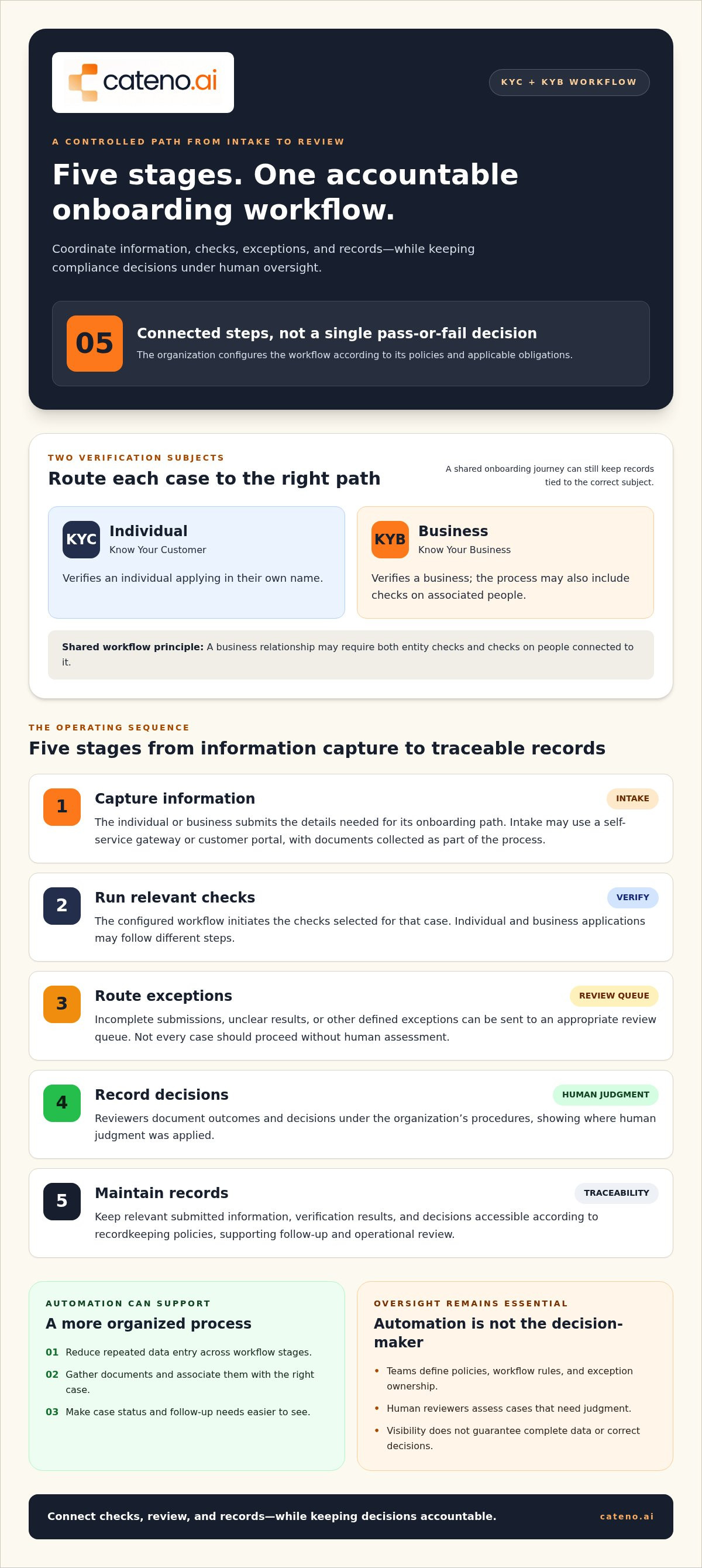
Automation works best as a sequence of controlled steps, not as a single pass-or-fail decision. A configured workflow can collect applicant information, initiate the relevant KYC or KYB checks, and direct the case toward completion or further review. The organization determines which steps apply based on its policies and applicable obligations.
Workflow orchestration connects verification checks to review and documentation, giving each result a defined place in the onboarding process.
- Capture information. An individual or business submits the details needed for its onboarding path. Intake may take place through a self-service gateway or customer portal, with documents collected as part of the process.
- Run relevant checks. The configured workflow sends submitted information to the checks selected for that case. Individual and business applications may follow different steps, while a business relationship may include checks on both the entity and associated people.
- Route exceptions. Rules can send incomplete submissions, unclear results, or other defined exceptions to an appropriate review queue. Automation should not assume every case can proceed without human assessment.
- Record decisions. Reviewers document the outcome and any decision made under the organization’s procedures. A clear record helps show how a case progressed and where human judgment was applied.
- Maintain records. Keep relevant submitted information, verification results, and decisions accessible according to the organization’s recordkeeping policies. This supports follow-up and operational review.
What happens from information capture to verification results?
Intake establishes the information a workflow will use. A self-service process can let applicants submit details and documents through a designated portal, rather than relying solely on staff to collect each item manually. The workflow then follows the organization’s configured path, directing information to relevant KYC, KYB, or other selected verification steps. Clear instructions at intake help applicants understand what they need to provide.
The sequence should reflect the actual onboarding policy, not a generic template. A company application, for example, may require different information from an individual application. Configurable workflows let teams define these paths and keep verification connected to the broader onboarding process.
How should exceptions, review, and records fit into the workflow?
Set the conditions for review before a workflow goes live. If a submission is incomplete or a result needs interpretation, route it to a defined review stage rather than treating automation as the final decision-maker. Specify who handles the case, what information they need, and how they record the outcome. This preserves oversight and makes handoffs more deliberate.
Records also need an owner and a maintenance process. Verification reports can support compliance monitoring, while teams remain responsible for deciding what follow-up their policies require. Cateno combines customizable workflows, self-service onboarding, and advanced verification reports as platform capabilities. Learn more about Cateno’s configurable onboarding workflow.
How to compare automated KYC and KYB software
A useful comparison starts with your onboarding requirements, not a vendor’s broadest feature list. Map the individual and business journeys your organization needs to support, then assess how each platform handles configuration, review, and reporting. The goal is to find a fit with your operating model and policies, rather than assuming every product provides the same checks or connections.
Use the criteria below to structure demonstrations and internal scoring. Ask the teams who will use the system to assess each capability against a real workflow, including routine cases and cases that need manual attention.
| Criterion | What to assess |
|---|---|
| Workflow configurability | Can you represent separate KYC and KYB paths, define review stages, and adapt workflows to internal policies? |
| Individual and entity coverage | Does the platform support the verification journeys you need for individuals, businesses, and associated people? |
| Review controls | Can teams identify exceptions, assign responsibility, and record decisions that require human judgment? |
| Reporting | Can reviewers access verification reports and records in a form that supports your internal processes? |
| Intake and documents | Do self-service submission and document management fit your applicants’ needs and your existing procedures? |
| Integration and operations | What connections are available for your environment, and who will own exceptions, maintenance, and policy changes? |
Which workflow and verification capabilities should buyers assess?
Test whether a platform can keep individual and entity paths distinct while managing them within an organized onboarding process. Examine how workflow steps can reflect internal policies, including where review is required. If bank account verification belongs in the same customer journey, include it in the assessment rather than treating it as an unrelated capability. Cateno’s platform includes customizable workflows, self-service KYC and KYB onboarding, and bank account verification.
Assess intake in practical terms: how applicants submit information and documents, how staff access those materials, and whether the approach fits your onboarding experience. Integration needs depend on your current environment. Document the systems involved and the handoffs the new workflow must support, then evaluate each platform against that map instead of assuming integrations will be identical.
How can buyers assess oversight, reporting, and operational fit?
Review sample reports and records with the teams who will use them. Check whether they can find the information needed to understand a case and support internal monitoring. Define operational ownership before selecting a solution: identify who handles manual review, resolves exceptions, and approves policy or workflow changes after launch.
Claims about speed, accuracy, or automation need context. Separate vendor-reported outcomes from independently validated evidence, and compare both with your own baseline. Another organization’s results may reflect different processes or case volumes, so don’t treat them as guaranteed outcomes for your operation. Compare commercial terms using each provider’s pricing information, and assess the full operating fit alongside the quoted structure.
How to prepare and implement KYC and KYB automation
Successful implementation starts with the process you need to control, not the software configuration screen. Before introducing automated KYC KYB verification software, document how onboarding works today, where individual and business paths diverge, and how staff resolve cases that don’t follow the routine path. This gives the project team a practical foundation for configuring, testing, and governing a more consistent workflow.
Use a staged approach:
- Document current steps. Map the information collected, verification activities, decision points, handoffs, and records for each onboarding path. Note where teams repeat work or rely on informal instructions.
- Define policies and ownership. Specify which steps apply to each customer type, what requires review, and who can make or escalate decisions. Assign owners for policy interpretation, exception handling, and future changes.
- Configure workflows. Translate the documented paths into workflow stages and routing rules. Keep distinct requirements for individuals, businesses, and relationships involving both, while aligning the steps with applicable obligations and internal policy.
- Test representative cases. Include straightforward applications, incomplete submissions, and cases that should be routed for additional review. Confirm the right information reaches each stage and reviewers can understand what action is needed.
- Refine using evidence. Compare workflow results with the baseline, investigate unexpected outcomes, and adjust configuration or procedures through a controlled change process.
How should teams map policies and onboarding paths before launch?
For each customer type, record the information required, verification steps, decision criteria, escalation route, and expected records. A business path may involve checks on the entity and associated people, while an individual path has its own requirements. Map these separately, then identify where they connect. Agree on review criteria and assign a team or role to each escalation before configuring automated routing.
Set baseline measures before changing the process. Useful indicators include completion rates, exception volume, and processing time, measured consistently across the cases you intend to compare. Define how each measure is calculated and which teams own the underlying data. This makes later comparisons more reliable than relying on impressions or changing definitions.
How can teams test and govern automated workflows?
Run test cases that reflect real operational variation, not only ideal submissions. Check that incomplete information follows the intended path, reviewers receive enough context to assess exceptions, and the workflow records outcomes in a way that supports internal oversight. A controlled rollout lets teams monitor results against the baseline and refine procedures before expanding use.
Governance continues after launch. Assign responsibility for reviewing exception patterns, approving policy changes, and maintaining workflow configuration. For a related view of process orchestration, see the business onboarding workflow engine guide. Cateno’s onboarding workflow capabilities can support a more structured process.
How Cateno brings automated KYC and KYB onboarding into one workflow
After mapping requirements and evaluating workflow criteria, consider how verification fits into the full onboarding journey. Cateno provides a cloud-based platform that brings self-service KYC and KYB onboarding, bank account verification, and customizable workflow management into a configurable process. Its workflow engine can initiate onboarding with a single piece of information, helping teams structure what happens next according to their process.
This orchestration matters when business onboarding involves several related tasks. An organization can design its intake and verification journey around its needs while maintaining defined review steps and oversight. Cateno’s capabilities include a self-service gateway, a branded customer portal, document management, autonomous compliance agents, and advanced verification reports. These components support an organized process; the organization remains responsible for its policies and compliance decisions.
How does Cateno support self-service verification workflows?
The self-service gateway supports automated KYC, KYB, and bank account verification. A branded customer portal provides the intake experience for onboarding and document collection. The customizable workflow engine coordinates the configured process, including steps initiated from a single piece of information. Document management helps organize submitted materials within the workflow, while advanced verification reports support compliance monitoring.
Teams can map these capabilities to their operating requirements:
- Intake: A self-service gateway and branded portal support information and document submission.
- Workflow: Configurable onboarding brings relevant verification steps into a managed process.
- Verification: The gateway supports KYC, KYB, and bank account verification.
- Oversight: Advanced verification reports support monitoring, and autonomous compliance agents are part of the platform.
The distinction between platform capability and organizational control remains important. Automated KYC KYB verification software can coordinate the steps a team configures, but staff still define policies, oversee exceptions, and decide how results are handled. For broader background on identity verification, see Cateno’s KYC verification guide.
When is Cateno a fit for KYC and KYB onboarding?
Cateno supports teams seeking a configurable way to coordinate onboarding and verification for business partners, particularly when intake involves both KYB and related individual checks. If bank account verification is part of that journey, it can be included alongside KYC and KYB onboarding through the platform’s self-service gateway. The workflow can be shaped around the organization’s process and review requirements.
Explore how these capabilities relate to your process through a conversation with Cateno about your onboarding requirements.
Make your next onboarding decision with confidence
Turn your requirements into a shared operating plan. Bring compliance, onboarding, and operations stakeholders together to agree on where decisions sit, what should be escalated, and how teams will review the process over time. That alignment gives automated KYC KYB verification software a clear framework to support, rather than leaving important decisions to default settings or informal handoffs.
Start with the onboarding journey that most needs structure. Clarify ownership, define how exceptions should be handled, and establish what a well-managed process looks like for your organization. Then assess how a configurable system fits those requirements and where it can support a more consistent experience.
To put those requirements into practice, talk with Cateno about your KYC and KYB onboarding workflow.
Frequently Asked Questions
Is automated KYC and KYB verification software the same as a compliance program?
No. Automated KYC KYB verification software supports operational tasks, but it can’t set an organization’s risk appetite or take responsibility for how staff interpret obligations. For example, a platform may route an unusual case to review, while the organization decides who assesses it and how to document the decision. Treat software as one component of a broader compliance program, with accountable owners and approved procedures.
Can one platform support both KYC and KYB verification?
Yes, if the platform can accommodate the distinct workflows involved. A business onboarding journey may need information about the entity as well as associated people, while an individual application follows a different path. Before adopting a shared platform, map a sample case from each path and check how staff can distinguish their requirements and records. This helps ensure one system supports connected processes without treating them as identical.
How does automated KYC and KYB software handle cases that need manual review?
A configured workflow can direct cases that meet defined criteria to a human reviewer. For example, an application with missing information might pause for follow-up, while a result that needs interpretation goes to an assigned reviewer. Establish who handles each route and what they must record. During testing, confirm that reviewers can see why a case was escalated and how to document its disposition.
What information does a business need to start automated KYB onboarding?
There’s no single information set that applies to every business relationship. The organization’s process determines what to request, and the workflow may begin with basic business details before collecting additional information or documents. Map which fields are needed to open a case and which can be requested later. Define how incomplete submissions are handled before enabling self-service intake, so applicants and staff have a clear process.
Can KYC and KYB software verify a business bank account?
Some onboarding platforms include bank account verification alongside KYC and KYB capabilities. Whether to include it depends on the organization’s process and how it will use the result. Cateno’s platform includes bank account verification in its self-service onboarding and verification offering. Teams can map where account verification belongs in the journey, who reviews its result, and how the outcome is recorded for the business relationship.
How much does automated KYC and KYB verification software cost?
Pricing depends on the provider’s commercial model and the scope of the deployment. Compare proposals using the same expected usage, workflow requirements, and verification needs, then review what each arrangement covers. This makes it easier to assess options against the process you plan to run, rather than comparing headline figures alone. Cateno can discuss pricing in the context of the onboarding workflow you need to support.


