

What if automation could speed up business checks without turning a clean match into a blind approval? Automated business entity verification works best when it connects evidence, decisions, and exceptions in a controlled workflow, rather than simply moving records through faster.
Manual document reviews and data checks can slow onboarding, especially when company details differ across submitted records. Disconnected tools make it harder to see what evidence has arrived, what still needs review, and why a decision was made. Automation can organize these steps, but it shouldn’t remove human judgment when a case needs closer attention.
This practical guide explains how an automated process can gather and evaluate business information, route inconsistencies for review, and keep verification status connected to evidence. You’ll learn where human review belongs, how to fit verification into an onboarding operation, and how a customizable workflow engine, self-service submission gateway, automated KYB checks, and compliance agents can support the process. The goal is a consistent workflow with clear decision points and oversight.
Key Takeaways
- Map verification from intake through recordkeeping so evidence and decisions stay connected.
- Distinguish business entity checks from identity checks on individuals associated with the entity.
- Use clear exception categories, case owners, and review triggers to guide human oversight.
- Compare manual checks, point solutions, and automated business entity verification by consistency, visibility, and adaptability.
- Assess how a customizable workflow engine and self-service gateway can fit your onboarding process.
What Automated Business Entity Verification Does, and Where Manual Checks Stall
Automated business entity verification is a controlled workflow that collects business identity evidence, applies defined checks, and routes results for a decision. It is more than a database lookup. A lookup returns a piece of information; a workflow manages the evidence and review steps that put that information in context.
In practice, a workflow can organize information and documents submitted during onboarding, apply repeatable checks, and show a case’s status as it progresses. The exact checks depend on the organization’s requirements and configured process. Automation can reduce repetitive handling, but it doesn’t make every judgment automatic. Conflicting details, incomplete evidence, or other exceptions may still need a person to assess the case and decide what happens next.
Business entity verification versus individual identity checks
Know Your Business (KYB) focuses on the business being assessed and the evidence used to establish its identity. People may matter because they submit information or appear in business records, but checking an individual’s identity is distinct from verifying the entity itself. A Legal Entity Identifier (LEI), for example, is an identifier used to distinguish legal entities in financial transactions. An identifier can support identification, but it is not a complete verification decision on its own.
When onboarding a business customer or partner, keep the entity and any associated people as distinct subjects in the case. That makes it easier to see what each piece of evidence supports and which question remains unresolved. For example, a document that supports an entity’s identity does not automatically answer a separate question about an individual associated with it.
Why manual verification becomes difficult to manage
Manual work often starts across separate channels. An applicant completes a form, sends documents another way, and responds to follow-up requests handled by a reviewer. If notes, evidence, and decisions live in different tools, staff must reconcile the case themselves. A reviewer may struggle to tell whether an item is missing, already supplied, or awaiting assessment.
That fragmentation creates friction even when everyone is careful. Teams may repeat requests because they cannot see what has arrived, while applicants may be unsure who owns the next step or why more information is needed. Status updates become harder to maintain, and handoffs can depend on manual messages instead of a clear case record.
A well-designed workflow addresses these gaps with consistent intake, defined check steps, visible case status, and deliberate routing for exceptions. It standardizes routine evidence handling without treating every mismatch as a simple pass-or-fail result. Human reviewers remain responsible for cases that require interpretation, and the workflow gives them the context to act. The aim is not to remove judgment, but to reserve it for the points where it adds value while making routine handling more structured and traceable.
How an Automated Business Entity Verification Workflow Moves from Intake to Decision
A well-structured workflow makes each handoff explicit: what information enters the case, which checks run, and what happens when evidence needs attention. The sequence is not a promise of instant or error-free verification. It makes the process repeatable, visible, and easier to govern.
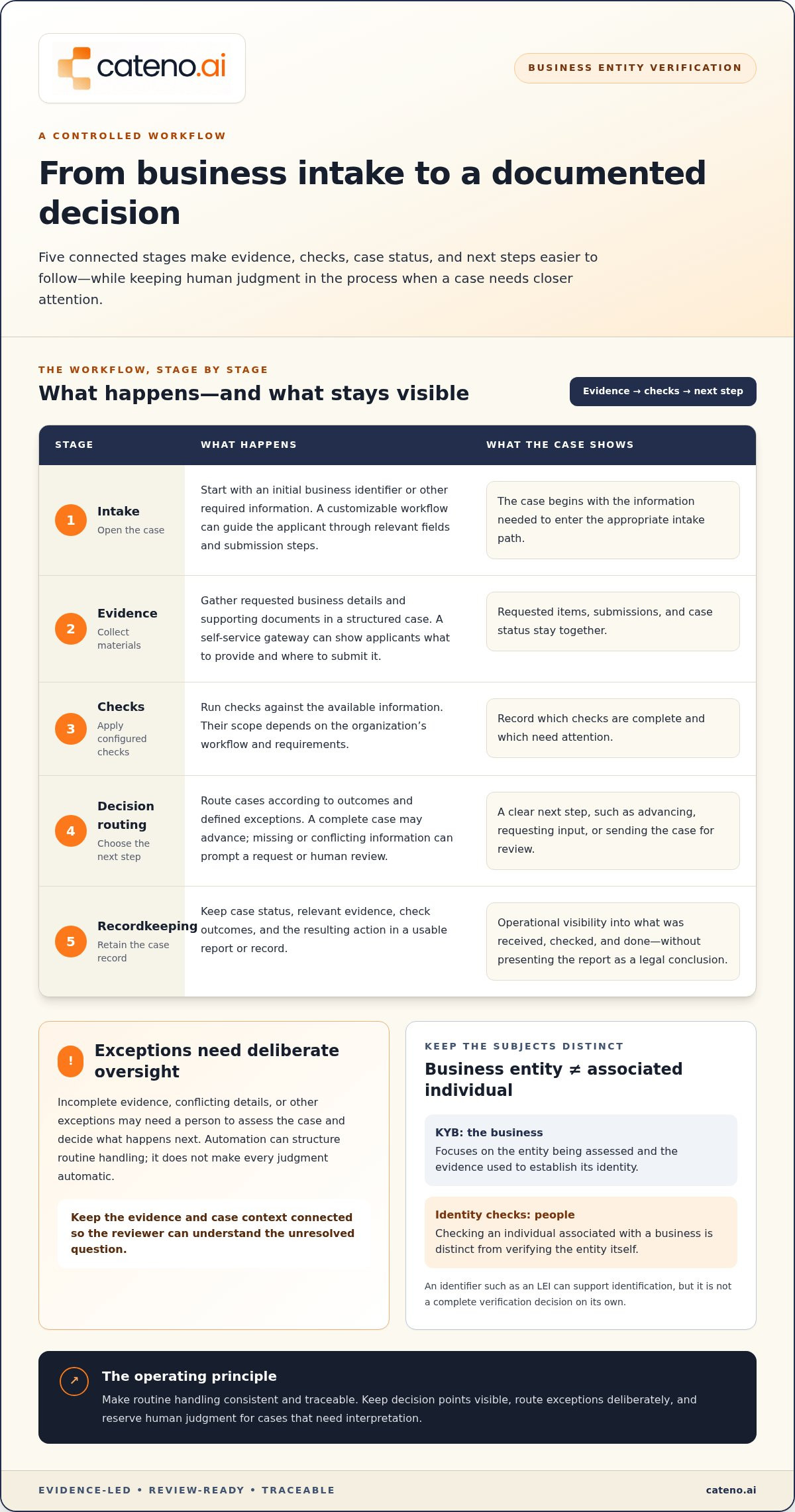
Intake, evidence collection, checks, decision routing, and recordkeeping connect submitted information to a documented next step. At each stage, automated business entity verification should leave a clear status, an owner or route for follow-up, and enough context for the next reviewer to understand the case.
- Intake: Start a case with an initial business identifier or other required information. A customizable workflow can use that entry point to guide the applicant through relevant fields and submission steps.
- Evidence collection: Gather requested business details and supporting documents in a structured case. A self-service onboarding gateway can present requests in one guided route, showing applicants what to provide and where to submit it.
- Checks: Apply the configured checks to the available information. Their scope depends on the organization’s workflow and requirements. Record which checks are complete and which need attention.
- Decision routing: Route cases according to outcomes and defined exceptions. A complete case may advance, while missing or conflicting information can prompt a request for input or human review.
- Recordkeeping: Retain case status, relevant evidence, check outcomes, and the resulting action in a usable report or record. This gives teams operational visibility without presenting the report as a legal conclusion.
Start with a business identifier and structured intake
An initial piece of information can open the right intake path, but it should not predetermine the result. The workflow can prompt for the details and documents relevant to the case, then show what remains outstanding. For example, an organization onboarding a business partner can collect entity information through a self-service gateway and keep each requested item, submission, and status together.
Evaluate evidence, route exceptions, and retain a report
Configured checks inform a status or next action; they do not eliminate the need to interpret exceptions. If details conflict or evidence is incomplete, the workflow should make clear whether the case needs more information or reviewer assessment. Where ownership information is part of the organization’s process, define the relevant people and evidence carefully. Investor.gov describes a beneficial owner as someone who enjoys the benefits of ownership. The workflow should show how that information affects routing, rather than treating a match as a complete decision.
A verification report can help teams see what was submitted, which checks informed the status, and what action remains. For broader system-design considerations, explore this digital KYB verification architecture guide. Cateno’s workflow tools can bring intake and verification steps together. Discuss your workflow requirements with Cateno.
Manual Review, Point Solutions, or Automation: Compare Verification Approaches
The right approach depends on how your team collects evidence, tracks decisions, and handles exceptions. A feature-rich system won’t fix a process with unclear ownership. First identify where work stalls and what reviewers need to see. Then compare approaches against those specific gaps, including how easily a reviewer can find the evidence behind a status and determine who owns the next step.
| Approach | Consistency | Visibility | Exception handling | Workflow adaptation |
|---|---|---|---|---|
| Manual processes | Depends on staff following shared procedures. | May rely on notes, email, and individual updates. | Reviewers resolve cases through manual handoffs. | Changes require teams to update their own practices. |
| Disconnected point solutions | Checks may follow separate steps and conventions. | Evidence and status can be spread across tools. | Staff may need to coordinate exceptions between systems. | Each tool may have its own configuration and limits. |
| Workflow-led automation | Configured steps support repeatable handling. | Case status and evidence can be managed within a workflow. | Defined routes can direct unresolved cases to review. | Workflow rules can be adjusted to reflect process needs. |
Where manual and disconnected processes create operational gaps
Repeated data entry and handoffs create opportunities for information to be handled inconsistently, though they don’t guarantee mistakes. Separate tools can also make it harder to trace which evidence informed a status or who owns the next action. For context on public information available from one state source, the California Secretary of State Business Entities section describes its role in business filings and records. Teams still need defined ownership when submitted details are incomplete or conflict.
What workflow-led automation can and cannot standardize
Automation can structure repeatable intake, document management, routing, and reporting. Configured rules or agent-supported tasks can direct routine cases and surface exceptions, but they don’t replace human judgment for ambiguous evidence or consequential decisions. Define escalation criteria and reviewer responsibility before deployment, so cases requiring interpretation have a clear route rather than an automatic outcome.
For example, a workflow might route a case with missing information for follow-up and send conflicting details to an assigned reviewer. That’s a control choice, not a claim that automation eliminates risk. Systems should make the action and its rationale visible to authorized teams, with reporting that supports operational oversight.
Evaluate automated business entity verification against the process you need to govern: where information enters, how evidence stays associated with a case, which tasks are repeatable, and where human decisions remain necessary. Broader orchestration considerations are covered in this business onboarding workflow engine overview. Cateno’s customizable workflow engine supports coordinated onboarding steps. Discuss how to structure your workflow with Cateno.
Design Verification Controls for Exceptions, Oversight, and Ongoing Monitoring
Automation needs clear boundaries. When a case falls outside the expected path, the workflow should show what happened, who owns the next action, and what information will support resolution. Exception handling is central to automation design because it preserves oversight when a case doesn’t follow the routine path.
Before configuring automated business entity verification, document the controls that shape how cases move and how teams review them:
- Case statuses: Define labels such as information requested, under review, and decision recorded, and specify what each status means.
- Owners: Assign responsibility for reviewing an exception, requesting additional input, and recording its resolution.
- Review triggers: Specify which conditions call for a person to assess a case, rather than allowing an unclear or incomplete result to proceed without review.
- Evidence handling: Determine what information belongs in the case record, how it is associated with decisions, and how long it should be retained under the organization’s policies.
- Configuration reviews: Revisit statuses, routing rules, and review triggers when business requirements change or case outcomes reveal a process gap.
These controls define how a verification workflow operates. They are not a substitute for legal interpretation or compliance consulting. Organizations should set their process according to their own requirements and applicable obligations.
Set escalation rules for incomplete or conflicting information
Make exception categories specific enough to guide consistent routing. For example, an incomplete submission could trigger an information request, while conflicting business details could go to a reviewer. Assign an owner to assess the issue, determine the next action within the organization’s process, and document the resolution. Rules should reflect the organization’s needs, not assume one approach fits every business or jurisdiction.
Keep the route visible to the people responsible for the case. A status should tell them whether the applicant needs to act, a reviewer needs to assess the evidence, or the case is waiting for another defined step. Clear statuses reduce ambiguity without forcing reviewers to treat every exception identically.
Keep verification records useful for operational oversight
A useful report gives teams a coherent view of information submitted, actions taken, current status, and decisions recorded. Consistent status definitions and documentation practices make it easier to understand a case over time and identify where a workflow may need adjustment. Reports support operational visibility; they should not be presented as legal conclusions.
Initial entity verification and ongoing monitoring are related but distinct activities. Initial checks establish a case based on information gathered during onboarding. Ongoing monitoring can support later review when the organization’s process calls for it. Define what prompts that review, who owns it, and how its outcome is recorded, rather than treating an onboarding result as a permanent status.
Cateno’s customizable workflow engine and advanced verification reports help teams coordinate case routing and maintain operational visibility. Discuss verification workflow controls with Cateno.
How Cateno Connects Business Verification to a Customizable Onboarding Workflow
Once the verification process is defined, align its intake, checks, exception routes, and records in an onboarding workflow. Cateno brings these needs together through a customizable workflow engine and self-service onboarding gateway, connecting business information and document submission with automated KYC and KYB checks. The workflow supports repeatable handling while keeping review and decision points under organizational control.
Coordinate intake, verification, and reporting in one workflow
Cateno’s platform supports a coordinated approach to onboarding. A branded customer portal gives applicants a self-service route to submit information and documents, while the workflow engine organizes the verification steps that follow. Teams can define how a case moves from submission to checks, review, and a recorded status.
Document management connects submitted materials to the onboarding process, while automated KYC and KYB checks support configured verification tasks. Autonomous compliance agents can assist with workflow activity, but they don’t mean every case is decided without human review. Teams can determine which routine steps proceed and where exceptions need a person to assess the available evidence.
Advanced verification reports provide operational visibility into case information and actions. Combined with ongoing compliance monitoring, they help teams keep onboarding records connected to later review activities. The value lies in orchestration: intake, verification steps, human oversight, and reporting work as parts of a process rather than isolated tasks.
Move from a verification requirement to a practical next step
Before adopting automated business entity verification, define the evidence your process needs to collect, how the workflow fits existing onboarding operations, which exceptions require escalation, and what teams need to oversee case progress. These priorities help clarify how to configure a workflow without assuming every organization has the same review rules or operating model.
A tailored workflow should reflect your intake requirements, verification steps, ownership model, and reporting needs. Cateno’s customizable engine and self-service gateway provide a foundation for structuring those activities, while human reviewers retain responsibility for cases that require interpretation. You can also revisit workflow configurations as business requirements evolve.
To discuss how these capabilities can align with your onboarding process, discuss your business verification workflow.
Build a Verification Workflow That Can Evolve
Treat automated business entity verification as an operating model, not simply a technology decision. Start with a practical question: where does your current onboarding process need clearer ownership, evidence handling, or escalation? Use the answer to define what a well-governed workflow should make easier for both reviewers and applicants.
Next, identify the decisions that must remain with your team and the routine steps a configured process can support. A useful workflow should reflect how your organization works today and give you a basis for reviewing and adjusting it as requirements change. Cateno can help you shape that approach around your onboarding needs.
Explore a workflow tailored to your business verification needs and take a considered next step toward more structured onboarding.
Frequently Asked Questions
What is automated business entity verification?
Automated business entity verification is a technology-supported process for collecting and evaluating information about a company and related evidence. Unlike a single lookup, it coordinates information gathering, configured checks, review routes, and case records. Organizations set the checks and escalation paths to fit their onboarding requirements. For example, a submitted business name may initiate several connected tasks. Automation makes repeatable steps easier to manage, but can’t guarantee an outcome or replace judgment in every case.
How does automated business verification work?
Automated business verification typically begins with information supplied by an applicant, followed by collection of documents or other evidence required by the configured process. The system applies selected checks, then assigns a status or routes the case to a next action. Exact inputs and outcomes depend on the organization’s workflow. If a submitted address differs across records, for instance, the case may need clarification or reviewer assessment instead of routine progression. Record the resulting action in the case.
Can business entity verification be fully automated?
Some repeatable tasks, such as gathering information, organizing submissions, and routing routine cases, can be automated. Incomplete evidence, conflicting details, or cases that call for closer assessment may need human review. The right balance depends on the organization’s process and requirements. Automation should make the path through a case visible and apply configured steps consistently, not imply every business can be verified without oversight or that a system can resolve every ambiguity.
What information is needed to verify a business entity?
The required information depends on the organization, the business relationship, and the verification process it has configured. A workflow may request identifying business details and supporting documents, but there isn’t one universal checklist for every case. Before automating intake, decide which fields and materials each case type requires. Also define how the workflow responds when a field is blank, a document is missing, or submitted details don’t agree.
Is automated business entity verification the same as KYB?
No. Know Your Business (KYB) describes the business-focused activity of understanding and assessing an entity. Automation describes how parts of that activity are performed or coordinated through technology. An automated verification workflow can support KYB by structuring information collection, checks, and review routes, but the terms aren’t interchangeable. A team can conduct KYB manually, through automation, or with a combination of both, depending on its operating model and requirements.
How should teams handle a failed or inconclusive business verification?
Use a documented exception path that identifies what remains unresolved, assigns a reviewer, and records the next action. An inconclusive result isn’t, by itself, proof of wrongdoing; it may reflect missing information or details that need clarification. Depending on configured rules and requirements, the team might request additional material or assess the case manually. Record the reason for escalation and its resolution so colleagues can understand the case history later.


