

A registry match is a starting point, not a complete trust decision. Automated corporate registry checks compare a company’s identifying details, such as its registration number, with official records to verify legal existence, status, business activity, and recorded representatives. The result gives you structured evidence to assess before onboarding or renewing a business relationship.
Automation can reduce manual searching, but records still need careful interpretation. Active status and good standing are not the same, and a failed lookup does not by itself mean a business is invalid. A sound workflow pairs registry data with checks that clarify ownership, document authenticity, and any gaps requiring review.
This guide explains how to build that workflow. You’ll learn what automated verification checks, which KYB reports can support a decision, where to search state business records, and how to handle companies registered outside the United States. It also explains how to respond to missing or conflicting results without treating an incomplete record as a final answer.
Key Takeaways
- Match the company’s registration number to official records, then interpret legal status, activity, and representatives together rather than relying on a name match alone.
- Use KYB reports to compare company documents with registry data and flag inconsistencies for review.
- For cross-border checks, distinguish the registered company from its directors, shareholders, and ultimate beneficial owners.
- Account for state-specific search rules, filters, and status definitions before deciding that a business record is missing or inactive.
- Build a repeatable workflow that records results, routes exceptions for review, and repeats checks when business circumstances change.
What does "automated" mean in practice?
In the United States, the Customer Due Diligence Final Rule requires verification of beneficial owners, while state registry rules shape company record searches. Automation matches identifying details to official records, retrieves available company information, and organizes the results for review.
-
Match Business Identities to Official Registries
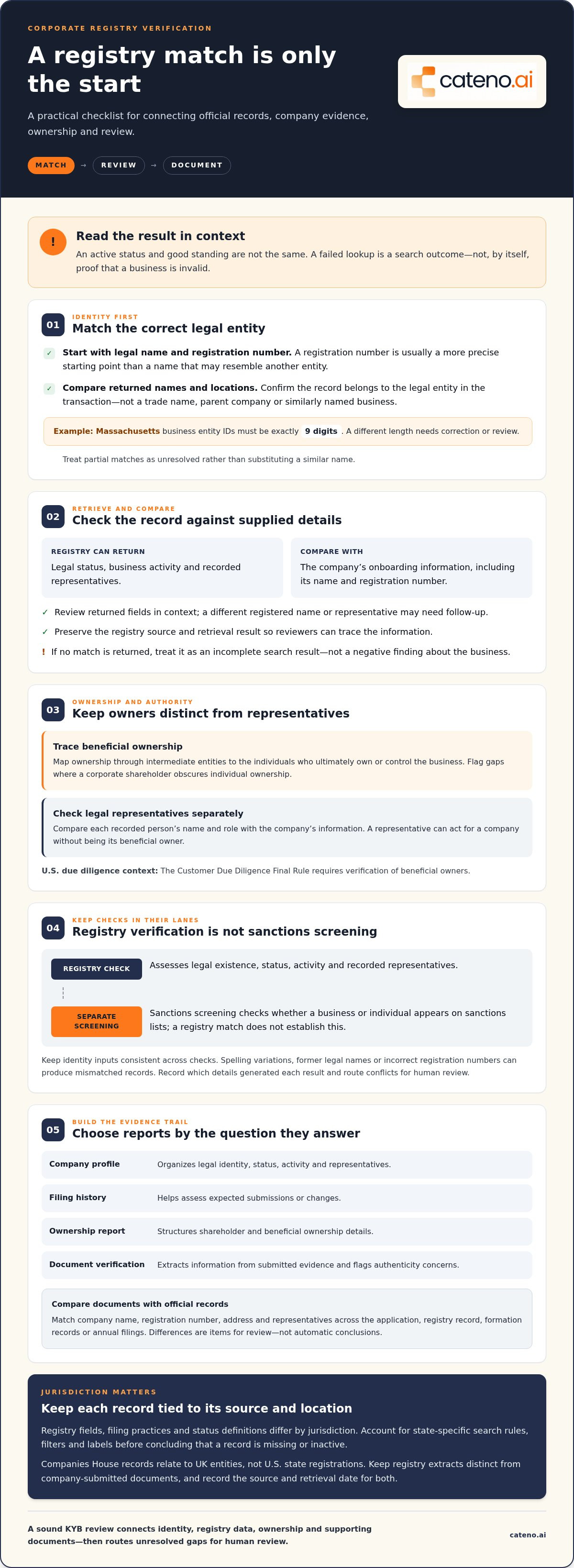
Start with the company’s legal name and registration number, then match them against the relevant official registry. A registration number usually provides a more precise starting point than a name, which may resemble another entity’s name. Compare returned names and locations before accepting a match. For example, Massachusetts business entity IDs must be exactly 9 digits, so an entry with a different length needs correction or review.
Confirm that the record identifies the same legal entity involved in your transaction. A trade name, parent company, or similarly named business may point to a different registry entry. Treat partial matches as unresolved rather than substituting a similar name. This establishes which company the remaining identity checks should examine.
-
Retrieve Company Data Automatically
Use the matched registry record to retrieve available details about legal status, business activity, and representatives. Automation can collect these fields into one result instead of requiring separate searches across registry pages. Compare the returned information with what the company supplied during onboarding, including its name and registration number.
Review each field in context. A record may show a company as active while listing a different registered name or representative that requires follow-up. Preserve the registry source and retrieval result so reviewers can trace the information. If an automated lookup returns no match, treat that as a search outcome, not a negative finding about the business.
-
Identify Beneficial Owners and Legal Representatives
Map ownership from the registered company through any intermediate entities to the individuals who ultimately own or control it. The Customer Due Diligence Final Rule requires verification of beneficial owners. Compare the ownership information with the entity’s records, and flag gaps where a corporate shareholder obscures individual ownership.
Separately identify the legal representatives recorded for the entity. Check whether each person’s name and role align with the company information provided. A representative can act for a company without being its beneficial owner, so keep these identities distinct. This helps reviewers understand who owns or controls the business and who is authorized to represent it.
- Separate registry checks from other screening. Use registry results to assess legal existence, status, activity, and recorded representatives. Treat sanctions screening as a separate check: a registry match does not establish whether a business or individual appears on sanctions lists. Combine results only after confirming that each search refers to the correct entity or person.
Keep identity inputs consistent across these checks. A spelling variation, former legal name, or incorrect registration number can produce mismatched records. Record which company details generated each result, then route conflicts for human review. This creates a clearer KYB decision trail without treating automated matching as a substitute for interpreting ownership or identity evidence.
What are the Key Types of KYB Reports for Corporate Registry Data?
Choose reports that connect official registry records with company documents and the decision at hand. A useful review compares names, filing details, ownership, and supporting evidence rather than treating each document as an isolated result.
- Compare submitted documents with registry records. Match the company name, registration number, address, and representatives across the application and official record. Then compare those details with documents such as formation records or annual filings. Company document authenticity analysis can detect fraud signals and extract data, helping reviewers identify altered documents or inconsistencies. Treat a mismatch as an item for review, not an automatic conclusion.
- Separate report types by the question they answer. A company profile report can organize legal identity, status, activity, and representatives. A filing history report helps assess expected submissions or changes. An ownership report structures shareholder and beneficial ownership details. A document verification report extracts information from submitted evidence and flags authenticity concerns. Together, these reports help trace how each KYB finding supports an onboarding decision.
- Preserve jurisdiction-specific records. Registry fields and filing practices differ by jurisdiction, so retain the country or state with every result. For example, Companies House records relate to UK entities, not US state registrations. Keep a registry extract distinct from a company-submitted document, and record the source and retrieval date for both. This helps prevent foreign filing formats or status labels from being interpreted according to US state rules.
- Automate document extraction and comparison. Configure a workflow to capture key fields from submitted documents and compare them with the corresponding registry record. Route differences in legal name, filing date, or representative details for review. Keep the original document and extracted values together as evidence. A platform can structure this process, but reviewers still need to assess whether a discrepancy reflects an error, a change, or a different entity.
- Apply filing requirements to the correct jurisdiction. Companies House requires all accounts filings made on or after 1 April 2028 to be submitted through commercial software in iXBRL format. In June 2026, Companies House revised the software-only filing timetable from April 2027 to 1 April 2028. Use those dates when designing a UK filing workflow, and keep them separate from US registry procedures.
- Set cost and refresh rules around use. The cost of a verification tool depends on jurisdiction coverage, search volume, report depth, and integration needs; pricing is provided after a quote request. Refresh records before granting or renewing access when stale information, a shell entity concern, or a jurisdiction change could affect the decision. A one-time lookup does not provide ongoing assurance, so tie rechecks to meaningful changes rather than assuming one search remains current.
Can I Check a Company Registered in Another Country?
Yes. Cross-border checks can verify a company’s legal existence, status, available filings, directors, shareholders, and beneficial ownership. Registry access and displayed fields vary by country, so interpret each result within its jurisdiction’s record system.
-
Verify Company Legal Existence
Search the official registry in the country where the entity was formed, using its legal name or registration number. Compare the returned identity and status with the contracting company’s details, then review available filings for consistency. Confirm that the formation date precedes the business commitment. A failed registry lookup alone is not a negative finding about the company.
-
Verify Directors, Shareholders, and Beneficial Owners
Review the directors and shareholders recorded in the registry, then map any holding companies between the registered entity and its ultimate beneficial owners. Keep each legal entity distinct in the ownership chain. A director represents or manages the company, while a shareholder holds ownership; these roles may belong to different people. Record which names come directly from registry data and which need supporting evidence.
- Confirm the country and registry coverage. Identify the company’s jurisdiction of formation before searching, since its trading location may differ from its registered country. Registry verification services cover multiple European countries for cross-border operations, but available records depend on jurisdiction. Confirm that the result relates to the exact legal entity, not a similarly named branch or parent company, and retain the jurisdiction with the result.
- Use manual verification when automated retrieval is incomplete. Searching government websites manually can take hours or days per entity. Search the relevant country’s official registry using the legal name and registration identifier, then inspect the filings or status details shown. Record the search date and terms. If there is no match, review spelling, identifiers, and search filters before treating the result as evidence.
- Separate credit checks from registry verification. Registry records establish legal identity and may show status, ownership, representatives, and filings. They do not, by themselves, show whether an entity can meet payment obligations. A credit check addresses financial risk and should be assessed as a separate evidence stream. Keep the company identity consistent across both checks to avoid attaching financial information to a different entity with a similar name.
- Assess what the record can support. Use registry findings to confirm existence and interpret the filings available in that country. A record may disclose directors and shareholders while offering limited visibility into ownership through intermediate entities. Follow the ownership chain through each holding entity, and document any unresolved link for review. This grounds the final decision in records actually tied to the business.
State business registry agencies and search portals
Search the registry maintained by the state where the company formed, then compare its record with the business’s declared details. State portals differ in search fields, status labels, and available filings, so follow each portal’s instructions before interpreting results.
-
Cross-Check Declared Business Information
Enter the company’s legal name or state identifier in the official portal, then compare the result with its onboarding details. In Washington, use the 9-digit UBI number when available. Match the legal name and entity record, rather than assuming a similar trade name identifies the same business. If the search returns no result, review the identifier and any active-only filters before drawing a conclusion.
Keep the state, identifier, and search result together as the source record for each match. This context helps distinguish a genuine discrepancy from a search conducted in the wrong state or with an incomplete identifier.
-
Check Business Activity and Legal Status
Read the state’s status label and filing history separately. An active entity generally has not been dissolved by the state, while good standing means it is current on annual reports and fees. These terms answer different questions, so do not treat “active” as proof that all filings or obligations are current.
In Nevada, “Default” means the entity still exists but is not current on its annual filing. In Rhode Island, an entity is active when the Inactive Status field is blank; review All Filings for its latest annual report. These state-specific meanings matter when assessing compliance and comparing status.
- Check which state agency maintains the record. Search the correct agency before relying on a portal result. Arizona business entity searches belong with the Corporation Commission, while the Secretary of State handles trade names. In Michigan, the older COFS business-entity search was retired in June 2025, so don’t rely on saved instructions for that system. Confirm that your process uses the current state search route.
- Inspect filters and hidden records. Kentucky and Tennessee searches may hide inactive entities by default. Clear the active-only filter before concluding that a company does not exist. This is especially important when a business reports an older registration or a changed status. Save the search settings with the result so another reviewer can understand why a record appeared or was omitted.
- Confirm standing through the right evidence. Delaware’s free registry search does not show entity status. To confirm standing, order a certificate from the state. In Texas, the Comptroller’s Taxable Entity Search is a free alternative that shows franchise tax standing. Treat that result as evidence about tax standing, not as a replacement for every detail in the Secretary of State’s entity record.
- Record what each portal can establish. A state result may show legal existence, filings, or a specific standing indicator, but these fields are not interchangeable. For example, compare Nevada’s “Default” label with the filing context rather than marking the entity dissolved. Store the portal name, search date, identifier, and relevant record details so future reviews can reproduce the checks.
Corporate registry check workflow
Choose a solution that covers your jurisdictions, captures evidence, and routes exceptions to a responsible reviewer. Use it during onboarding, then define triggers for refreshing records when business details or access decisions change.
-
Choose an Automated Registry Check Solution
Start by mapping the states and countries where your counterparties are registered. Compare that coverage with the identifiers and registry fields your process needs, such as registration number, legal status, filings, and ownership details. Assess how results enter your onboarding workflow and how reviewers access supporting evidence. Do not select a system based only on a successful name match.
-
Implement the Corporate Registry Check Workflow
Place the registry search after collecting the company’s legal name, jurisdiction, and registration number. Configure the workflow to compare those inputs with returned records, then send incomplete or conflicting matches for human review. Keep the search result and its source attached to the onboarding record. Reviewers can then see what informed the decision without repeating the search.
- Define the evidence needed for a decision. Specify which fields support approval, escalation, or rejection. For example, distinguish legal existence and active status from beneficial ownership and representative details. A status result alone does not resolve an ownership gap. Assign a reviewer to assess exceptions, document the reasoning, and retain the relevant registry evidence with the decision.
- Build clear exception paths. Route a mismatched registration number, missing filing, or inconsistent legal name to a review queue instead of treating every result as a pass or fail. A state registry outage may be temporary, so schedule another lookup if retrieval fails. Record the initial attempt and follow-up result to preserve a traceable decision history.
- Set refresh triggers. A one-time lookup does not provide ongoing assurance. Recheck before granting or renewing access when records may be stale, ownership concerns arise, or the company changes jurisdiction. Tie each refresh to a business event or decision point, then retain the updated record alongside earlier results. This makes changes visible throughout the relationship lifecycle.
- Review performance and refine the workflow. Track where searches fail, which fields most often conflict, and how exceptions move through review. Use those patterns to improve data collection and routing rules, not to bypass manual review. A repeatable process should show the original input, registry result, reviewer action, and final decision for each onboarding case.
To map these steps into a structured onboarding process, discuss your workflow requirements.
Cateno: Customizable Workflow Engine
Cateno helps businesses structure KYB checks within a broader partner onboarding process. Its Customizable Workflow Engine lets teams shape workflows around their information requirements and review steps, while the Self-Service Onboarding Gateway provides a dedicated way for business partners to submit onboarding information. Automated KYC and KYB Checks support verification, and Bank Account Verification adds a separate check of banking details.
Use this approach when registry review is one part of a broader process involving entity intake, identity verification, and follow-up. Cateno can bring these steps into a more consistent workflow, while your reviewers assess registry results and handle exceptions. To discuss how Cateno could fit your onboarding process, contact Cateno.
Make Verification Part of Your Operating Model
Registry verification works best when it has a defined role in how your organization accepts and maintains business relationships. Decide who handles exceptions, what evidence supports a decision, and how teams respond when company information changes. That turns automated corporate registry checks into an accountable process, rather than a standalone search that ends at onboarding.
Cateno supports this operational design with its Customizable Workflow Engine, Self-Service Onboarding Gateway, and Automated KYC and KYB Checks. These offerings bring onboarding and verification steps into a structured flow, while your team remains responsible for interpreting results and making decisions. The next step is to map your current process, identify where checks create friction, and define what a more consistent workflow should accomplish.
Contact Cateno about registry checks to discuss your workflow. A clear process gives your team a stronger foundation for each business relationship.
Frequently Asked Questions
How Does a Corporate Registry Check Work?
A corporate registry check compares a business’s identifying details with records held by the relevant government registry. It can return information such as legal status, activity, filings, and representatives. For a reliable decision, confirm that the result belongs to the entity under review, then assess any mismatches against the onboarding documents. The registry result supports due diligence but does not replace a decision about the relationship.
Can Companies House filings be automated?
Yes. Companies House requires all accounts filings made on or after 1 April 2028 to be submitted through commercial software in iXBRL format. In June 2026, Companies House confirmed that the software-only filing timetable had changed from April 2027 to 1 April 2028. Businesses can build software into their filing workflow, but they still need to prepare and review the underlying accounts information before submission.
What if the Registry Data Doesn't Match What the Client Submitted?
Pause the automated decision and isolate the mismatched field. Compare the submitted document with the registry result, checking for a former legal name, a typing error, or a different entity with a similar name. For example, a registration number mismatch warrants closer review than an address formatting difference. Record the evidence and route unresolved inconsistencies to a reviewer rather than treating them as automatic proof of fraud.
Which U.S. corporate registries and data sources can automated checks search?
Automated searches can use official state business registry portals selected according to the company’s state of formation. Separate sources may answer narrower questions: for example, the Texas Comptroller’s Taxable Entity Search shows franchise tax standing, while Texas SOSDirect provides registry searches. These sources may not display the same fields. Record which portal produced each result and interpret its status according to that source’s purpose.
How do automated corporate registry checks work step by step?
First, collect the company’s legal name, jurisdiction, and registration number. Submit those details to the relevant registry and compare the returned information with the onboarding record. Then review ownership, representatives, and filings against the decision’s requirements. Preserve the source and result, route discrepancies for assessment, and document the outcome. If a temporary registry outage causes a failed lookup, run it again later rather than treating the failure as a business finding.
What are the risks and limitations of automated corporate registry checks, including outdated or mismatched records?
Registry information can be stale, incomplete, or difficult to match when company names or ownership structures change. Search portals vary by jurisdiction, and outages can interrupt retrieval. A failed lookup alone does not establish that a business is invalid. A single check also offers no ongoing assurance: reassess records when access is renewed or relevant company circumstances change, and send conflicting or incomplete results for human review.
What U.S. federal and state laws apply to automated business verification and registry checks?
The Customer Due Diligence Final Rule requires verification of beneficial owners. State registry rules shape company record searches, while status definitions and search procedures vary by state.


